18 · Cron and background tasks
§1 · TL;DR
Section titled “§1 · TL;DR”§2 · Architecture diagram
Section titled “§2 · Architecture diagram”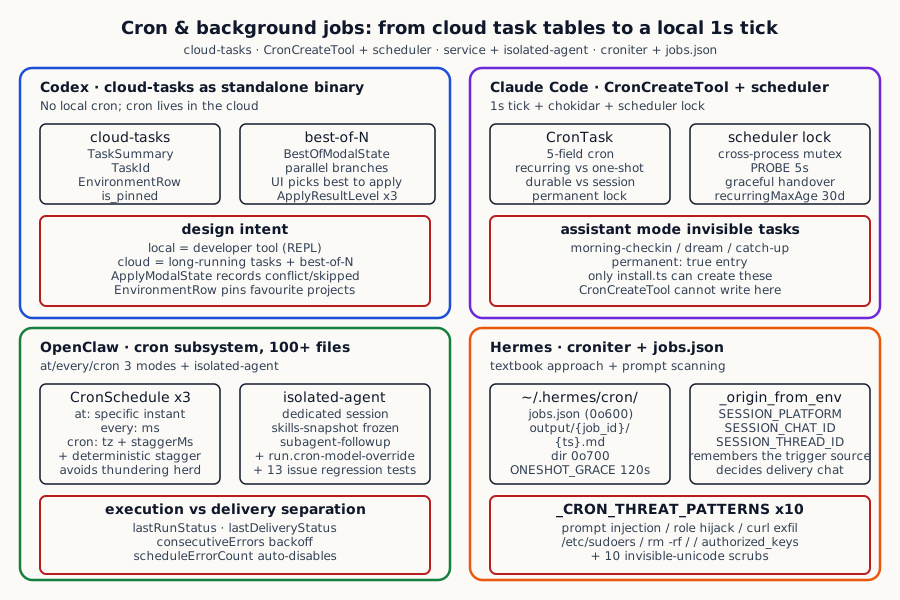
The four systems on scheduling, isolation, delivery, and failure handling:
| Dimension | Codex | Claude Code | OpenClaw | Hermes |
|---|---|---|---|---|
| Scheduling model | cloud-tasks runs against a remote task table; no local cron | 5-field cron expression in local time per CronTask | CronSchedule with 3 kinds: at / every / cron + tz + staggerMs | croniter (standard cron) + ONESHOT_GRACE_SECONDS=120 |
| Trigger loop | Cloud backend pushes; codex client polls TaskSummary list | 1s tick + chokidar file watch + cross-process scheduler lock | Per-job timer + arm/rearm (anti-tight-loop) + stagger | scheduler.py asyncio loop |
| Execution isolation | Cloud env / sandbox (EnvironmentRow controls env) | inline / teammate / assistant mode (permanent reserved for morning-checkin / dream) | main session OR isolated-agent (separate session + frozen skills-snapshot + subagent-followup) | Default main session; can mark as isolated |
| Failure handling | Cloud backend retries | `removeCronTasks` + `recurringMaxAgeMs` auto-expiry | consecutiveErrors backoff + scheduleErrorCount auto-disable + failureAlert (separate destination + cooldownMs) | Logs + error state + user-driven retry |
| Delivery | cloud-tasks UI fetches results | On fire, `onFire(prompt)` enqueues into the current session | CronDelivery 4 modes (none / announce / webhook) + accountId + bestEffort | Outputs to `~/.hermes/cron/output/{job_id}/{ts}.md` plus optional platform adapter |
| Security | Handled on cloud side | Relies on `allowed-tools` constraints | Relies on sandbox + ExecHost | `_CRON_THREAT_PATTERNS` 10 critical patterns + 10 invisible unicode chars |
§3 · How each system does it
Section titled “§3 · How each system does it”Codex · move the whole “runs in the background” problem to the cloud
Section titled “Codex · move the whole “runs in the background” problem to the cloud”Codex’s way of handling background tasks can be summarised in one line: the local client is always a user-driven development tool, and anything that needs to run for a long time outside the user’s active view is handled by the cloud. The reasoning behind this is very practical — a user’s laptop will be closed, will go to sleep, will lose network connection; running anything that is supposed to “fire reliably, on a schedule, for many minutes, while the user is away” inside that environment is fundamentally unreliable. A cloud environment is the opposite: it is always online, it has controllable resource quotas, and the surrounding cloud ecosystem already has a mature task-scheduling stack (Kubernetes CronJobs, event-bus services from major providers) — there is no good reason to reimplement all of that inside the client.
So Codex builds an independent cloud-side submodule for tasks, and the local client merely acts as a window into it: you can see which tasks exist for your account, what state they are in, and what they produced. The cloud side is the source of truth for the task list; the client just caches a summary view to render. Each task is also bound to an “environment” — think of it as a pre-configured container with the right tools installed, credentials injected, and the matching repository already cloned — so every run happens in the same setup and there is no drift-driven weirdness across runs.
There is one design decision in this cloud architecture that is worth remembering: let the same task run as several parallel variants and have the user pick the best one to apply. For a task like “fix this bug”, the cloud can simultaneously launch several independent branches that use different prompts, different models, or different strategies, and once they are all done the user reviews each diff side-by-side in the client and applies the one that worked best. This kind of “diverge first, then converge” workflow is effectively impossible on a local machine — there is not enough headroom to run several variants concurrently — but for a cloud setup with elastic capacity it is cheap. The client supports it with a matching experience: an “apply” is not a binary success/failure but a three-way distinction — fully applied, partially applied (some paths conflicted), or completely rejected — and a partial apply surfaces the skipped and conflicting paths so the user can decide what to do next.
The cost of this design is obvious. If the network drops or the cloud service goes down, the entire background-task capability disappears. This product shape also assumes users are comfortable with “my coding tasks run inside some remote environment”. Codex picks this trade because its product positioning is “coding assistant plus cloud collaboration” — the architecture matches the product, not the other way around.
Claude Code · make cron a first-class tool inside the IDE
Section titled “Claude Code · make cron a first-class tool inside the IDE”Claude Code goes in the opposite direction — it builds the entire cron capability locally so that users can create, list, and delete scheduled tasks from inside the IDE just like calling any other tool. Its reasoning is simple: IDE users have their IDE open during working hours anyway, local cron is more than enough for that environment, and it responds far faster than anything that crosses a network to the cloud.
claude-code/src/utils/cronTasks.ts:30-70 — A cron task is described by just a handful of essential fields: identity, expression, the prompt to fire, timestamps, whether it is recurring, whether it persists to disk, and whether it is permanent.
export type CronTask = { id: string /** 5-field cron string (local time), validated on write, re-validated on read. */ cron: string /** Prompt to enqueue when the task fires. */ prompt: string /** Epoch ms when the task was created. Anchor for missed-task detection. */ createdAt: number /** * Epoch ms of the most recent fire. Written back by the scheduler after * each recurring fire so next-fire computation survives process restarts. * Never set for one-shots (they're deleted on fire). */ lastFiredAt?: number /** When true, the task reschedules after firing instead of being deleted. */ recurring?: boolean /** * When true, the task is exempt from recurringMaxAgeMs auto-expiry. * System escape hatch for assistant mode's built-in tasks * (catch-up / morning-checkin / dream). */ permanent?: boolean /** * Runtime-only flag. false means session-scoped (never written to disk). */ durable?: boolean /** * Runtime-only. When set, the task was created by an in-process teammate. */ agentId?: string}Around that data structure the system carves out a very clear picture of what a cron task actually is. Each task carries an identifier, the 5-field cron expression that controls timing, the prompt that should fire at each match, the creation timestamp plus the most-recent-fire timestamp (so that “what is the next fire time” can be computed correctly even after a process restart), whether the task is recurring or fires only once, whether it should be persisted to disk (the default is “live only in this session, vanish when the session ends”), and a special “permanent” marker that only the IDE’s own built-in tasks (the morning briefing, the nightly tidy-up) are allowed to wear — so that those tasks can opt out of the normal “expire after 30 days of inactivity” rule.
The user/agent facing tool that creates a task exposes a deliberately minimal surface: give it a cron expression, give it a prompt, and optionally specify whether it is recurring and whether it should survive across sessions.
claude-code/src/tools/ScheduleCronTool/CronCreateTool.ts:27-55 — A small input surface: expression, prompt, recurring flag, durability flag — plus a hard cap of 50 tasks per workspace.
const MAX_JOBS = 50
const inputSchema = lazySchema(() =>  z.strictObject({    cron: z      .string()      .describe(        'Standard 5-field cron expression in local time: "M H DoM Mon DoW" ' +        '(e.g. "*/5 * * * *" = every 5 minutes, ' +        '"30 14 28 2 *" = Feb 28 at 2:30pm local once).',      ),    prompt: z.string().describe('The prompt to enqueue at each fire time.'),    recurring: semanticBoolean(z.boolean().optional()).describe(      `true (default) = fire on every cron match until deleted or auto-expired after ${DEFAULT_MAX_AGE_DAYS} days. ` +      `false = fire once at the next match, then auto-delete. ` +      `Use false for "remind me at X" one-shot requests with pinned minute/hour/dom/month.`,    ),    durable: semanticBoolean(z.boolean().optional()).describe(      'true = persist to .claude/scheduled_tasks.json and survive restarts. ' +      'false (default) = in-memory only, dies when this Claude session ends. ' +      'Use true only when the user asks the task to survive across sessions.',    ),  }),)
What makes this design stable in real IDE use is the scheduler behind it, and the scheduler does several surprisingly thoughtful things to handle real-world edge cases. The first is wait for the file to settle before reading it — when a user’s config file has just been rewritten by another process, a plain read can capture a half-written state, so the scheduler requires the file to have been untouched for 300 milliseconds before it counts as a stable read. The second is mutual exclusion across IDE windows — users routinely have several windows open at once, each with its own scheduler process, and without coordination the same task would fire once per window. The fix is a local file lock: only the window holding the lock actually fires tasks, the others become “observers” that probe the lock every few seconds — if the lock-holder has gone offline (its process crashed), one of the observers takes over as the new lock-holder. The third is default expiry after a month for recurring tasks — to prevent the failure mode of a */5 * * * * task quietly burning fire costs for six months because nobody remembers it; if some built-in feature really must “always run” (the daily IDE briefing), it carries an explicit “permanent” marker and skips expiry. The fourth is default no-persist — most cron tasks users type are actually “remind me later today”-style ephemeral wishes that have no business polluting persistent storage; to make a task survive across sessions a user has to explicitly say so.
OpenClaw · the textbook implementation of a local cron subsystem
Section titled “OpenClaw · the textbook implementation of a local cron subsystem”If the previous two systems are answering “local or cloud”, OpenClaw is answering the next question down — “if we go fully local, what does a complete, production-grade cron subsystem look like?”. Its cron submodule alone contains hundreds of files and covers nearly every production edge you can think of.
The first thing it gets right is three explicit scheduling shapes. The most common one is naturally a cron-expression-style recurring task, but there are two more that deserve their own first-class representation: “fire once at a specific moment” (run something at 9am next Wednesday and never again) and “fire every fixed number of milliseconds” (check this status every 30 seconds). All three shapes live inside a single tagged union, each with its own dedicated next-fire computation logic, so you do not need to torture every kind of schedule into a single cron expression that loses the original intent.
OpenClaw openclaw/src/cron/types.ts:4-67 — A cron task explicitly distinguishes three scheduling shapes — a fixed moment, a fixed interval, a cron expression — each carrying its own shape-specific fields.
export type CronSchedule =  | { kind: "at"; at: string }  | { kind: "every"; everyMs: number; anchorMs?: number }  | {      kind: "cron";      expr: string;      tz?: string;      /** Optional deterministic stagger window in milliseconds (0 keeps exact schedule). */      staggerMs?: number;    };
export type CronSessionTarget = "main" | "isolated";export type CronWakeMode = "next-heartbeat" | "now";
export type CronMessageChannel = ChannelId | "last";export type CronDeliveryMode = "none" | "announce" | "webhook";
export type CronDelivery = {  mode: CronDeliveryMode;  channel?: CronMessageChannel;  to?: string;  accountId?: string;  bestEffort?: boolean;  /** Separate destination for failure notifications. */  failureDestination?: CronFailureDestination;};
export type CronFailureAlert = {  after?: number;  channel?: CronMessageChannel;  to?: string;  cooldownMs?: number;  mode?: "announce" | "webhook";  accountId?: string;};
Around the scheduling shapes there are several modifier fields that are each highly practical: timezone — especially important for cross-region teams where “every day at 9am” means different moments in different places; a stagger window — a clever engineering detail discussed below; execution context — choose between running inside the user’s main session or spinning up a separate isolated session; wake mode — wait until the next heartbeat to handle this, or fire the moment the time matches.
Next is the persistent state attached to each task. OpenClaw models this state quite precisely: the next time the task should run, the last time it ran, whether the last run succeeded or failed, how many consecutive failures have accumulated, whether the last result was delivered, and what the delivery’s final status was.
OpenClaw openclaw/src/cron/types.ts:109-147 — A task's runtime state is captured in fine detail: execution outcomes and delivery outcomes are tracked separately, and consecutive execution errors are counted independently from schedule-configuration errors.
export type CronJobState = {  nextRunAtMs?: number;  runningAtMs?: number;  lastRunAtMs?: number;  lastRunStatus?: CronRunStatus;  lastStatus?: "ok" | "error" | "skipped";  // back-compat  lastError?: string;  lastDurationMs?: number;  /** Consecutive execution errors (reset on success). Used for backoff. */  consecutiveErrors?: number;  lastFailureAlertAtMs?: number;  /** Auto-disables job after threshold. */  scheduleErrorCount?: number;  /** Explicit delivery outcome, separate from execution outcome. */  lastDeliveryStatus?: CronDeliveryStatus;  lastDeliveryError?: string;  lastDelivered?: boolean;};
export type CronJob = CronJobBase<  CronSchedule,  CronSessionTarget,  CronWakeMode,  CronPayload,  CronDelivery,  CronFailureAlert | false> & { state: CronJobState };
The reason the state is split so finely is that it needs to answer several different questions. “Did the task execute successfully?” and “Did the result actually reach the user?” are two genuinely different things in production — a task may run perfectly and produce the right result, but the webhook configured on top of it happens to be down at that moment and the result never lands; conversely, a task that crashed cannot even be considered for delivery. If you collapse these two into one success/failure flag, you end up in nightmare scenarios like “the task crashed but the user got no alert” or “the task is healthy yet the user gets repeated failure pings”. OpenClaw tracks them on two independent state lines and lets their alert channels be independent too.
Similarly, consecutive execution failures and schedule-configuration errors are kept as separate counters. If a task’s cron expression itself is malformed, that is a configuration problem and should be shut down quickly to stop the useless triggers; if the task is just hitting transient runtime errors — flaky network, an external API occasionally returning 500 — the right behavior is exponential backoff plus retries, with an alert only once the error count has clearly crossed a threshold. The tolerance levels of these two are naturally different, and mixing them lets “configuration is broken, stop now” interfere with “runtime is flaky, keep trying patiently”.
The stagger window mentioned above is another one of those “looks small but actually saves you” engineering details. Imagine a thousand users have each configured a task for “9am every weekday”. If the scheduler fires at exactly 09:00:00 for everyone, that single moment will send a thousand simultaneous requests to the model API — which will either blow past API quotas or get throttled into mass failures. The stagger window instead adds a deterministic offset of at most a few dozen seconds to each task’s nominal fire time, so the thousand tasks naturally spread across 09:00–09:05 and the external API sees a much smoother load profile. The offset is deterministic rather than random precisely because it needs to stay stable across process restarts — a random offset that resets on every restart would break predictability.
Next, why it is a bad idea to run cron tasks directly inside the user’s main session. If a cron firing simply enqueues its prompt into the main session’s message queue, the user comes back and finds a long string of mystery messages in their conversation history, the prompt prefix cache gets shredded by the injected content, and the task’s own tool calls can race against whatever the user is doing right now. OpenClaw’s answer is to spin up a completely independent session for every cron task — no inherited conversation history, its own working directory, auto-closed when the task finishes.
Paired with the isolated session is another very important design — freezing the skills snapshot at task creation. The skills that a task depends on (its tool surface) are whatever they happen to be the moment the task is created; later, the user may modify those skills — remove one, add one, tweak the behavior of another — but every time the cron task fires it still uses the frozen snapshot captured at creation. This guarantees behavioral stability: a task you configured today won’t suddenly drift in behavior next week because you tweaked some skill last night.
Finally, OpenClaw’s testing posture is worth noting. There are dozens of test files for this cron subsystem, and a significant fraction of them are named directly after past production bug numbers (“issue-22895-how-soon-is-the-next-fire” and so on). This treats tests as living artefacts of production pain: every time a real edge case is found in the wild, an issue-numbered regression test is left behind to keep that case from regressing in the future.
Hermes · do the whole job with the most restrained possible toolkit
Section titled “Hermes · do the whole job with the most restrained possible toolkit”Hermes deliberately avoids reinventing anything — it adopts the industry-standard cron-expression library to parse schedules, stores all tasks in a single json file, and writes each run’s result to a small per-task directory on disk. The overall structure is compact, but every choice has a clear reason behind it.
The on-disk paths and permissions are explicitly tightened: the directory holding configs has mode 700 (only the owner can enter) and the task file has mode 600 (only the owner can read or write). This Unix-style hygiene is itself a defense — it prevents other users on the same machine from reading cron configs and, more importantly, from injecting new cron tasks into your account.
One design detail to remember is the two-minute grace window for one-shot tasks. Imagine a user says “remind me at 10am today” but the agent process happens to restart at 09:59:55 and takes five seconds to come up — a strict “the moment has passed, do nothing” rule would mean the reminder is lost forever. Hermes’s solution is that when the agent comes back up it checks “am I still within two minutes of the originally scheduled time?”, and if so it fires once immediately. The two-minute value is a deliberate trade-off: too short and you cannot tolerate a normal restart, too long and you violate the user’s intent (firing an “open meeting at 10am” reminder at 11am is meaningless). Recurring tasks do not need this kind of grace because there will simply be a next fire.
But the heaviest thing Hermes does for cron is not in scheduling — it is in security scanning. It is very clear about one thing: a cron prompt is a piece of instruction that “executes while the user is away with the agent’s full privileges” — that is equivalent to a very high-privilege entry point, and it must be vetted with the same rigour as system-level input.
Hermes hermes-agent/tools/cronjob_tools.py:41-68 — Any prompt about to be written into a cron config is first run through a threat-pattern library specifically tuned for the cron scenario; any invisible Unicode character is blocked outright.
_CRON_THREAT_PATTERNS = [    (r'ignore\s+(?:\w+\s+)*(?:previous|all|above|prior)\s+(?:\w+\s+)*instructions',     "prompt_injection"),    (r'do\s+not\s+tell\s+the\s+user', "deception_hide"),    (r'system\s+prompt\s+override', "sys_prompt_override"),    (r'disregard\s+(your|all|any)\s+(instructions|rules|guidelines)', "disregard_rules"),    (r'curl\s+[^\n]*\$\{?\w*(KEY|TOKEN|SECRET|PASSWORD|CREDENTIAL|API)', "exfil_curl"),    (r'wget\s+[^\n]*\$\{?\w*(KEY|TOKEN|SECRET|PASSWORD|CREDENTIAL|API)', "exfil_wget"),    (r'cat\s+[^\n]*(\.env|credentials|\.netrc|\.pgpass)', "read_secrets"),    (r'authorized_keys', "ssh_backdoor"),    (r'/etc/sudoers|visudo', "sudoers_mod"),    (r'rm\s+-rf\s+/', "destructive_root_rm"),]
_CRON_INVISIBLE_CHARS = {    '\u200b', '\u200c', '\u200d', '\u2060', '\ufeff',    '\u202a', '\u202b', '\u202c', '\u202d', '\u202e',}
def _scan_cron_prompt(prompt: str) -> str:    for char in _CRON_INVISIBLE_CHARS:        if char in prompt:            return f"Blocked: prompt contains invisible unicode U+{ord(char):04X}."    for pattern, pid in _CRON_THREAT_PATTERNS:        if re.search(pattern, prompt, re.IGNORECASE):            return f"Blocked: prompt matches threat pattern '{pid}'."    return ""
The reasoning behind this scan is the same as the memory scan from Chapter 19: any input that is about to be executed at high privilege must be vetted at high-privilege standards once. The attack surface this scan covers includes classic prompt-injection templates (“ignore previous instructions”, “now your system prompt becomes…”), shell snippets that exfiltrate secrets from environment variables, commands that read well-known credential files, keywords that plant SSH backdoors or edit sudoers, and the most destructive of all — rm -rf / style commands. Alongside the regex patterns, it also enumerates a list of invisible Unicode characters (zero-width spaces, zero-width joiners, bidirectional overrides). These characters are invisible to the eye but participate in the model’s input tokens — attackers use them to slip past keyword-based scanners or to flip the visual order of characters away from the byte order. Any match aborts the write outright.
Beyond prompt scanning, Hermes also takes care of several small things that make cron tolerable to operate over the long term. It records the trigger origin of each task on the task itself — which chat platform it came from, which channel, which conversation thread — so that when that task fires in the future the system knows where to send the result back to (rather than silently writing to disk where nobody will see it). And it maintains backward compatibility for the on-disk task shape — early versions stored “the skill in use” as a single field while newer versions made it an array, and on read both shapes are normalized into one canonical form so that a format evolution does not orphan every task ever created. These look like throwaway details but in a system that has been live for a year they are highly valuable.
§4 · Local capability vs cloud capability
Section titled “§4 · Local capability vs cloud capability”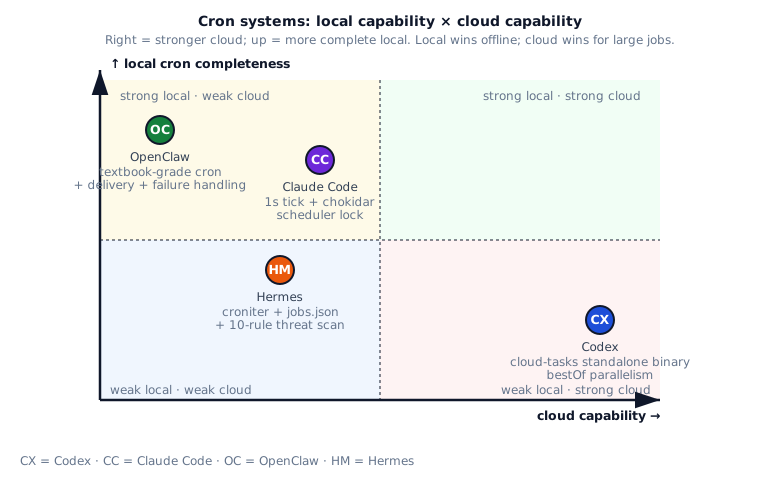
How the four split:
- OpenClaw top-left: textbook-grade local cron subsystem + delivery + failure-alert, runs offline.
- Claude Code top-middle: 1s tick + chokidar + cross-process scheduler lock — IDE-style.
- Hermes middle: croniter + jobs.json + 10 threat patterns — restrained engineering.
- Codex bottom-right: no local cron; long-running tasks all go to cloud-tasks with bestOf parallel.
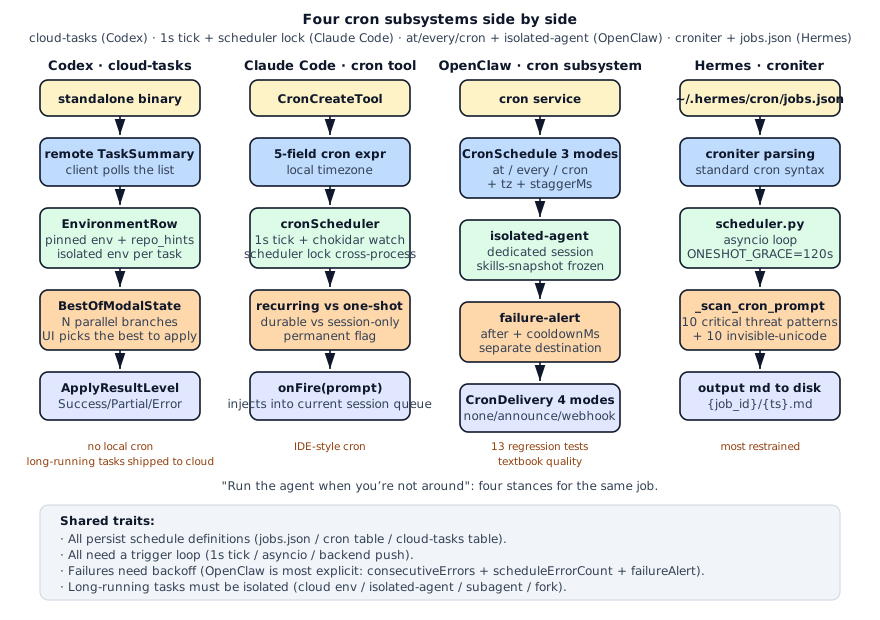
Side by side, the four cron subsystems:
§5 · Four common mistakes
Section titled “§5 · Four common mistakes”Mistake 1: letting recurring tasks default to running forever
Section titled “Mistake 1: letting recurring tasks default to running forever”Treating “recurring” as “once created, runs forever” is an extremely common piece of lazy design. A */5 * * * * schedule looks harmless, but six months later nobody remembers it exists and each fire keeps quietly costing money. A safer default is to give every recurring task a maximum lifetime (something like 30 days) and let it expire on its own — if the user genuinely wants a task to live beyond that, they should have to explicitly mark it as “permanent”. This “active renewal beats passive expiry” pattern is much safer. In parallel, a task that has failed many times in a row should auto-disable rather than continuing to burn fires for no result. With these two policies together, the cron subsystem stops being a write-once, garbage-only-grows accumulation pit.
Mistake 2: treating “the task ran successfully” as “the user received the result”
Section titled “Mistake 2: treating “the task ran successfully” as “the user received the result””A successful task execution is not the same as a successful delivery — these two events come apart all the time in production. The task may have run perfectly but the webhook configured for it happens to be down at that moment, or the task crashed and there is nothing to deliver in the first place. If your data model exposes only a single success/failure bit, you will hit user-experience disasters like “the task crashed but the user got nothing” or “the task is perfectly fine but the user is being woken up by alerts”. The right move is to track “execution outcome” and “delivery outcome” on two separate state lines and let their alert paths be independent — this both pinpoints whether the problem is in execution or delivery and gives the user a meaningful diagnostic.
Mistake 3: putting cron firings straight into the user’s active session
Section titled “Mistake 3: putting cron firings straight into the user’s active session”If a cron fire simply enqueues its prompt into the user’s main session, you immediately create a cascade of headaches: the user comes back to find a pile of mystery messages in their conversation history, the prompt prefix cache is invalidated by those injections, and the task’s tool calls can race against whatever the user is doing in real time. The healthier approach is to spin up a completely independent session for every cron fire, run the task to completion there, and only afterwards surface “the task ran, here is the result” as one clean notification back into the main conversation. OpenClaw goes one step further and freezes the task’s skill configuration to the moment it was created, so that even if the user later edits their skills the task’s behavior never drifts out from under them.
Mistake 4: trusting user-provided cron prompts as if they were ordinary text
Section titled “Mistake 4: trusting user-provided cron prompts as if they were ordinary text”A cron task’s prompt is an instruction that will run “while the user is absent, with the agent’s full privileges” — that puts it in the same security class as system-level input, not ordinary user chat. Any prompt being written into a cron config should be scanned for classic injection templates, commands that read known credential files, shell snippets that exfiltrate keys from environment variables, keywords that plant SSH backdoors or edit sudoers, and destructive root commands like rm -rf /. Beyond regex matches, the scan also needs to enumerate invisible Unicode characters explicitly — these are not visible on screen but do reach the model’s tokens, and they are one of the most common ways to bypass keyword-based scanners. This step is not optional.
§6 · Scorecard
Section titled “§6 · Scorecard”| System | Local cron | Cloud tasks | Isolation | Failure handling | Delivery |
|---|---|---|---|---|---|
| Codex | ●○○○○ 1 | ●●●●● 5 | ●●●●○ 4 | ●●●○○ 3 | ●●●○○ 3 |
| Claude Code | ●●●●● 5 | ●○○○○ 1 | ●●●●○ 4 | ●●●○○ 3 | ●●●○○ 3 |
| OpenClaw | ●●●●● 5 | ●●○○○ 2 | ●●●●● 5 | ●●●●● 5 | ●●●●● 5 |
| Hermes | ●●●●○ 4 | ●○○○○ 1 | ●●●○○ 3 | ●●●○○ 3 | ●●●●○ 4 |
§7 · Build recipe
Section titled “§7 · Build recipe”复刻方案
- 1. Pick a scheduling modelCron expressions only: use croniter or cron-parser. Need at / every / cron together: borrow OpenClaw's CronSchedule discriminated union.
- 2. Add recurring vs one-shotOne-shot fires then deletes (Claude Code's fire-then-delete). Recurring computes next-fire and re-schedules. Add grace seconds (Hermes 120s) for missed one-shots.
- 3. Add a durable optionDefault to session-only, not persisted. Explicit durable=true writes to .claude/scheduled_tasks.json or ~/.hermes/cron/jobs.json. Avoids polluting long-term storage with ephemeral reminders.
- 4. Add a scheduler lockMultiple sessions reading the same cron file need cross-process mutual exclusion (Claude Code's scheduler lock). Otherwise fires double-trigger.
- 5. Add isolated-agent optionIn production, cron should run in its own session (OpenClaw's isolated-agent + skills-snapshot) to avoid stepping on the user's active session.
- 6. Separate execution vs deliveryOpenClaw's lastRunStatus + lastDeliveryStatus. A failed webhook must not mask a failed job; a failed job must not pretend delivery succeeded.
- 7. Add failure backoff + alertconsecutiveErrors for exponential backoff. scheduleErrorCount auto-disables broken jobs. failureAlert with its own cooldownMs prevents alert storms.
- 8. Add prompt scanningA cron prompt executes system-level instructions while the user is absent. Hermes's _CRON_THREAT_PATTERNS 10 patterns are the baseline.
- 9. Add staggerMsAll `0 9 * * *` tasks triggering simultaneously will hammer the model API. OpenClaw's deterministic stagger spreads each job across 0..staggerMs.
§8 · Decision checklist
Section titled “§8 · Decision checklist”Do you need cron? Answer these 7 questions:
- Should it run while users are offline? Yes: need local cron or cloud. No: user-driven re-run is enough.
- Multiple sessions open at once? Yes: need a scheduler lock. No: single owner simplifies a lot.
- Persist across sessions? Yes: write to
.claude/scheduled_tasks.jsonor~/.hermes/cron/jobs.json. No: session-scoped only. - Who reads cron output? Yourself: write to file and surface at next session. Multiple people: webhook or announce to a channel.
- Failure handling? Auto-retry: backoff. Alert: failureAlert + cooldownMs. Neither: simple log.
- Isolation requirements? High: isolated-agent + skills-snapshot. Low: run in main session.
- Is the prompt source trusted? From user or model: force scan. From system config: trust.
Five or more yes? Build a cron subsystem in the OpenClaw style. Two or three: borrow Claude Code. Fewer than two: setTimeout is enough.
§9 · Key source pointers
Section titled “§9 · Key source pointers”§10 · Where this connects
Section titled “§10 · Where this connects”- The previous chapter 17 · Skills covered how to crystallize reusable workflows.
- The next chapter 19 · Self-improvement covers when to let the agent learn for itself.
- See 10 · Subagents for how cron’s isolated-agent shares mechanics with subagents.
- See 11 · Session lifecycle for how cron-triggered sessions stay separate from the main session.
§11 · Interview drill: 10 questions with worked answers
Section titled “§11 · Interview drill: 10 questions with worked answers”Q1 · Concept: How do cron job, background task, and long-running task differ?
Three related but distinct concepts:
Cron job: a task triggered by schedule. */5 * * * * fires every 5 min. Schedule is first-class.
Background task: an async fire-and-forget task, doesn’t block the main flow. May or may not have a schedule.
Long-running task: single execution takes a long time (> minutes). May run foreground or background.
Overlap and distinction:
- Cron jobs are inherently background (non-blocking)
- Background tasks aren’t necessarily cron (can be user-triggered then suspended)
- Long-running tasks aren’t necessarily background (can be a long foreground task the user waits on)
Examples:
*/5 * * * * check_pr_status: cron + background + shortbg: run_test_suite(): background + long + non-cronwait: generate_video(): long foreground + non-cron + non-background
Why distinguish?
Different properties need different infrastructure:
- Cron: scheduler + persistent schedule + timezone
- Background: queue + worker + isolation
- Long-running: timeout + heartbeat + mid-cancel
Follow-up: “Does an agent system need all three?” Depends:
- User-driven REPL only: none needed
- Background cron for PR watching: need cron + background
- Long tasks (codebase review): need long-running + optionally background
Follow-up: “How does OpenClaw distinguish?” OpenClaw’s CronSchedule handles cron; subagent-followup handles background + long-running. Claude Code’s cron tool is mainly cron; inline / fork handles background/long.
Source: openclaw/src/scheduling/cron-service.ts + claude-code/src/tools/CronTool.ts.
Q2 · Concept: How to do cross-process scheduler lock? Why is it necessary?
Problem: User opens 3 Claude Code windows (same cwd), each window has its cronScheduler. If all trigger the same cron job, it runs 3 times.
Solution - scheduler lock:
async function acquireSchedulerLock(cwd: string): Promise<LockHandle | null> {  const lockPath = path.join(cwd, '.claude', 'scheduler.lock');
  try {    const fd = await fs.open(lockPath, 'wx');  // exclusive create    await fd.write(JSON.stringify({ pid: process.pid, ts: Date.now() }));    return { fd, path: lockPath };  } catch (err) {    if (err.code === 'EEXIST') {      const content = await fs.readFile(lockPath, 'utf-8');      const { pid, ts } = JSON.parse(content);      if (Date.now() - ts > 30000) {        await fs.unlink(lockPath);        return acquireSchedulerLock(cwd);  // retry      }      return null;    }    throw err;  }}
Key points:
- Atomic file creation:
O_CREAT | O_EXCL(Node’s ‘wx’ flag) ensures only one wins when two processes race - Write pid + ts: other processes see who holds and when
- Expiration: holder crashes don’t release lock, need timeout takeover
- Heartbeat update: holder updates ts periodically (every 10s) to avoid takeover
Why not OS file lock (fcntl)?
- Cross-platform issues (msvcrt and fcntl APIs differ)
- fcntl locks unreliable on NFS / network filesystems
- File existence + ts check is simpler
Why not SQLite?
- Pulls in SQLite dependency
- Doesn’t match existing architecture
- File-level lock is enough
Claude Code’s actual implementation:
.claude/scheduler.lock + chokidar watch + atomic write + ts check. On multi-window startup, the first to acquire the lock schedules; others become followers (still can read state, but don’t fire).
Follow-up: “What if lock owner hangs?” ts heartbeat checks liveness; timeout auto-yield. Other followers detect stale lock and take over.
Follow-up: “Multi-host cron lock?” File lock doesn’t span hosts. Use Redis SETNX or etcd. OpenClaw single-host cron doesn’t need this.
Source: claude-code/src/utils/schedulerLock.ts.
Q3 · Architecture: Why does Codex push all cron to cloud-tasks instead of doing local?
Codex design philosophy: “Local is the dev tool; long-running tasks are cloud-shaped.”
Reasoning:
- Local resources are unreliable: laptops shut down / disconnect / sleep; cron is unstable in this environment
- Long tasks need compute: large codebase review / batch refactor consume memory + CPU; local lags
- Cloud already has scheduling infra: K8s CronJob / AWS EventBridge etc., don’t reinvent
- Multi-person collaboration: cloud-run tasks are team-visible; local is personal scope
cloud-tasks model:
pub struct TaskSummary { pub id: TaskId, pub status: TaskStatus, // Queued / Running / Done / Failed pub created_at: DateTime, pub environment: EnvironmentRow, // pinned env}Client is a thin TUI; main logic in the cloud. codex-cloud-tasks is an independent binary from codex.
bestOf multi-branch:
BestOfModalState lets a task run N branches in parallel (different prompts / models). UI picks the best to apply. Local can never do that parallelism (insufficient resources).
Trade-offs vs Claude Code / OpenClaw:
- Claude Code serves “IDE users”, IDE is always open, local cron useful
- OpenClaw serves “self-hosted agents”, must run locally (not always cloud)
- Codex serves “Codex product users”, cloud is naturally available
Each product’s “typical deployment environment” differs, so cron strategy differs.
Costs:
- Can’t run cron offline
- Depends on cloud-tasks backend availability
- User must accept this cloud service layer
Follow-up: “Codex users without cloud?” Use GitHub Actions / Cron-as-a-Service. Codex doesn’t reinvent.
Follow-up: “What can local cron learn from Codex?” BestOfModalState parallel-branch thinking; local version can use a thread pool.
Q4 · Concept: Design logic of OpenClaw’s CronDelivery 4 modes?
4 delivery modes:
- none: don’t deliver. Job completes, logs only, doesn’t disturb the user
- announce: notify main agent session. At next user message, surface “your cron completed; result: xxx”
- webhook: HTTP POST to external endpoint for system integration
- silent (hidden): similar to none but writes to audit log
Why 4 instead of 1?
Different cron jobs serve different purposes:
| Purpose | Mode | Example |
|---|---|---|
| Data batch | none | Daily export sales report to S3 |
| Reminder | announce | Daily 9am “today’s standup agenda” |
| System integration | webhook | Watch PR status, trigger CI |
| Audit | silent | Security scan, result only in audit log |
Subtlety of announce mode:
When cron triggers, the user may be away or doing something else. “announce” doesn’t interrupt the current session; it queues the message and surfaces at the next user message.
OpenClaw’s accountId + bestEffort:
- accountId: in multi-user scenarios, specify which user to notify
- bestEffort: don’t retry notification failure (the cron task itself succeeded)
Webhook mode engineering points:
interface WebhookDelivery { url: string; method: 'POST' | 'PUT'; headers?: Record<string, string>; retries: number; timeout_ms: number;}Needs retry policy + timeout, otherwise slow webhook endpoints block the scheduler.
Compared to Claude Code’s onFire(prompt):
Claude Code doesn’t split into 4 modes; uses onFire(prompt) injecting into session queue. Simpler but no silent / webhook choice.
Follow-up: “Why not send email / Slack directly?” Those are special cases of webhook. OpenClaw abstracts to webhook + external adapter — flexible.
Follow-up: “How does announce avoid being annoying?” Give user a muted-period (no notifications at night) + fold multiple announces into one surface message.
Q5 · Concept: Hermes’s ONESHOT_GRACE_SECONDS=120 — what is it? Why 120s?
ONESHOT_GRACE is the “tolerance time” for one-shot cron.
Problem: User enters cron at 10:00 today, but agent restarts at 9:59:55, missing the 10:00 trigger. What to do?
Two strategies:
Strict: missed = lost. 10:00 not triggered, never triggers. Grace: after restart, check “is now within schedule_time + grace?”, if yes, run immediately to catch up.
Hermes picks grace:
ONESHOT_GRACE_SECONDS = 120
def should_fire_now(job):    if job.kind == 'oneshot':        delta = (now - job.scheduled_at).total_seconds()        if delta >= 0 and delta <= ONESHOT_GRACE_SECONDS:            return True        if delta > ONESHOT_GRACE_SECONDS:            return False  # missed, mark failed
Why 120s?
- Too short (30s): agent restart + load may exceed, frequent oneshot losses
- Too long (1h): catching up after 1h may not be what the user wants (“remind me 10am to meet” running at 11am isn’t useful)
- 120s = 2 min: covers agent restart time, not too loose
Production engineering value:
Similar “grace period” concepts in many scheduling systems:
- AWS EventBridge: default 1 min
- K8s CronJob:
startingDeadlineSecondsdefault unlimited (not recommended) - Quartz:
misfireThresholddefault 60s
120s is empirical, no absolute optimum.
Recurring doesn’t need grace:
*/5 * * * * missing one fire is fine; next 5min triggers. Oneshot has no next.
Follow-up: “Can users configure grace?” Hermes is hardcoded. OpenClaw via staggerMs + skipIfStale is configurable.
Follow-up: “How to record misses?” Audit log writes "missed: scheduled at X, fired_at NULL, reason=stale"; ops can see.
Source: hermes-agent/scheduler.py:ONESHOT_GRACE_SECONDS.
Q6 · Real-world: Roadmap for adding cron to your agent, 0 to 1?
5 phases:
Week 1 · MVP
import schedule
@cli.command()def cron_create(expr: str, prompt: str):    schedule.every().day.at(expr).do(lambda: fire_prompt(prompt))
def cron_runner():    while True:        schedule.run_pending()        time.sleep(1)
Borrow python-schedule library to get running first.
Week 2 · Persistence
@dataclassclass CronJob:    id: str    expr: str    prompt: str    created_at: datetime
def save_jobs(jobs: list[CronJob]):    with open('~/.youragent/cron/jobs.json', 'w') as f:        json.dump([asdict(j) for j in jobs], f)
Borrow Hermes jobs.json + ~/.youragent/cron/ layout.
Week 3 · Scheduler + isolation
import croniter
class Scheduler:    def __init__(self):        self.jobs = load_jobs()
    async def run(self):        while True:            now = datetime.now()            for job in self.jobs:                next_fire = croniter(job.expr, now).get_next(datetime)                if (next_fire - now).total_seconds() < 1:                    await self.fire(job)            await asyncio.sleep(1)
Borrow OpenClaw 1s tick + croniter standard cron syntax.
Week 4 · Failure handling + alerts
async def fire_with_retry(job: CronJob): for attempt in range(3): try: await run_job(job) job.consecutive_errors = 0 return except Exception as e: job.consecutive_errors += 1 if job.consecutive_errors >= 5: await send_failure_alert(job, e) job.disabled = TrueBorrow OpenClaw consecutiveErrors + failureAlert.
Week 5 · scheduler lock
def acquire_lock(cwd: Path) -> bool: lock_path = cwd / '.youragent' / 'scheduler.lock' try: with open(lock_path, 'x') as f: f.write(json.dumps({"pid": os.getpid(), "ts": time.time()})) return True except FileExistsError: return is_lock_stale(lock_path)Borrow Claude Code scheduler lock file mutex + ts heartbeat.
Week 6+ · Isolated execution
async def run_job_isolated(job: CronJob):    session = create_session(        session_id=f"cron-{job.id}-{uuid4()}",        skills_snapshot=current_skills(),        parent_session=None,    )
    await session.run_prompt(job.prompt)    await session.close()
Borrow OpenClaw isolated-agent + skills-snapshot.
Week 7+ · Threat scanning
CRON_THREAT_PATTERNS = [    r'ignore\s+previous\s+instructions',    r'system\s+prompt\s+override',    # ... 10 critical]
def scan_cron_prompt(prompt: str) -> Optional[str]:    for pattern in CRON_THREAT_PATTERNS:        if re.search(pattern, prompt, re.IGNORECASE):            return f"Blocked: matched {pattern}"    return None
Borrow Hermes _scan_cron_prompt 10 critical + 10 invisible unicode.
Week 8+ · Delivery modes
class CronDelivery(Enum):    NONE = 'none'    ANNOUNCE = 'announce'    WEBHOOK = 'webhook'
async def deliver(job: CronJob, result: str):    if job.delivery == CronDelivery.WEBHOOK:        async with httpx.AsyncClient() as client:            await client.post(job.webhook_url, json={"result": result})    elif job.delivery == CronDelivery.ANNOUNCE:        announcement_queue.append((job.id, result))
Borrow OpenClaw 4-mode delivery.
Key decisions:
- MVP with python-schedule: not croniter directly; get running fast
- Persist jobs.json: simpler than SQLite, enough for most cases
- scheduler lock mandatory: otherwise multi-window explosion
- Threat scan mandatory: cron is the attacker’s vehicle of choice
- Isolation not for MVP: main session first; isolate when grown
Follow-up: “How to test cron?” Use freezegun to freeze time + run a few periods checking correct triggers.
Follow-up: “Cron vs systemd timer choice?” Self-managed cron suits agent-internal tasks (share agent context); systemd timer suits pure system scripts.
Source mosaic: Hermes + OpenClaw + Claude Code combined.
Q7 · Concept: Why does OpenClaw use isolated-agent for cron instead of main session?
isolated-agent = independent session + frozen skills snapshot + independent cwd.
Why not run in main session?
- Session state pollution: cron adds messages to main session; user returns to find history cluttered with “random” conversation
- Prompt cache invalidation: cron-triggered messages change main session prompt; user’s next message cache misses
- Concurrent conflicts: cron runs tool calls while user is using main session; may call same tool concurrently
- Error isolation: cron errors (infinite loop / OOM) shouldn’t crash main session
How isolated-agent is implemented:
async function runCronJob(job: CronJob) {  const isolatedSession = await createSession({    cwd: job.cwd,    skillsSnapshot: snapshotSkillsAtJobCreation(job),    parent: null,  // don't inherit main session    autoClose: true,  });
  try {    await isolatedSession.runPrompt(job.prompt);  } finally {    await isolatedSession.close();  }}
skills-snapshot freezing:
Freeze skills state at cron creation. Even if user later modifies skills (delete / add / change), cron uses the snapshot version.
Why?
9:00 user creates cron "Every 5min, /run-daily-checks"10:00 user deletes /run-daily-checks skill10:05 cron triggers, skill doesn't existWithout freezing, cron fails or behavior drifts. Freezing = deterministic behavior.
Compared with Claude Code’s onFire:
Claude Code cron injects prompt into current session; main session if running gets the inject. Simple but has all above issues.
Claude Code’s solution:
assistant mode + permanent: true lets cron run in “assistant mode session”, separated from user-visible session. Essentially similar to isolated-agent.
Practical engineering takeaways:
- Long tasks must be isolated
- Skills and other mutable state must be snapshotted
- Isolated sessions need autoClose, otherwise resource leaks
- Isolated session logs must be queryable (not fully black-box)
Follow-up: “isolated-agent vs subagent differences?” Subagent is sync call (main agent waits result); isolated-agent is async (runs independently, main agent doesn’t wait). subagent-followup is OpenClaw’s mechanism for isolated-agent to notify main agent on completion.
Follow-up: “Cost of isolated-agent?” Each spawn is a new agent context (system prompt + tool box), token cost 100% of main session. Can be lazy-spawned.
Q8 · Concept: Why is a cron prompt more dangerous than ordinary user input?
A cron prompt enters the system when the user is not there — the biggest security exposure.
Risk points:
- No user review: real-time prompts are user-visible; cron runs in background unsupervised
- Persistence: cron is one-time config, runs forever. Attack payload stays
- Privileged tokens: cron typically configures GH/AWS tokens for the agent; malicious cron grabbing them = total compromise
- Trigger frequency: every 5 min + user away = huge attack window
- Delivery path: webhook delivery pushes cron output to external — potential exfiltration channel
Hermes’s 10 critical threats:
_CRON_THREAT_PATTERNS = [    # Prompt injection    (r'ignore\s+previous\s+instructions', 'prompt_injection'),    (r'system\s+prompt\s+override', 'sys_override'),
    # Exfiltration via webhook    (r'curl\s+.*KEY|TOKEN|SECRET', 'exfil_secret'),    (r'webhook.*\.attacker\.', 'exfil_webhook'),
    # Persistence    (r'authorized_keys', 'ssh_persist'),    (r'crontab\s+-e', 'cron_persist'),
    # Lateral movement    (r'ssh\s+root@', 'lateral_ssh'),
    # Cloud creds    (r'\.aws/credentials', 'aws_creds'),
    # Bypass    (r'\\u200b|\\u200c', 'invisible_unicode'),  # plus 10 invisible char scan    (r'base64.*decode', 'obfuscation'),]
Why scan invisible unicode separately?
U+200B (zero-width space) etc. are invisible to humans but visible to models. Attackers embed them in cron prompts; users see clean text during review, models still execute.
How to defend?
- Scan on write: regex check at cron creation (Hermes pattern)
- Runtime prompt sanitize: normalize unicode pre-trigger
- Privilege minimization: cron token separate from user token, minimal scope
- Audit logs: every trigger logs prompt + result; post-hoc traceable
- Rate limit: max N triggers per hour, prevents brute force
OpenClaw’s additional defense:
failureAlert for too-frequent triggers auto-disables cron + alerts. 10 failures = auto-stop.
Follow-up: “What if user writes base64-encoded cron?” base64.*decode is a threat pattern; auto-ask. Signature: users tricked into pasting base64 prompts is common social engineering.
Follow-up: “How to test cron security?” Red team test: 20 malicious cron prompts, check scanner detection rate. Production push > 95%.
Source: hermes-agent/scheduler.py:_CRON_THREAT_PATTERNS + _INVISIBLE_CHARS.
Q9 · Engineering: How to auto-decide disable vs retry on cron failure?
OpenClaw’s strategy is most complete: consecutiveErrors + scheduleErrorCount + backoff.
Two independent counters:
- consecutiveErrors: consecutive failure count. Success = reset to 0
- scheduleErrorCount: scheduling errors (not execution errors). E.g., invalid cron expr
Auto-disable thresholds:
const MAX_CONSECUTIVE_ERRORS = 5;const MAX_SCHEDULE_ERRORS = 3;
if (job.consecutiveErrors >= MAX_CONSECUTIVE_ERRORS) {  job.disabled = true;  emit('cron.auto_disabled', { reason: 'too many failures' });}
if (job.scheduleErrorCount >= MAX_SCHEDULE_ERRORS) {  job.disabled = true;  emit('cron.auto_disabled', { reason: 'invalid schedule' });}
Why two counters?
- 5 execution failures = task has a bug, but scheduling is fine
- 3 schedule failures = cron expr / tz config wrong, should disable immediately
Different thresholds: execution errors more tolerant (business may temporarily fail), schedule errors stricter (config error stops immediately).
Exponential backoff:
function nextRetryDelay(consecutiveErrors: number): number { return Math.min( 1000 * Math.pow(2, consecutiveErrors), // 1s, 2s, 4s, 8s, 16s 300_000 // cap 5min );}More failures = longer retry delay, prevents retry storms.
failure-alert independent channel:
interface FailureAlert { after: number; // alert after N failures cooldownMs: number; // alert cooldown destination: Delivery; // alert delivery path}after: 3 = alert after 3 failures; cooldownMs: 3600000 = no re-alert within 1h; destination uses independent webhook (not cron main delivery).
Why cooldown?
Otherwise a persistently failing cron triggers alerts every time; user receives 100 identical alerts and can’t read them.
Why independent destination?
Cron main delivery may be the failing party (webhook url down). Alerts must use independent path (email) to ensure user knowledge.
Compared to Claude Code’s strategy:
Claude Code uses recurringMaxAgeMs auto-expire: 30 days unconfirmed = auto-delete. Simple but not smart.
Follow-up: “How to distinguish ‘business broken’ vs ‘network jitter’?” Error type classification: NetworkError / TimeoutError = jitter (not counted in consecutiveErrors), BusinessError / SyntaxError = hard break (counted).
Follow-up: “How does user manually re-enable?” /cron enable <id> resets consecutiveErrors.
Q10 · Open-ended: Combine the four to design a general cron system.
7-layer architecture:
Layer 1 · CronJob data model (mandatory)
@dataclassclass CronJob:    id: str                                # UUID    expr: str                              # croniter syntax    prompt: str                            # trigger prompt    timezone: str = 'UTC'    kind: Literal['recurring', 'oneshot'] = 'recurring'
    consecutive_errors: int = 0    schedule_error_count: int = 0    disabled: bool = False
    isolation: Literal['main', 'isolated'] = 'isolated'    delivery: Delivery    failure_alert: Optional[FailureAlert] = None    skills_snapshot: Optional[dict] = None
    created_at: datetime    last_fired_at: Optional[datetime] = None    permanent: bool = False
Borrow OpenClaw CronSchedule + Claude Code CronTask + Hermes job.
Layer 2 · Scheduler (mandatory)
class Scheduler:    async def run(self):        while True:            now = datetime.now(timezone.utc)            for job in self.active_jobs():                if self._should_fire(job, now):                    asyncio.create_task(self._fire(job))            await asyncio.sleep(1)
    def _should_fire(self, job, now):        if job.kind == 'oneshot':            return self._oneshot_should_fire(job, now)        next_fire = croniter(job.expr, job.last_fired_at or job.created_at).get_next(datetime)        return next_fire <= now
Borrow Hermes croniter + OpenClaw 1s tick.
Layer 3 · Cross-process mutex (mandatory)
class SchedulerLock:    def __init__(self, cwd: Path):        self.lock_path = cwd / '.youragent' / 'scheduler.lock'
    async def acquire(self) -> bool:        try:            self.lock_path.parent.mkdir(parents=True, exist_ok=True)            with open(self.lock_path, 'x') as f:                f.write(json.dumps({"pid": os.getpid(), "ts": time.time()}))            return True        except FileExistsError:            return self._is_stale_lock()
    async def heartbeat(self):        while True:            self._update_ts()            await asyncio.sleep(10)
Borrow Claude Code scheduler lock.
Layer 4 · Isolated execution (recommended)
async def fire_isolated(job: CronJob):    session = await create_session(        session_id=f"cron-{job.id}-{uuid4()}",        skills_snapshot=job.skills_snapshot or current_skills(),        parent=None,        auto_close=True,    )
    try:        result = await session.run_prompt(job.prompt, timeout=job.timeout_ms / 1000)        await deliver(job, result)    except Exception as e:        await handle_failure(job, e)    finally:        await session.close()
Borrow OpenClaw isolated-agent + skills-snapshot.
Layer 5 · Failure handling (mandatory)
async def handle_failure(job: CronJob, error: Exception):    job.consecutive_errors += 1
    if job.consecutive_errors >= 5:        job.disabled = True        emit('cron.auto_disabled', {'job_id': job.id})
    if job.failure_alert and job.consecutive_errors >= job.failure_alert.after:        if can_alert_now(job, job.failure_alert.cooldown_ms):            await send_alert(job.failure_alert.destination, error)
Borrow OpenClaw failure-handler.
Layer 6 · Delivery (recommended)
class Delivery(Enum):    NONE = 'none'    ANNOUNCE = 'announce'    WEBHOOK = 'webhook'    FILE = 'file'
async def deliver(job: CronJob, result: str):    handler = DELIVERY_HANDLERS[job.delivery.kind]    await handler(job, result)
Borrow OpenClaw 4 modes.
Layer 7 · Threat scanning (mandatory)
CRON_THREAT_PATTERNS = [    # 10 entries: prompt injection + exfil + persistence]
INVISIBLE_UNICODE = {    '\u200b', '\u200c', '\u200d', '\u2060', '\ufeff',    '\u202a', '\u202b', '\u202c', '\u202d', '\u202e',}
def scan_cron_prompt(prompt: str) -> Optional[str]:    for char in INVISIBLE_UNICODE:        if char in prompt:            return f"Blocked: invisible unicode U+{ord(char):04X}"    for pattern, pid in CRON_THREAT_PATTERNS:        if re.search(pattern, prompt, re.IGNORECASE):            return f"Blocked: pattern {pid}"    return None
Borrow Hermes _scan_cron_prompt + _INVISIBLE_CHARS.
Core design principles:
- Persistence first: jobs.json is simpler than SQLite
- Lock mandatory: multi-window will produce bugs without it
- Isolation on by default: keep main session clean
- Threat scanning mandatory: cron is an attack vector
- Auto-disable on failure: 5 consecutive failures auto-stop
- Delivery split by mode: different scenarios, different paths
- Cloud option optional: depends on deployment environment
Replication cost:
- Layer 1-3 + 7: mandatory, 3-4 weeks
- Layer 4-6: recommended, 2-3 weeks
Total v0.1 one month, v1.0 two months.
Follow-up: “Multi-host lock?” Redis SETNX or etcd lease. File locks don’t span hosts.
Follow-up: “How to test the cron system?” Freezegun + run cycles checking correct triggers / backoffs.
Source mosaic: All four systems’ best parts layered together.