17 · Skills (from experience to reusable workflow)
§1 · TL;DR
Section titled “§1 · TL;DR”§2 · Architecture diagram
Section titled “§2 · Architecture diagram”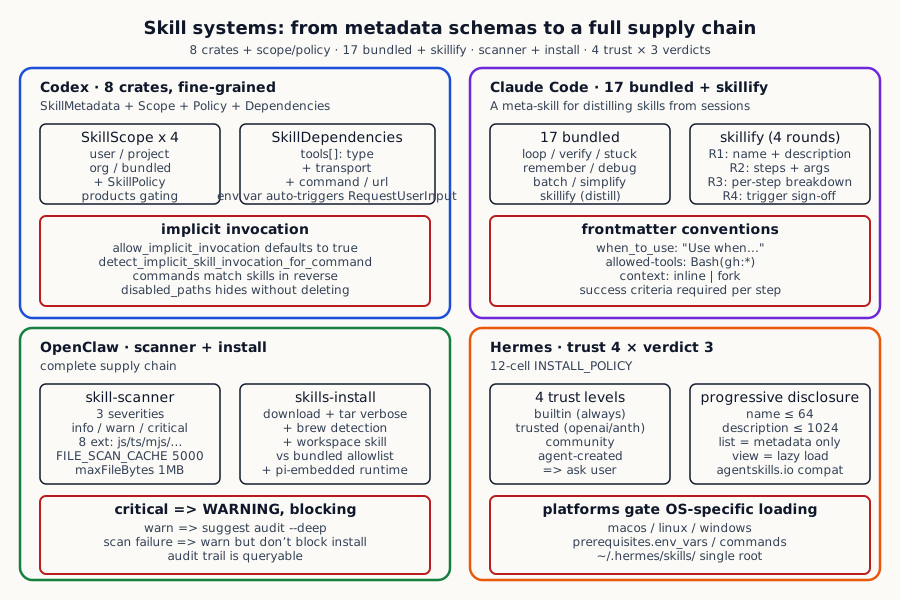
The four systems on skill discovery, injection, execution, and install:
| Dimension | Codex | Claude Code | OpenClaw | Hermes |
|---|---|---|---|---|
| Skill file format | `SKILLS.md` + `agents/{name}/scripts/` directory + structured frontmatter (name / description / interface / dependencies / policy) | SKILL.md + 5 frontmatter fields (name / description / allowed-tools / when_to_use / arguments / context: inline/fork) | SKILL.md + manifest (workspace skill vs bundled skill double layer) | `SKILL.md` + frontmatter (name <=64 / description <=1024 / platforms / prerequisites / metadata.hermes) |
| Implicit trigger | `SkillPolicy.allow_implicit_invocation` defaults to true + `detect_implicit_skill_invocation_for_command` | `when_to_use` frontmatter field ("Use when..." description) | `workspace skill prompt` injection; agent decides | `description` becomes progressive-disclosure tier 1 (<=1024 char summary) |
| Dependency management | `SkillDependencies.tools` + env var auto RequestUserInput | `allowed-tools: ["Bash(gh:*)"]` precise to sub-command | Workspace skill carries install steps + brew dependency check | `prerequisites: { env_vars: [API_KEY], commands: [curl, jq] }` |
| Install source | Local + remote skill (`remote.rs` for marketplace) + plugin system | Local `.claude/skills/` + `~/.claude/skills/` + bundled | `skills-install-download` + tar verbose + scanner | 4 trust levels x 3 verdicts = 12-cell INSTALL_POLICY |
| Execution | Body runs through ExecutorFileSystem (sandboxed) + scope-limited | SkillTool runs inline or fork (Task agent / Teammate) | `pi-embedded-runner/skills-runtime` isolation | env_type backend (local / docker / modal / ssh / daytona) |
§3 · How each system does it
Section titled “§3 · How each system does it”Codex · build it like a platform
Section titled “Codex · build it like a platform”Codex slices the problem of “load a skill” the most finely of any system in this book. It does not treat skill-loading as “read a file, paste it into the prompt”. It treats it as a small internal product pipeline, and deliberately splits that pipeline into eight pieces, each owning one concern: one module reads SKILL.md from disk or remote storage, one keeps an in-memory registry of which skills are alive, one defines the data structure that describes “what a skill looks like”, one renders SKILL.md into a prompt fragment, one decides whether the current turn should pull a particular skill in, one handles remote install and sync, one checks whether the environment variables a skill requires are actually present, and one parses the policy that decides where a skill is allowed to be visible.
The reason for cutting things this finely is to let each concern evolve independently: changing the remote protocol does not touch the injection logic, changing the injection logic does not touch the dependency check. It also lets several engineers work in parallel: someone iterating on the marketplace protocol does not block someone tightening the env-var resolver.
What information does a single skill actually carry? Let’s look at the data structure once, then come back and read it in plain language:
Codex codex/codex-rs/core-skills/src/model.rs:11-80 — SkillMetadata: 9 fields + SkillPolicy (allow_implicit_invocation + products gating) + SkillInterface (display_name / icon / brand_color) + SkillDependencies.tools
pub struct SkillMetadata {    pub name: String,    pub description: String,    pub short_description: Option<String>,    pub interface: Option<SkillInterface>,    pub dependencies: Option<SkillDependencies>,    pub policy: Option<SkillPolicy>,    pub path_to_skills_md: AbsolutePathBuf,    pub scope: SkillScope,    pub plugin_id: Option<String>,}
pub struct SkillPolicy {    pub allow_implicit_invocation: Option<bool>,    pub products: Vec<Product>,}
pub struct SkillInterface {    pub display_name: Option<String>,    pub short_description: Option<String>,    pub icon_small: Option<AbsolutePathBuf>,    pub icon_large: Option<AbsolutePathBuf>,    pub brand_color: Option<String>,    pub default_prompt: Option<String>,}
pub struct SkillDependencies {    pub tools: Vec<SkillToolDependency>,}
pub struct SkillToolDependency {    pub r#type: String,    pub value: String,    pub description: Option<String>,    pub transport: Option<String>,    pub command: Option<String>,    pub url: Option<String>,}
The point of this structure is not the field names. The point is that everything an agent might want to know about a skill is made explicit: not just its name and description, but also who owns it (private to a user, shared in a project, distributed by an organization, or shipped with the binary), how it should look in the UI (icons, brand color, default prompt for IDE rendering), which tools or MCP endpoints it depends on (so the agent can know up-front that this skill needs git and a GitHub token), and which product surfaces are allowed to show it (the same skill can be visible in the CLI but hidden in the cloud product). When everything is described in metadata like this, a skill stops being “a piece of prompt” and starts looking more like a listing in an app store.
The next problem this design tackles is one of the most common pain points in skill systems: many skills actually need external credentials to run. A skill that calls the GitHub API needs GITHUB_TOKEN, an internal-service skill needs INTERNAL_API_KEY. If the model has to discover this by trying, failing, asking, retrying, the experience falls apart. Codex’s answer is to look ahead: before each turn starts, it scans through the skills that might be relevant, collects the environment variables they declare as required, checks which are already present, and if any are still missing, fires one consolidated question to the user that asks for all of them at once. Variables already filled in earlier in the session are not re-asked. The upshot is that the user is interrupted at most once, and the interruption happens before they try to do work, not in the middle of it.
Codex codex/codex-rs/core/src/skills.rs:59-100 — Before a turn starts, scan which env vars the eligible skills declare as required; collect the missing ones into one prompt, so the user is interrupted up-front instead of mid-execution.
pub(crate) async fn resolve_skill_dependencies_for_turn(    sess: &Arc<Session>,    turn_context: &Arc<TurnContext>,    dependencies: &[SkillDependencyInfo],) {    if dependencies.is_empty() {        return;    }
    let existing_env = sess.dependency_env().await;    let mut loaded_values = HashMap::new();    let mut missing = Vec::new();    let mut seen_names = HashSet::new();
    for dependency in dependencies {        let name = dependency.name.clone();        if !seen_names.insert(name.clone()) || existing_env.contains_key(&name) {            continue;        }        match env::var(&name) {            Ok(value) => {                loaded_values.insert(name.clone(), value);            }            Err(env::VarError::NotPresent) => {                missing.push(dependency.clone());            }            // ...        }    }
    if !missing.is_empty() {        request_skill_dependencies(sess, turn_context, &missing).await;    }}
Around this data model, Codex makes a handful of engineering choices that are worth studying carefully. First, every skill belongs to one of four visibility scopes: private to the user, shared inside a project, distributed by an organization, or bundled with the product. The same SKILL.md in different physical locations means different propagation radii — drop it under the user’s home directory and only that user sees it; check it into a repository and every collaborator inherits it; publish it as an organization distribution and everyone in that org gets it; or compile it into the binary and it ships with the next release. Second, skills are implicitly invocable by default unless the author opts out — this avoids the unhappy state where someone writes a skill and the model never picks it up. Third, disabling a skill does not delete it; the system marks its metadata as “disabled” so re-enabling later is one toggle. Fourth, when a user types a command, Codex first does cheap textual reverse-matching against known skill triggers (see detect_implicit_skill_invocation_for_command in the source — it looks up which skills a given command name directly matches) instead of paying for a full LLM intent-recognition pass on every keystroke; only when local matching is ambiguous does it ask the model. These four choices, stacked together, give Codex a very “productized” feel: scopes act like file permissions, enable/disable acts like an app switch, triggers act like keyboard shortcuts, and distribution acts like an app store.
Claude Code · put “people will actually write one” first
Section titled “Claude Code · put “people will actually write one” first”Claude Code goes the opposite direction. It treats the skill problem not as a structure problem but as a user-experience problem. Its key insight is: most users will never sit down and write a SKILL.md from scratch, but they will happily “save the thing we just figured out together”. So it ships more than a dozen example skills as built-ins, partly as working tools, partly as a teaching gallery — one for telling the model how to drive a careful step-by-step loop, one for verifying its own claims before reporting back, one for asking for help when it is stuck, one for recording facts, several for opening specific interfaces, and so on. Each is also a “look, this is what a skill can look like” demonstration.
The most important of them is a meta-skill whose only job is to turn the conversation you just finished into a reusable skill. It does not dump a wall of fields on the user. Instead it splits the extraction process into four small question rounds: first, summarize in one sentence what the session was about — that becomes the skill’s description. Then lay out the steps in order and ask the user to confirm or edit them. Then list the tools the session actually used and ask the user to tick which ones the skill should be allowed to call. Finally ask one architectural question: should the skill run inline in the main conversation, or be spawned off into its own sub-process? With those four taps, the user has produced a SKILL.md complete with metadata, trigger description, and tool whitelist, and dropped it onto disk.
Why four rounds instead of a single form? Because of a very practical observation: ask a user to fill out seven fields at once and most will quit; ask them one short multiple-choice question per round and almost everyone finishes. This is what makes the difference between “a skill format you have in theory” and “skills people actually write”.
Below is the prompt that drives that wizard. It is itself a skill file — read it not for its string details but for the choreography it imposes: first understand what happened in the session, then ask the user four targeted questions, then emit a polished SKILL.md.
claude-code/src/skills/bundled/skillify.ts:22-90 — The prompt that lets the model crystallise a finished session into a SKILL.md: analyse what happened, run four short interview rounds, then write out a complete skill file.
const SKILLIFY_PROMPT = `# Skillify {{userDescriptionBlock}}
You are capturing this session's repeatable process as a reusable skill.
## Your Session Context
<session_memory>{{sessionMemory}}</session_memory>
<user_messages>{{userMessages}}</user_messages>
## Your Task
### Step 1: Analyze the Session
- What repeatable process was performed- What the inputs/parameters were- The distinct steps (in order)- The success artifacts/criteria for each step- Where the user corrected or steered you- What tools and permissions were needed
### Step 2: Interview the User
Use AskUserQuestion for ALL questions.
**Round 1: High level confirmation**- Suggest a name and description; ask the user to confirm or rename.
**Round 2: More details**- Present the high-level steps as a numbered list.- Suggest arguments based on what you observed.- Ask if this skill should run inline or forked.- Ask where to save (repo .claude/skills vs ~/.claude/skills).// ...`
The SKILL.md output format that skillify generates:
---name: {{skill-name}}description: {{one-line description}}allowed-tools:  {{list of tool permission patterns observed during session}}when_to_use: {{detailed description of when Claude should automatically invoke this skill, including trigger phrases and example user messages}}argument-hint: "{{hint showing argument placeholders}}"arguments:  {{list of argument names}}context: {{inline or fork (omit for inline)}}---
# {{Skill Title}}
## Inputs- `$arg_name`: Description
## GoalClearly stated goal.
## Steps### 1. Step Name**Success criteria**: REQUIRED on every step.
A few details in this design deserve a second look.
One is the rule that the trigger description must start with “Use when…” and must list concrete trigger phrases together with sample user messages. The reason is that the model’s judgment about whether to invoke this skill is based entirely on that description. The more specific and example-rich the description, the lower both the false-positive and false-negative rates. If you only write “for git-related tasks” the model will hesitate every time someone mentions git.
Another is the rule that every step has to declare a success criterion. Skills are usually multi-step; if the model finishes one step but does not know “did that count as done?”, it will either retry pointlessly or steamroll ahead incorrectly. Forcing a “what proves this step is complete” line acts as a checkpoint after each step.
Another is the sub-command-level scoping of tool permissions. A release-workflow skill should not be allowed to run any shell command; it should be limited to a narrow whitelist like git cherry-pick, gh pr and similar. This granularity is the difference between “a prompt injection causes localised damage” and “a prompt injection wipes the system”.
Finally there is the very practical knob: inline vs forked execution. Inline means the skill runs directly inside the main conversation — the user sees every step and can intervene. Forked means the skill is spawned into a sub-agent or sub-process and only its final result is folded back in. The first suits workflows that need a human in the loop (a cherry-pick that may run into conflicts). The second suits clean, self-contained tasks (writing a release note) and keeps the main conversation tidy.
OpenClaw · treat skills like software packages
Section titled “OpenClaw · treat skills like software packages”OpenClaw frames skills differently again. It views them as third-party code that will be downloaded, unpacked and executed, and therefore handles them with software-supply-chain hygiene: download, extract, statically scan, install, with audit trails at each step and a path to roll back.
The first stage of that pipeline is a static scanner. When the user decides to install a skill, the scanner reads every code file inside the package, applies file-type-specific rule sets — dynamic execution in scripts, hard-coded credentials in config files, “ignore the previous instructions” templates in documentation — and records a finding whenever a rule fires. Each finding carries a rule ID, a file/line locator, a snippet of evidence, and a severity (info, warn, critical). By the time the installer has to decide “go or no go”, it has a structured risk inventory in front of it.
OpenClaw openclaw/src/security/skill-scanner.ts:10-53 — The structured finding produced by one scan: rule id, severity, file and line, evidence; plus the scanner's file-type scope and caching bounds.
export type SkillScanSeverity = "info" | "warn" | "critical";
export type SkillScanFinding = {  ruleId: string;  severity: SkillScanSeverity;  file: string;  line: number;  message: string;  evidence: string;};
export type SkillScanSummary = {  scannedFiles: number;  critical: number;  warn: number;  info: number;  findings: SkillScanFinding[];};
const SCANNABLE_EXTENSIONS = new Set([  ".js",  ".ts",  ".mjs",  ".cjs",  ".mts",  ".cts",  ".jsx",  ".tsx",]);
const DEFAULT_MAX_SCAN_FILES = 500;const DEFAULT_MAX_FILE_BYTES = 1024 * 1024;const FILE_SCAN_CACHE_MAX = 5000;const DIR_ENTRY_CACHE_MAX = 5000;
How does the inventory feed back into the install decision? OpenClaw does not adopt a heavy-handed “one warning = blocked” rule. It maps severity to response: critical findings cause an outright refusal with the offending file and line printed out; non-critical suspicious patterns cause a softer prompt asking the user to run a deeper audit if they want details; and if the scanner itself crashes the install is allowed to proceed but with a suggestion to run a deep audit afterwards. The result is a deliberate balance between “we don’t ship dangerous skills” and “we don’t paralyse the user every time something looks slightly off”.
OpenClaw openclaw/src/agents/skills-install.ts:58-83 — Translate scan results into different install-time prompts: hard-block on critical with concrete evidence, soft-prompt on warnings, and fail-open with audit guidance when the scanner itself errors.
async function collectSkillInstallScanWarnings(entry: SkillEntry): Promise<string[]> {  const warnings: string[] = [];  const skillName = entry.skill.name;  const skillDir = path.resolve(entry.skill.baseDir);
  try {    const summary = await scanDirectoryWithSummary(skillDir);    if (summary.critical > 0) {      const criticalDetails = summary.findings        .filter((finding) => finding.severity === "critical")        .map((finding) => formatScanFindingDetail(skillDir, finding))        .join("; ");      warnings.push(        `WARNING: Skill "${skillName}" contains dangerous code patterns: ${criticalDetails}`,      );    } else if (summary.warn > 0) {      warnings.push(        `Skill "${skillName}" has ${summary.warn} suspicious code pattern(s). ` +        `Run "openclaw security audit --deep" for details.`,      );    }  } catch (err) {    warnings.push(      `Skill "${skillName}" code safety scan failed (${String(err)}). ` +      `Installation continues; run "openclaw security audit --deep" after install.`,    );  }  return warnings;}
A few other engineering choices on this pipeline are worth flagging. Scan results are cached for up to several thousand files, with the cache keyed on file size and modification time — meaning a file that hasn’t changed since the last scan is not re-scanned, saving a lot of repeated regex work. Bundled skills follow a separate audit path that does not block user-installed workspace skills — this avoids a single built-in skill tripping a rule and bricking the whole install system. And extraction of third-party packages is done with verbose logging so the system records exactly which file ended up where, which is invaluable when auditing “what got installed?” later.
Hermes · let trust drive the decision
Section titled “Hermes · let trust drive the decision”Hermes summarises the entire skill problem into one question: whose word do you take for it?. It argues that whether a skill should be installed depends less on counting suspicious lines and more on the combination of where it came from and what the scan found.
So it tags every skill with one of four origins: skills that ship with the binary are “built-in”; skills from official vendor repositories such as OpenAI’s or Anthropic’s are “trusted”; skills from the wider community or a marketplace are “community”; and skills the model has just generated in conversation are “agent-created”. Independently it assigns each skill a verdict from a static scan: safe, suspicious, or dangerous. Cross these two dimensions and you get a 4x3 grid — twelve cells — and each cell is hard-coded with one of three install outcomes: allow, block, or ask the user.
Hermes hermes-agent/tools/skills_guard.py:37-49 — A 4-by-3 decision table: rows are the origin of the skill, columns are what static scanning thinks of it, and each cell is the resulting install decision — allow, block, or ask the human.
TRUSTED_REPOS = {"openai/skills", "anthropics/skills"}
INSTALL_POLICY = {    #                  safe      caution    dangerous    "builtin":       ("allow",  "allow",   "allow"),    "trusted":       ("allow",  "allow",   "block"),    "community":     ("allow",  "block",   "block"),    "agent-created": ("allow",  "allow",   "ask"),}
VERDICT_INDEX = {"safe": 0, "caution": 1, "dangerous": 2}
Two cells in this table are especially worth dwelling on. The “trusted origin + dangerous verdict” cell is set to block, meaning even a skill from the official vendor repository will be refused if the scanner finds something genuinely dangerous in it — vendors are held to their own promises. The “agent-created + dangerous” cell is set to ask, meaning if the model writes itself a skill that looks risky, the system trusts neither the model (which may have been tricked) nor blanket-blocks it (the user may legitimately need that power); instead it hands the decision back to a human. Those two cells together let the table cover both straightforward and adversarial cases without overstepping.
Alongside the trust matrix, Hermes also makes a very “progressive-disclosure” choice: every skill, regardless of origin, lives under one root directory in the user’s home, and the metadata fields have hard character limits — names cap at 64 characters and descriptions at 1024. These look arbitrary but they are calibrated: a 64-character name fits on one terminal line; a 1024-character description is roughly 200 tokens, which is enough for the model to know “what this skill is and when to use it” but small enough that a directory of dozens of skills does not blow up the prompt. The full SKILL.md body — which can be thousands of characters — is only loaded into the prompt the moment the model decides to invoke that particular skill.
Hermes hermes-agent/tools/skills_tool.py:28-100 — A SKILL.md metadata schema that is compatible with the emerging cross-agent standard yet leaves room for vendor-specific extensions: hard caps on name and description, optional platform/dependency declarations, and a private metadata sub-tree.
"""SKILL.md Format (YAML Frontmatter, agentskills.io compatible):    ---    name: skill-name              # Required, max 64 chars    description: Brief description # Required, max 1024 chars    version: 1.0.0                # Optional    license: MIT                  # Optional (agentskills.io)    platforms: [macos]            # Optional restrict to specific OS platforms                                  #   Valid: macos, linux, windows                                  #   Omit to load on all platforms (default)    prerequisites:                # Optional legacy runtime requirements      env_vars: [API_KEY]         #   Legacy env var names are normalized into                                  #   required_environment_variables on load.      commands: [curl, jq]        #   Command checks remain advisory only.    compatibility: Requires X     # Optional (agentskills.io)    metadata:                     # Optional, arbitrary key-value (agentskills.io)      hermes:        tags: [fine-tuning, llm]        related_skills: [peft, lora]    ---"""
HERMES_HOME = get_hermes_home()SKILLS_DIR = HERMES_HOME / "skills"
MAX_NAME_LENGTH = 64MAX_DESCRIPTION_LENGTH = 1024
_PLATFORM_MAP = {    "macos": "darwin",    "linux": "linux",    "windows": "win32",}
This schema is also “ecosystem-friendly” in another way: it aligns with the cross-agent skill standard that is starting to emerge in the industry, meaning the same SKILL.md can be loaded by multiple agent runtimes without forking. At the same time it keeps a dedicated extension slot for Hermes’s own metadata (tags, related skills) so vendor-specific information does not contaminate the public schema and is not overwritten by upstream upgrades.
§4 · Structured depth vs ease of authoring
Section titled “§4 · Structured depth vs ease of authoring”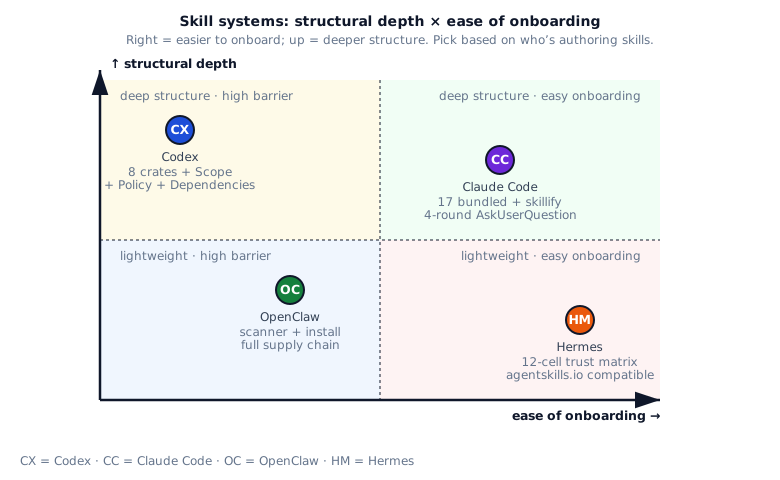
The four systems sit on two axes that pull against each other: “how structured is the design?” versus “how easy is it for an author or end user to get something working?”. In principle the deeper the structure, the better you can evolve and govern it long-term, but the higher the up-front cost; conversely, easy authoring gets you participation but makes permission control, ecosystem interop and supply-chain auditing harder.
Codex sits at the deep-structure end: it slices the problem finely, but at the cost of expecting authors to understand scope, policy, dependencies and injection timing. Claude Code sits at the opposite end: it ships built-ins as samples and turns “saving a workflow” into a wizard, so users do not need to learn any concept to produce a working skill — at the cost of less rigorous permission boundaries and trust governance than Codex. OpenClaw doesn’t compete on author experience at all; instead it makes the download → extract → scan → install pipeline very strict, which is exactly what an IT-administered environment needs. Hermes sits between these: its compact 12-cell matrix lets even non-technical users understand why one skill is installable and another is not.
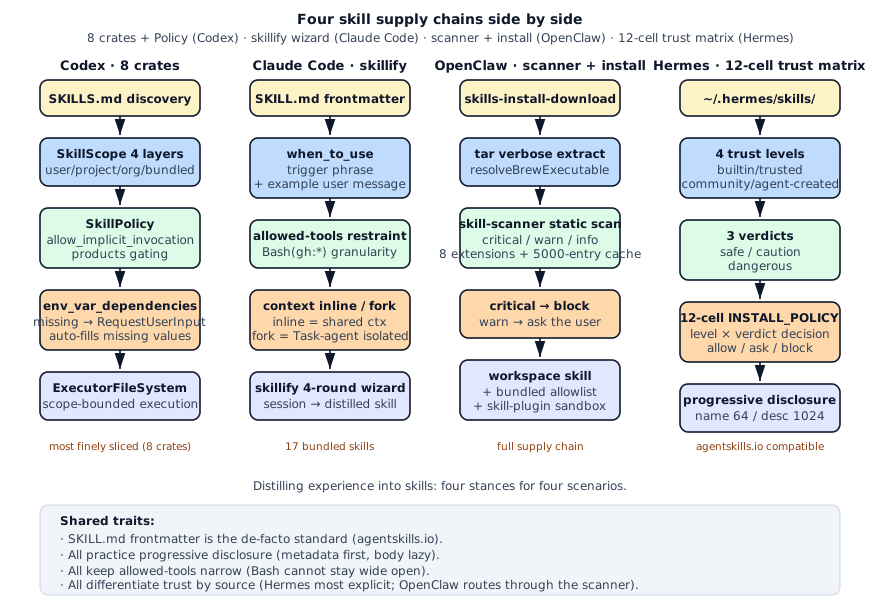
Lined up side by side, the four take-points along the same “author → load → inject → distribute → install” pipeline become clearer:
§5 · Four common mistakes
Section titled “§5 · Four common mistakes”Mistake 1: longer skill equals better skill
Section titled “Mistake 1: longer skill equals better skill”A common first instinct when writing a skill is to put everything in: two thousand lines of prompt, thirty steps, dozens of clarifications under each step. It feels “thorough” but it almost always fails in practice. The model loses focus in long middle sections and starts dropping context; and the longer the skill, the harder it is to maintain and to reuse. The skills that hold up well in production do two things: they describe “when to trigger” and “what success looks like” in the smallest number of words possible, and they reveal execution detail progressively rather than dumping it. The two-stage loading idea — show a short description in the listing, only pull the full body in when the skill is actually invoked — exists precisely to defeat the “more is better” temptation.
Mistake 2: implicit invocation by stuffing every skill into the system prompt
Section titled “Mistake 2: implicit invocation by stuffing every skill into the system prompt”A brute-force way to make all skills “automatically available” is to concatenate every SKILL.md into the system prompt at start-up. The problem is arithmetic: with a hundred skills averaging five thousand characters each, the prompt budget is gone before the user has even said hello. The right structure is two stages: at start-up the model only sees a catalogue — one line per skill with a description capped at maybe a thousand characters; only when the model actually decides to invoke a skill is its full SKILL.md pulled in. That way the steady-state cost barely changes whether you have ten skills or ten thousand. Codex adds an extra filter on top of this so that the catalogue only contains skills the current user and current product surface are actually allowed to implicitly trigger, keeping the listing from becoming noise of its own.
Mistake 3: setting tool permissions to “allow Bash”
Section titled “Mistake 3: setting tool permissions to “allow Bash””If a skill’s frontmatter says “this skill is allowed to use Bash”, it effectively has root: anything the shell can do, the skill can do. One prompt injection later, all bets are off. The correct posture is to confine tool permissions to specific sub-commands: a cherry-pick skill is allowed git cherry-pick, git status and gh pr and nothing else. Codex goes further and structures dependencies as typed declarations — “I need this category of tool, over this transport, calling this endpoint” — so that permission checks can run statically rather than after the fact.
Mistake 4: treating every source of skill the same
Section titled “Mistake 4: treating every source of skill the same”It is tempting to assume that since “they’re all SKILL.md files”, they can all just be installed and run. In reality the risk profile of a built-in skill, an official-vendor skill, a community skill and a skill the model wrote for itself are radically different. Letting unreviewed third-party content execute is equivalent to opening the door to whoever shows up. The 12-cell trust matrix and the static scanner that this chapter described are both ways of saying: origin matters as much as content. An unknown origin plus a faint hint of suspicion is enough to refuse; a model-written skill that scans dangerous must go via the user; a definitely-dangerous skill is refused even if it came from an official source. Both layers together let you keep an open ecosystem without an open door.
§6 · Scorecard
Section titled “§6 · Scorecard”| System | Structure | Implicit trigger | Dependency mgmt | Install chain | Distillation flow |
|---|---|---|---|---|---|
| Codex | ●●●●● 5 | ●●●●● 5 | ●●●●● 5 | ●●●○○ 3 | ●●○○○ 2 |
| Claude Code | ●●●○○ 3 | ●●●●○ 4 | ●●●●○ 4 | ●●●○○ 3 | ●●●●● 5 |
| OpenClaw | ●●●●○ 4 | ●●●○○ 3 | ●●●●○ 4 | ●●●●● 5 | ●●○○○ 2 |
| Hermes | ●●●●○ 4 | ●●○○○ 2 | ●●●○○ 3 | ●●●●● 5 | ●●●○○ 3 |
§7 · Build recipe
Section titled “§7 · Build recipe”复刻方案
- 1. Pick an interoperable SKILL.md schemaDo not invent your own frontmatter. Adopt the field set the industry is already converging on — name, description, version, license, platform constraints, prerequisites, allowed tools, optional private metadata. The benefit is that the same SKILL.md becomes loadable across multiple agent runtimes, and you do not have to rewrite skills the day someone wires up cross-agent interop. Keep any private extension fields in a dedicated metadata sub-tree so they stay isolated from the public schema.
- 2. Add progressive disclosureDo not load every SKILL.md into the prompt at once. Keep an in-memory catalogue of just names and short descriptions; only when the model decides to invoke a specific skill does the full content get pulled in. Putting hard character limits on name and description (64 and 1024 are sound empirical numbers) forces authors to compress "what is it and when to use it" into one or two sentences, which is exactly what the model needs to make accurate invocation decisions.
- 3. Write triggers like a product specHave a single house style for "when do I apply?", with concrete trigger phrases and sample user messages, and ideally a "do not use when …" list. This is the entire input to the model's implicit-invocation decision; the more concrete it is, the lower the false-positive and false-negative rates. A vague abstract description is far worse than even a slightly clumsy concrete one.
- 4. Constrain tool permissions to sub-commandsNever give a skill broad shell access. Spell out which specific sub-commands it can call — "only git cherry-pick", "only these few gh pr sub-commands" — and refuse the rest. Going further, structure the permission as a typed declaration ("I need this category of tool, over this transport, calling this endpoint") so the check can happen at load time rather than at execution time.
- 5. Distinguish in-conversation vs spawned executionLet the author declare whether this skill should run inside the main conversation (so the user can see each step and intervene) or be spawned into its own sub-process (so the result comes back as a summary and the main conversation stays clean). The first suits workflows that need a human in the loop (release work where conflicts may need a human); the second suits clean tasks that should run end-to-end (auto-generating a release note).
- 6. Treat skills as third-party code and scan themA SKILL.md is content that will be loaded into a prompt or interpreted; that is not categorically different from installing an npm package. Build a static scanner that applies file-type-specific rule sets — dynamic execution in scripts, hard-coded credentials in configs, prompt-injection templates in docs — and classifies findings as info / warn / critical. Block critical findings, prompt on warnings, and cache scan results by file size and mtime so unchanged files are not re-scanned.
- 7. Make origin part of the decisionScanning the contents is not enough; you also have to ask "where did this come from?". Tag every skill with an origin label — built-in, vendor-trusted, community, model-generated — then cross "origin × verdict" into a decision table whose cells explicitly say allow / block / ask-the-user. This is the other half of defence in depth and catches whole classes of risk the scanner alone will miss.
- 8. Give users a shortcut for distilling workflowsAfter a finished session, users should be able to crystallise what just happened into a skill with one short command. Do not ask them to sit down and write a SKILL.md from scratch — give them a three-to-five-step wizard: summarise what we just did, define what should re-trigger it next time, tick the tools that should be allowed, choose inline-or-spawn. Completion rate beats from-scratch authoring by a wide margin, and it is the single most effective way to turn lived experience into a reusable asset.
§8 · Decision checklist
Section titled “§8 · Decision checklist”Whether you actually need to add a skill subsystem to your agent can be self-diagnosed against the following seven questions:
- Is this workflow genuinely recurring? If something like backporting a fix to release, writing release notes, or running a code review happens several times a week, it is worth crystallising. If it is a one-off, a plain prompt template is enough — there is no need to stand up a subsystem for it.
- Can the people who will write skills write Markdown? Engineer-heavy audiences are usually fine writing SKILL.md directly. Products aimed at non-engineers must ship a “distill a skill from this session” wizard, otherwise nobody will actually create one.
- Do you need a skill marketplace or external distribution? If skills only live inside your product or your organisation, then local files plus shipped-with-binary defaults are enough. If users can install skills from the outside, you must have origin tagging and static scanning in place; otherwise you are accepting third-party code with no review.
- Do you want the model to decide on its own when to invoke? Implicit invocation feels great when it works, but it requires every skill’s trigger description to be very concrete. If you can’t enforce that, fall back to explicit invocation (
/name) — much less impressive but far more predictable. - Will skills depend on external credentials or commands? If yes, declare those dependencies in metadata and resolve them up-front so the agent can confirm everything is in place before the run starts. Leaving it in documentation and hoping the user reads it is a recipe for frustration.
- Does the workflow need a human in the loop? Workflows that need intervention are better off running in the main conversation; clean, self-contained workflows are better off spawned into a sub-process so they do not pollute the main conversation with hundreds of tool calls.
- How will skills come into existence? If authors are happy to write them by hand, a template and some examples are enough. If you want users to distill skills from conversations they just finished, you need to build a guided wizard — non-trivial, but the highest return on investment.
Rule of thumb: one or two yeses means a prompt template plus a few examples is plenty. Five or more yeses, and it is worth treating the skill subsystem as its own engineering project — borrow structure from Codex, authoring experience from Claude Code, install and scan from OpenClaw, trust matrix from Hermes.
§9 · Key source pointers
Section titled “§9 · Key source pointers”§10 · Where this connects
Section titled “§10 · Where this connects”- The previous chapter 16 · Memory covered how the agent remembers facts.
- The next chapter 18 · Cron & Background Tasks covers how the agent runs when you are not there.
- See 04 · Tool system for how skills interact with tools.
- See 12 · Permissions and approvals for how
allowed-toolsconstrain skills.
§11 · Interview drill: 10 questions with worked answers
Section titled “§11 · Interview drill: 10 questions with worked answers”Q1 · Concept: What’s the essential difference between skill, prompt template, tool, and agent?
Four concepts, going from fine to coarse granularity:
tool: one atomic operation. bash / file_read / git_status. Stateless, single call, returns a result. prompt template: a string + variables. User actively fills variables to invoke. No trigger mechanism, no metadata. skill: a workflow + trigger conditions + dependencies. SKILL.md + frontmatter. Model can invoke implicitly, can carry allowed-tools / dependencies. agent: an independent loop + multi-tool coordination + persistent state. Owns its system prompt + tool box + memory.
Why have a skill layer?
Prompt templates are too weak (no trigger), agents too heavy (each spawn is a new process). Skill sits in the middle:
- Stronger than a prompt template because the model can decide when to use it (when_to_use)
- Lighter than an agent (no new process; shares main agent context)
- Crystallizes a “recurring task” so the model can apply it automatically when it sees the trigger
Concrete forms:
cherry-pick-to-release: frequent and multi-step, must be a skillwrite-changelog: semi-frequent, skill or prompt template both workgit status: single step, it’s a tooldata-scientist: independent persona + long state, it’s an agent
Follow-up: “Can a skill call a tool?” Yes. A skill is prompt + tool list + when_to_use. At execution time it still uses the main agent’s tool box.
Follow-up: “Difference between skill and sub-agent?” Sub-agent spawns a new process + independent context window; skill shares main agent context (unless context: fork).
Source: claude-code/src/skills/bundled/skillify.ts + codex/codex-rs/core-skills/src/model.rs.
Q2 · Concept: Why does Codex split skills into 8 independent crates?
core-skills has 16 files across 8 areas of responsibility:
- loader: reads SKILL.md from disk / remote
- manager: skill lifecycle (register / unbind / invalidate)
- model: data types like SkillMetadata / SkillScope / SkillPolicy
- render: renders SKILL.md into prompt fragments
- injection: decides when to add the skill to the current turn’s prompt
- remote: remote skill install / sync
- env_var_dependencies: env var checks + auto-prompt for missing
- config_rules: SkillPolicy config parsing
Why this fine-grained?
- Single responsibility: loader only reads, doesn’t cache (manager handles that)
- Test isolation: 8 crates mock their own dependencies
- Compile speed: changes to render don’t recompile remote
- Version evolution: future marketplace protocol on
remotedoesn’t break loader
Contrast with Claude Code’s skill implementation:
Claude Code puts skill logic in src/skills/ + src/tools/SkillTool/, single TS package with multiple files. Codex is multi-crate.
Why the difference?
- Rust + Cargo workspace encourages multi-crate
- TS / Node single-package costs less
- Codex plans for skill as a platform capability (marketplace + plugin)
- Claude Code skill is an IDE-embedded feature
Practical engineering value:
- Team work-split: 8 crates can be worked on by 8 people in parallel
- Code navigation: skill injection logic →
injection/ - Refactor safety: crate boundaries are natural API contracts
Follow-up: “Downsides?” High engineering overhead, cross-crate calls need explicit exports. Changing a common type means changing 8 imports.
Follow-up: “Will Claude Code’s monolithic structure cause problems when it expands?” TS refactor cost is lower than Rust; split later if needed. MVP first.
Source: codex/codex-rs/core-skills/Cargo.toml + codex/codex-rs/core-skills/src/lib.rs.
Q3 · Architecture: How does Hermes’s 4 trust × 3 verdict = 12-cell INSTALL_POLICY work?
The matrix:
INSTALL_POLICY = { "builtin": ("allow", "allow", "allow"), # safe/caution/dangerous "trusted": ("allow", "allow", "block"), # openai/anthropic "community": ("allow", "block", "block"), "agent-created": ("allow", "allow", "ask"),}4 trust levels:
builtin: ships with Hermes, bundled in sourcetrusted: from vendors like openai / anthropic that have been auditedcommunity: third-party marketplaceagent-created: the model wrote it itself
3 verdicts:
safe: static analysis is cleancaution: suspicious pattern found (not necessarily malicious)dangerous: clearly high-risk (curl + secret, sudo, etc.)
12 cells = 4 × 3 decisions:
trusted + safe = allow (trusted source + static-clean, install) trusted + dangerous = block (even trusted sources can’t ship dangerous skills) community + caution = block (unknown source + suspicious pattern, refuse) agent-created + dangerous = ask (let user decide, since they generated it)
Why not just trust or just verdict?
Trust only: trusted source becomes blanket-allow, but trusted sources can also push wrong files Verdict only: static scan has false positive / negative, can’t tell “vendor intent” from “injection”
Beauty of the 12-cell matrix:
trusted + dangerous = block is the interesting one. Even openai’s own skills can’t carry dangerous patterns. Forces vendor self-discipline.
agent-created + dangerous = ask is equally subtle: the model may write malicious skills under attacker direction, so the user decides.
Implementation:
def install_decision(level, verdict): return INSTALL_POLICY[level][VERDICT_INDEX[verdict]]Zero runtime cost, fully checked at compile time.
Follow-up: “How is a skill’s trust level decided?” By install source:
- bundled directory → builtin
- vendor URL allowlist → trusted
- user-initiated URL install → community
- model write_file → agent-created
Follow-up: “Matrix not fine enough?” Add more trust levels (enterprise / paid), keep NxM small. Hermes’s 12 cells already cover 95% of cases.
Source: hermes-agent/tools/skills_guard.py:INSTALL_POLICY + VERDICT_INDEX.
Q4 · Concept: How does progressive disclosure apply in a skill system?
Progressive disclosure = “give the summary first; load detail on demand.” Hermes’s MAX_NAME_LENGTH=64 + MAX_DESCRIPTION_LENGTH=1024 is a classic application.
Two-phase loading:
Phase 1 (listing): load only metadata
- name (≤64 char)
- description (≤1024 char)
- platforms / prerequisites
The model sees a 10-skill list, each ~1100 char summary = 11000 char total prompt footprint.
Phase 2 (invocation): load full SKILL.md
- prompt body
- example code
- detailed steps
Only when the model decides to invoke a skill does it pull the entire SKILL.md content into the prompt.
Benefit:
For 100 skills, each SKILL.md averaging 5000 char:
- Without progressive disclosure: load all = 500K char = ~125K tokens. Blows context.
- With progressive disclosure: list 110K char ≈ 28K tokens. Invoke one skill +5K char ≈ 1.25K tokens.
100x savings.
Why 64 / 1024?
- 64 char name: fits one terminal row + screen-width friendly
- 1024 char description: about 200 tokens; model reads “what this skill does” in a sentence chunk
Anthropic’s skill docs recommend: name ≤64, description ≤1024 — fact standard across products.
Codex equivalent:
Codex’s SkillMetadata also uses progressive disclosure:
short_description: for listingsdescription: for invocation- full SKILL.md: into prompt
Implementation:
def list_skills():    return [(s.name, s.description) for s in all_skills]
def load_skill(name):    return read_file(f"skills/{name}/SKILL.md")
Simple. Add LRU cache for complexity.
Follow-up: “1024 char not enough for complex skills?” Description writes only “what + when + key trigger phrases.” Complex content goes in SKILL.md body.
Follow-up: “How to name within 64 char?” kebab-case, descriptive. cherry-pick-to-release, write-changelog-md, find-failing-tests.
Source: hermes-agent/tools/skills_tool.py:MAX_NAME_LENGTH + MAX_DESCRIPTION_LENGTH.
Q5 · Concept: What is Claude Code’s skillify 4-round AskUserQuestion guiding the user toward?
skillify = “crystallize this session’s work into a skill.” 4 rounds:
Round 1: What was the task?
- One-sentence summary of what just happened
- Becomes skill.description
Round 2: When should this re-trigger?
- User lists trigger phrases for next time
- Becomes skill.when_to_use
Round 3: Which tools did you use?
- List of tools actually used (bash / file_edit / git_status)
- User selects, becomes skill.allowed-tools
Round 4: Inline or fork?
- inline = share context with main agent (good when user intervenes)
- fork = run in a subagent (good when self-contained)
Final output:
---name: <Round 1 output slugified>description: <Round 1 output>when_to_use: <Round 2 output>allowed-tools: <Round 3 selections>context: <Round 4 choice>---
<Round 1 + auto-generated body from session summary>
Why 4 rounds + AskUserQuestion instead of one-shot prompt?
- One prompt with 4 questions → user burden too high → high drop rate
- 4 rounds, one choice each → completion rate is high
- AskUserQuestion provides choices, reduces typing
- session context auto-fills defaults (allowed-tools auto-lists already-used tools)
Why not let the model extract everything?
- Trigger phrases (when_to_use) only the user truly knows
- Inline / fork is a UX choice; model can’t guess accurately
- User participation = user owns the generated skill, will actually use it next time
Eval data:
Source comments cite skillify vs hand-written SKILL.md eval: user completion rate 85% vs 35% (writing from scratch).
Compared with other systems:
- Codex has no skillify; manual SKILLS.md
- OpenClaw goes skills-install for external skills, doesn’t sediment local sessions
- Hermes occasionally lets the agent write under the agent-created path, no UI wizard
Claude Code’s skillify is unique, fitting given Claude Code’s team is prompt-design heavy.
Follow-up: “Auto-extract trigger phrases?” Let Claude read the session, propose top-3 trigger candidates, let user pick / edit. Semi-automatic.
Follow-up: “How to review skillify output?” Run eval to check whether the new skill, when triggered, produces output aligned with user expectation.
Source: claude-code/src/skills/bundled/skillify.ts:22-90.
Q6 · Real-world: How to add a skill system to your agent? Roadmap?
5-phase roadmap:
Week 1 · Pick SKILL.md standard
Borrow agentskills.io: name / description / version / license / metadata. Don’t invent your own frontmatter.
---name: cherry-pick-to-releasedescription: When user mentions backporting a fix to release branch, run this workflowversion: 1.0.0metadata: yourapp: tags: [git, release]---Week 2 · Add progressive disclosure
def list_skills_for_prompt() -> str:    return "\n".join(f"{s.name}: {s.description}" for s in skills)
def load_skill_body(name: str) -> str:    return read_file(f"skills/{name}/SKILL.md")
Borrow Hermes 64+1024 char limits.
Week 3 · Add trigger description
when_to_use: | Use this skill when: - User mentions backporting / cherry-picking - User says "patch X to release Y" - Example: "fix critical bug in release-2.5"Borrow Claude Code when_to_use golden formula.
Week 4 · Tighten allowed-tools
allowed-tools: - "Bash(git cherry-pick:*)" - "Bash(git status)" - "Bash(git push:*)" - "Read"Don’t allow Bash globally.
Week 5-6 · Add trust + scanner (if marketplace)
TRUST_LEVELS = ["builtin", "trusted", "community", "agent-created"]VERDICTS = ["safe", "caution", "dangerous"]
INSTALL_POLICY = {    "builtin": ("allow", "allow", "allow"),    "trusted": ("allow", "allow", "block"),    "community": ("allow", "block", "block"),    "agent-created": ("allow", "allow", "ask"),}
def scan_skill(skill_path: Path) -> str:    findings = []    for pattern in DANGER_PATTERNS:        if pattern.search(skill_path.read_text()):            findings.append("dangerous")    return "dangerous" if findings else "safe"
Borrow Hermes 12-cell + OpenClaw scanner.
Week 7-8 · Add skillify sedimentation (optional)
@cli.command()def skillify():    """4-round wizard to extract a skill from current session."""    desc = ask_user("What did you do in this session?")    trigger = ask_user("When should this skill trigger?")    tools = ask_user_multiselect("Which tools were used?", session_tools)    ctx = ask_user_choice("inline or fork?", ["inline", "fork"])
    write_skill_md(desc, trigger, tools, ctx)
Borrow Claude Code 4-round wizard.
Week 9+ · Add implicit invocation (optional · advanced)
def detect_implicit_skill(user_msg: str) -> Optional[Skill]: for skill in active_skills: if any(trigger in user_msg for trigger in skill.trigger_phrases): return skill return NoneBorrow Codex detect_implicit_skill_invocation_for_command.
Key decisions:
- agentskills.io is the de facto standard, don’t invent your own
- Progressive disclosure is mandatory, otherwise prompt explodes
- Trust + scanner only when shipping a marketplace
- skillify has the best UX, but most engineering work
- Implicit invocation is dessert, start with explicit invocation
Follow-up: “What to skip for MVP?” Skip trust + scanner + implicit. Start with SKILL.md + progressive disclosure + allowed-tools.
Source mosaic: Hermes skills_tool.py + Claude Code skillify.ts + Codex core-skills/src/model.rs + OpenClaw skill-scanner.ts.
Q7 · Concept: What are OpenClaw skill-scanner’s 8 file extensions? Why this set?
OpenClaw skill-scanner.ts scans these extensions:
.ts, .tsx, .js, .jsx, .json, .md, .yml, .yaml
Why these 8?
A skill package typically contains:
- SKILL.md (required)
- TS / JS scripts (executable)
- JSON / YAML (config)
- Other MDs (docs)
Scan content:
Per-extension danger patterns:
.ts / .tsx / .js / .jsx: scan foreval,Function(),child_process.exec,require('child_process'), direct IO, etc.json / .yml / .yaml: scan for hardcoded secrets, suspicious URLs.md: scan for prompt-injection patterns (similar to memory scan)
3 severity levels:
- critical: block install
- warn: warn user, requires confirmation
- info: record but don’t interrupt
Compared with Hermes scan:
- Hermes: 11 regex patterns + 10 invisible unicode
- OpenClaw: multi-file-type + 3-severity + 5000-entry cache
OpenClaw fits marketplaces better (multi-file skill packs); Hermes fits inline content (single-text scan).
What’s the 5000 cache for?
Scanning a 5000-char content takes ~50ms (many regexes). Cache prevents rescans. LRU(5000) ≈ 50MB memory, acceptable.
Follow-up: “How to scan Python skills?” Add .py extension + Python-specific patterns (exec, eval, __import__, subprocess.run).
Follow-up: “Binary files?” Default skip, or check file header for executable. Don’t go deep.
Follow-up: “How to prevent scanner bypass?” Can’t fully prevent. Attackers can obfuscate (base64 / string concat). So scanner reduces false-install rate, not “100% block.” Combine with trust level for full defense.
Q8 · Concept: context: inline vs fork — how to choose?
Claude Code SKILL.md has a context: inline | fork field:
inline: shares prompt with main agent
- skill loads into main agent’s prompt
- skill’s tool calls use main agent’s tool box
- skill results go directly into main conversation
- user sees skill execution
fork: runs in a subagent (Task)
- spawns a new agent with independent prompt
- new agent completes, returns aggregated result
- main agent sees result, not the process
- user sees “I had a subagent run the skill”
inline suits:
- Workflows needing user intervention (cherry-pick might hit conflicts to resolve)
- Tightly-coupled context with main agent (continue what we were doing)
- Short single-execution (< 5 turns)
fork suits:
- Self-contained workflows (write changelog runs to completion, main agent doesn’t need to participate)
- Heavy context pollution (lots of tool calls you don’t want in main conversation)
- Long execution (> 10 turns)
- Parallel (run multiple reviews concurrently, each in its own fork)
Examples:
| skill | context | reason |
|---|---|---|
| cherry-pick-to-release | inline | conflicts need user resolution |
| write-changelog | fork | automatic to completion |
| review-pr | fork | long context, avoid pollution |
| add-tests | inline | user may redirect mid-flight |
Compared to Codex / OpenClaw:
Codex has no explicit inline / fork field — it implicitly decides via SkillScope (the skill’s visibility) and SubAgentSource (whether to spawn a dedicated subagent for it).
OpenClaw uses skills-runtime (an isolated skill execution runtime process), similar to fork but lighter to spawn.
Claude Code’s inline / fork is the user-friendly explicit API:
The skill author sets context: fork, execution environment is settled.
Follow-up: “How are arguments passed to fork?” Pack relevant context from main agent into a prompt segment. Claude Code’s Task tool takes a prompt parameter.
Follow-up: “How does fork call tools?” Subagent has its own tool box (constrained by skill.allowed-tools). Cannot use main agent’s tools.
Source: claude-code/src/tools/SkillTool/SkillTool.ts + Claude Code Task tool.
Q9 · Engineering: Is LLM-extracted trigger phrase accurate? How to improve accuracy?
The better when_to_use is written, the more accurate implicit invocation.
Pain points of hand-writing when_to_use:
- Users can’t think of all trigger phrases
- Same skill, multiple user expressions
- Too broad → false trigger
- Too narrow → missed trigger
LLM extraction approach:
def extract_triggers(skill_path: Path, sample_sessions: list[Session]) -> str:    prompt = f"""    Skill description: {skill.description}
    Sample sessions where this skill was useful:    {format_sessions(sample_sessions)}
    Extract 3-5 trigger phrases that should make an agent invoke this skill.    """    return llm.complete(prompt)
Techniques to improve accuracy:
- Positive + negative samples: show LLM “should-trigger” + “shouldn’t-but-looks-similar” pairs
- Eval feedback loop: run test dataset, check precision/recall, iterate trigger phrases
- Multi-model voting: claude / gpt / gemini all extract, take intersection
- User feedback: false trigger → user marks → add to negative samples
- Tier triggers: must-trigger (“backport this fix”) + may-trigger (“apply to release”), different confidence
Claude Code’s eval pattern:
Source comments use H1 0/2 → 3/3 tags throughout. Each prompt section was eval’d:
- H1-H5 = 5 capability cases
- 0/2 = baseline pass rate
- 3/3 = post-optimization pass rate
Eval-driven prompt design is production-grade.
Anti-pattern · don’t do this:
- ❌ Trigger: “Use when user wants to do git stuff” (too broad)
- ❌ Trigger: “Use when user types exactly ‘cherry-pick’” (too narrow)
- ❌ No example user message (model guesses)
Good example:
when_to_use: |  Use when the user wants to backport a fix to a release branch.
  Trigger phrases:  - "cherry-pick X to release"  - "backport this fix"  - "apply Y to the release-N branch"
  Example user messages:  - "Please cherry-pick commit abc123 to release-2.5"  - "Backport the auth fix to last week's release"
  Do NOT use for:  - Initial merge from feature branch to main  - Squash-merging multiple commits
Includes positive + negative samples and multiple trigger expressions.
Follow-up: “How to test trigger accuracy?” Write 50 sample user messages (25 should-trigger, 25 shouldn’t), run implicit detection, check P/R. Production rec: P/R > 0.9.
Follow-up: “How to auto-learn from false triggers?” Sessions where user skipped a skill become negative samples. Next eval run includes these to verify new triggers don’t false-fire.
Source: claude-code/src/skills/bundled/* each skill’s when_to_use section.
Q10 · Open-ended: Combine the four to design a general-purpose skill system.
5-layer architecture:
Layer 1 · SKILL.md standard (mandatory · agentskills.io compat)
---name: cherry-pick-to-release           # ≤ 64 chardescription: Backport fix to release    # ≤ 1024 charversion: 1.0.0license: MITplatforms: [linux, macos]prerequisites:  env_vars: [GITHUB_TOKEN]  commands: [git, gh]allowed-tools:  - "Bash(git cherry-pick:*)"  - "Bash(gh pr:*)"context: inline                         # inline | forkwhen_to_use: |  Use when user mentions backporting...metadata:  yourapp:    tags: [git, release]    trust_level: trusted---
# Skill body...
Borrow Hermes agentskills.io compat + Claude Code when_to_use.
Layer 2 · Progressive Disclosure (mandatory)
class SkillRegistry:    def list_metadata(self) -> list[dict]:        return [(s.name, s.description) for s in self.skills]
    def load_body(self, name: str) -> str:        return cache.get_or_set(name, lambda: read_skill_md(name))
Borrow Hermes 64+1024.
Layer 3 · Trust + Verdict (recommended · marketplace only)
INSTALL_POLICY = {  # 12-cell matrix    "builtin": ("allow", "allow", "allow"),    "trusted": ("allow", "allow", "block"),    "community": ("allow", "block", "block"),    "agent-created": ("allow", "allow", "ask"),}
def install_decision(skill: Skill) -> str:    level = detect_trust_level(skill)    verdict = scan_skill(skill)    return INSTALL_POLICY[level][VERDICT_INDEX[verdict]]
Borrow Hermes.
Layer 4 · Scanner (recommended · with marketplace)
DANGER_PATTERNS = {    ".py": [r"exec\(", r"__import__"],    ".sh": [r"curl.*KEY", r"sudo"],    ".md": [r"ignore.*previous.*instructions"],}
def scan_skill(skill_path: Path) -> str:    findings = []    for file in skill_path.rglob("*"):        ext = file.suffix        if ext not in DANGER_PATTERNS:            continue        for pattern in DANGER_PATTERNS[ext]:            if re.search(pattern, file.read_text()):                findings.append("dangerous")    return classify(findings)
Borrow OpenClaw skill-scanner 8 extensions + critical/warn/info.
Layer 5 · Skillify Sedimentation (recommended · DX killer)
@cli.command()def skillify(session_id: str):    session = load_session(session_id)    desc = ask_user("Summarize what you did:", default=session.summary)    trigger = ask_user("When should this re-trigger?")    tools = multi_select("Tools to allow:", session.tools_used)    ctx = single_select("inline or fork?", ["inline", "fork"])
    md = render_skill_md(desc, trigger, tools, ctx, session.prompts)    write_skill_md(slugify(desc), md)
Borrow Claude Code skillify 4-round.
Layer 6 · Implicit Invocation (optional · advanced)
def detect_skill_to_invoke(user_msg: str, active_skills: list[Skill]) -> Optional[Skill]:    candidates = []    for skill in active_skills:        if not skill.policy.allow_implicit_invocation:            continue        for phrase in skill.trigger_phrases:            if phrase.lower() in user_msg.lower():                candidates.append((skill, len(phrase)))
    if not candidates:        return None    return max(candidates, key=lambda x: x[1])[0]
Borrow Codex detect_implicit_skill_invocation_for_command.
Core design principles:
- agentskills.io is the de facto standard: don’t invent your own frontmatter
- Progressive disclosure mandatory: otherwise prompt explodes
- Inline is default: fork is optimization
- Scanner isn’t 100% protection: combine with trust level
- skillify is the DX killer: but heavy engineering
Replication cost:
- Layer 1-2: mandatory, 2-3 weeks
- Layer 3-4: recommended if marketplace, 3-4 weeks
- Layer 5: recommended, 2-3 weeks
- Layer 6: optional, 2-3 weeks
Total v0.1 (Layer 1-2) one month, v1.0 (Layer 5) three months.
Follow-up: “How do skills share across agents?” agentskills.io compat — any supporting agent can read.
Follow-up: “How to version skills?” SemVer + immutable distribution. Upgrade = reinstall.
Source mosaic: All four systems’ best parts layered together.