14 · Multi-Channel Entry
§1 · TL;DR
Section titled “§1 · TL;DR”§2 · Architecture Diagram
Section titled “§2 · Architecture Diagram”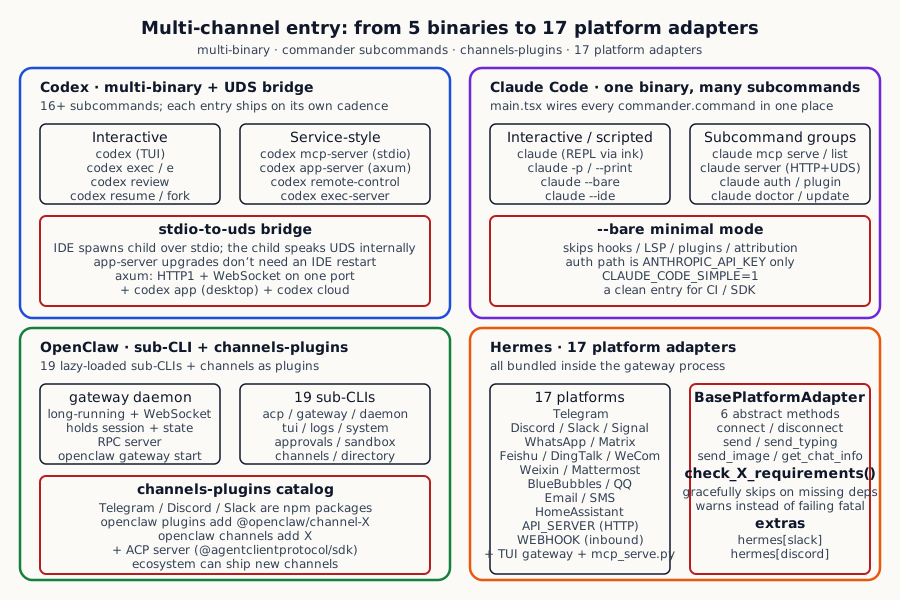
How the four systems cover multi-channel entry:
| Dimension | Codex | Claude Code | OpenClaw | Hermes |
|---|---|---|---|---|
| Primary interaction | TUI default + exec subcommand for scripting | REPL default + -p/--print for scripting | gateway daemon + sub-CLI client | gateway single process + 17 platform adapters |
| IDE integration | codex stdio-to-uds (VSCode / Cursor via UDS) + codex mcp-server (stdio MCP) | --ide flag auto-detect + IDE MCP; mcp serve subcommand starts MCP server | ACP server (@agentclientprotocol/sdk) + gateway WebSocket | Not IDE-focused; relies on Webhook / API server / Mattermost / Matrix for ChatOps integration |
| MCP / remote protocols | codex mcp-server (stdio) + codex app-server (axum HTTP+WS) + remote-control | mcp serve subcommand (stdio MCP) + server subcommand (HTTP/Unix socket session server) | ACP server (standardized agent control protocol) + WebSocket gateway | mcp_serve.py (MCP server) + API_SERVER platform adapter + Webhook |
| Chat platform coverage | Not first-party; relies on ChatGPT cloud + external wrappers | Not first-party; relies on plugins / SDK wrappers | Telegram / Discord / WhatsApp etc. via channels-plugins as npm packages | 17 platform adapters built in (Telegram, Discord, Slack, Signal, Feishu, DingTalk, WeCom, Weixin, Matrix, Mattermost, BlueBubbles, QQ, Email, SMS, Webhook, API server, HomeAssistant) |
| TUI / CLI client | codex_tui crate + ratatui | main.tsx with ink + ratatui-like rendering | tui-cli subcommand + ui-tui packages (standalone TUI connecting to gateway) | tui_gateway package, connects to local gateway daemon |
§3 · How Each System Does It
Section titled “§3 · How Each System Does It”Codex · Make every calling mode a separate subcommand, then bridge IDE and daemon over a Unix domain socket
Section titled “Codex · Make every calling mode a separate subcommand, then bridge IDE and daemon over a Unix domain socket”Codex’s reasoning is clear: it has to serve callers with wildly different needs. A developer running bare in the terminal wants a full ratatui-rendered TUI. A CI script wants something that takes a prompt and produces JSON before exiting. An IDE integration wants a bidirectional streaming channel. A desktop app wants a stateful daemon. A remote client wants an HTTP/WS service with authentication. These scenarios have different lifecycle patterns, different state management needs, and different protocol requirements — cramming them all into one process makes them all conflict.
Codex’s solution is to split each scenario into a subcommand of the codex multitool — one binary, but every subcommand maps to a completely different entry mode. This is the same design philosophy as git (one git command dispatching to git-checkout, git-commit and friends), but each subcommand’s code organisation is genuinely cleanly separated, almost as if multiple independent binaries shared one dispatcher.
Codex codex/codex-rs/cli/src/main.rs:105-182 — codex multitool subcommands: exec / review / mcp / mcp-server / app-server / remote-control / app / resume / fork / cloud / responses-api-proxy / stdio-to-uds / exec-server / features
#[derive(Debug, clap::Subcommand)]enum Subcommand {    /// Run Codex non-interactively.    #[clap(visible_alias = "e")]    Exec(ExecCli),
    /// Run a code review non-interactively.    Review(ReviewArgs),
    /// Manage login.    Login(LoginCommand),
    /// Manage external MCP servers for Codex.    Mcp(McpCli),
    /// Start Codex as an MCP server (stdio).    McpServer,
    /// [experimental] Run the app server or related tooling.    AppServer(AppServerCommand),
    /// [experimental] Start a headless app-server with remote control enabled.    RemoteControl,
    /// Launch the Codex desktop app.    #[cfg(any(target_os = "macos", target_os = "windows"))]    App(app_cmd::AppCommand),
    /// Resume a previous interactive session.    Resume(ResumeCommand),
    /// Fork a previous interactive session.    Fork(ForkCommand),
    /// [EXPERIMENTAL] Browse tasks from Codex Cloud.    #[clap(name = "cloud", alias = "cloud-tasks")]    Cloud(CloudTasksCli),
    /// Internal: relay stdio to a Unix domain socket.    #[clap(hide = true, name = "stdio-to-uds")]    StdioToUds(StdioToUdsCommand),
    /// [EXPERIMENTAL] Run the standalone exec-server service.    ExecServer(ExecServerCommand),    // ...}
Each subcommand corresponds to one independent entry mode. The most common ones are: running bare codex boots the full-screen ratatui-rendered TUI (the everyday conversational entry); codex exec runs in non-interactive script mode that consumes a prompt and exits, fitting CI pipelines and automation; codex review is a specialised non-interactive code review variant; codex mcp-server turns the current process into an MCP server (talking over stdio), so MCP-compatible clients like Cursor, Cline, or Claude Desktop can call codex as an agent tool; codex mcp does the reverse — manages external MCP server configuration; codex app-server runs an axum-based daemon that simultaneously speaks HTTP1 and WebSocket, used by the desktop app and remote clients; codex resume / codex fork picks up or branches a historical session.
The most notable one is a hidden subcommand called codex stdio-to-uds — its existence solves a very real engineering pain point in IDE integration.
Picture the typical IDE-integration friction: an IDE spawns the agent as a child process, and the IDE talks to the child over stdio for JSON-RPC (this is how LSP, DAP, MCP, and basically every IDE protocol work); meanwhile the agent itself wants to be a long-running daemon — it wants to keep session state across IDE restarts, share sessions with other IDE instances, and let agent upgrades happen without restarting the IDE. These two needs conflict: IDEs assume “one child process per agent session”, while the daemon model assumes “one daemon serves many clients”.
codex stdio-to-uds resolves this with a small bridge process — the IDE spawns it as a child, and the bridge does exactly one thing: every byte it receives over stdio it forwards to a Unix domain socket, and every byte it receives from the socket it writes back to stdout. The daemon itself listens on that socket. From the IDE’s perspective, it is talking to a plain stdio child; from the daemon’s perspective, it is talking to a socket client. The daemon can be restarted/upgraded at any time (the IDE only feels a reconnect blip), and the bridge process has no state of its own, so a crash-restart costs almost nothing.
codex app-server uses axum with simultaneous HTTP1 and WebSocket support (the Cargo.toml declares axum’s features as ["http1", "json", "tokio", "ws"]), so the same daemon can do RESTful-style session management (for stateless clients) and real-time WebSocket streaming (for IDEs that need streaming output).
Claude Code · Pack everything into one npm package, organised through a commander subcommand tree
Section titled “Claude Code · Pack everything into one npm package, organised through a commander subcommand tree”Claude Code’s trade-off is the exact opposite of Codex. It assumes its users are developers who install with one npm install -g @anthropic-ai/claude-code; what it most wants to avoid is the user needing to remember “oh, you have to install another binary to get MCP mode”. So it picks “one binary, many subcommands” — every feature lives in the same npm package’s entry, dispatched by commander.js.
Claude Code claude-code/src/main.tsx:971-1006 — Top-level program key flags: --print / --bare / --ide / --mcp-config / --print (script mode); almost every feature toggles via a flag
.option('-p, --print', 'Print response and exit (useful for pipes). Note: The workspace trust dialog is skipped when Claude is run with the -p mode. Only use this flag in directories you trust.', () => true).option('--bare', 'Minimal mode: skip hooks, LSP, plugin sync, attribution, auto-memory, background prefetches, keychain reads, and CLAUDE.md auto-discovery. Sets CLAUDE_CODE_SIMPLE=1. Anthropic auth is strictly ANTHROPIC_API_KEY or apiKeyHelper via --settings (OAuth and keychain are never read). 3P providers (Bedrock/Vertex/Foundry) use their own credentials. Skills still resolve via /skill-name. Explicitly provide context via: --system-prompt[-file], --append-system-prompt[...].').option('--mcp-config <configs...>', 'Load MCP servers from JSON files or strings (space-separated)').option('--ide', 'Automatically connect to IDE on startup if exactly one valid IDE is available', () => true).option('--strict-mcp-config', 'Only use MCP servers from --mcp-config, ignoring all other MCP configurations', () => true)Subcommand groups (via commander.command):
Claude Code claude-code/src/main.tsx:3894-3962 — Main management subcommands: mcp serve / mcp list / mcp add-from-claude-desktop / server / auth / plugin / setup-token
const mcp = program.command('mcp').description('Configure and manage MCP servers')mcp.command('serve').description(`Start the Claude Code MCP server`)mcp.command('list').description('List configured MCP servers...')mcp.command('add-from-claude-desktop').description('Import MCP servers from Claude Desktop (Mac and WSL only)')mcp.command('reset-project-choices').description('Reset all approved and rejected project-scoped (.mcp.json) servers within this project')
program.command('server').description('Start a Claude Code session server')  .option('--port <number>', 'HTTP port', '0')  .option('--host <string>', 'Bind address', '0.0.0.0')  .option('--auth-token <token>', 'Bearer token for auth')  .option('--unix <path>', 'Listen on a unix domain socket')  .option('--workspace <dir>', 'Default working directory for sessions that do not specify cwd')  .option('--idle-timeout <ms>', 'Idle timeout for detached sessions in ms (0 = never expire)', '600000')  .option('--max-sessions <n>', 'Maximum concurrent sessions (0 = unlimited)', '32')
The five most commonly used entry modes are: bare claude opens the REPL (a terminal UI rendered with the ink library), the everyday conversational entry; claude -p "..." enters “print mode” — run the prompt, print the result, exit — friendly to shell pipes (think cat file | claude -p "summarise"), and the help text has one important note: this mode skips the workspace trust dialog, so use it only in directories you trust to avoid auto-loading project-level config from hostile directories.
The mode that deserves a dedicated paragraph is claude --bare — it exists to give CI pipelines and SDK callers a “fully controllable” entry. A regular claude startup does a long list of automation: load project-level hooks, start an LSP server, sync plugins, generate git attribution, load long-term memory, prefetch data in the background, read the system keychain, auto-discover and load CLAUDE.md files. All of these are there for a smooth interactive developer experience. But in CI they become a liability: each run looks slightly different, surprising side effects appear, environment information leaks. --bare turns the whole automation pile off in one move, restricting auth to the two strictest modes (the ANTHROPIC_API_KEY env var or an explicit apiKeyHelper script) and refusing to touch OAuth or keychain.
The remaining common entries: claude --ide auto-detects the currently open IDE on startup and connects (provided exactly one valid IDE instance is present, to avoid ambiguity); claude mcp serve turns the process into a stdio MCP server, claude mcp list manages MCP config; claude server boots an HTTP or Unix-socket session server with --port, --host, --unix, --max-sessions, --idle-timeout and other flags — designed for the enterprise case of many users sharing one agent process; and then auth (auth login, auth status, auth logout), plugin management (plugin list, plugin marketplace), initial token setup (setup-token), triage (doctor), auto-update (update), and listing sub-agent definitions (agents) each live in their own subcommand.
Compared with Codex, Claude Code chooses “the user installs one npm package” (simple distribution), at the cost of main.tsx becoming a single ten-thousand-line file (heavy maintenance). Neither trade-off is absolutely better — it depends on how the team weighs UX simplicity vs engineering modularity.
OpenClaw · 19 lazily-loaded sub-CLIs plus channels as independently-published npm packages
Section titled “OpenClaw · 19 lazily-loaded sub-CLIs plus channels as independently-published npm packages”OpenClaw’s reasoning differs from both of the above. The scenario it serves is much more complex than an IDE tool — at its core it is a ChatOps framework that must simultaneously connect to many chat platforms (Telegram, Discord, Slack), provide RPC interfaces for many local tools, support sandbox container isolation, and provide a standardised connect protocol for external IDEs. One CLI ends up having to cover “manage Telegram config”, “start a sandbox container”, “tail logs”, “manage DNS resolution”, and dozens of other functions at once.
Its solution is to split the CLI into 19 independent sub-CLIs — each sub-CLI corresponds to one function domain, and the organisation is neither Codex-style “each subcommand is its own entry mode” nor Claude Code-style “main entry with many small subcommands”, but rather “the main program only dispatches, all heavy logic lives in the sub-CLIs”.
OpenClaw openclaw/src/cli/program/register.subclis.ts:44-160 — 19 top-level sub-CLIs: acp / gateway / daemon / logs / system / models / approvals / nodes / devices / node / sandbox / tui / cron / dns / docs / hooks / webhooks / qr / clawbot / pairing / plugins / channels / directory / security / secrets / skills / update
const entries: SubCliEntry[] = [ { name: "acp", description: "Agent Control Protocol tools", hasSubcommands: true, register: ... }, { name: "gateway", description: "Run, inspect, and query the WebSocket Gateway", hasSubcommands: true, register: ... }, { name: "daemon", description: "Gateway service (legacy alias)", hasSubcommands: true, register: ... }, { name: "logs", description: "Tail gateway file logs via RPC", hasSubcommands: false, register: ... }, { name: "system", description: "System events, heartbeat, and presence", hasSubcommands: true, register: ... }, { name: "models", description: "Discover, scan, and configure models", hasSubcommands: true, register: ... }, { name: "approvals", description: "Manage exec approvals (gateway or node host)", hasSubcommands: true, register: ... }, { name: "sandbox", description: "Manage sandbox containers for agent isolation", hasSubcommands: true, register: ... }, { name: "tui", description: "Open a terminal UI connected to the Gateway", hasSubcommands: false, register: ... }, { name: "cron", description: "Manage cron jobs via the Gateway scheduler", hasSubcommands: true, register: ... }, { name: "channels", description: "Manage connected chat channels (Telegram, Discord, etc.)", hasSubcommands: true, register: ... }, { name: "directory", description: "Lookup contact and group IDs (self, peers, groups) for supported chat channels", hasSubcommands: true, register: ... }, // ...];This design lands as a clean four-layer runtime structure:
Layer 1 is the gateway daemon — a long-running background process that holds every WebSocket connection, the global state, and the active sessions. This is the “heart” of the system, started with openclaw gateway start.
Layer 2 is the 19 sub-CLIs — every openclaw <subcli> <cmd>-shaped command is actually an RPC client. It does no real business logic internally, just translates the command into an RPC request and sends it to the local gateway. This design buys one key engineering benefit: lazy loading. When the user runs a short command like openclaw logs tail, Node.js only has to require the logs-cli.js file — gateway, daemon, sandbox and the rest of the modules are never loaded. The result is sub-CLI startup latency in the tens of milliseconds, comparable to a long-running process.
Layer 3 is a standalone TUI app (openclaw tui) — it is a completely separate npm package from the sub-CLIs (called ui-tui in the repo), connecting to the gateway over WebSocket. That separation means the TUI can iterate independently, release independently, and even run on a different machine (TUI on the user’s laptop, gateway on a company server).
Layer 4 is the ACP server (openclaw acp serve) — ACP stands for “Agent Control Protocol”, a standardised agent communication protocol (similar to MCP but more focused on agent interop) that lets external IDEs or orchestration systems talk to OpenClaw agents over a standard wire.
Chat channels (Telegram, Discord, Slack and similar) integrate in a particularly distinctive way — they are not built into the main repo the way Hermes does it, but instead follow a “plugin as npm package” route:
OpenClaw openclaw/src/channels/plugins/catalog.ts:1-58 — Channels register through a catalog of npm packages, one `@openclaw/channel-<name>` per platform
type ChannelPluginCatalogEntry = {  id: string;  meta: ChannelMeta;  install: {    npmSpec: string;    localPath?: string;    defaultChoice?: "npm" | "local";  };};
const DEFAULT_CATALOG_PATHS = [  path.join(CONFIG_DIR, "mpm", "plugins.json"),  path.join(CONFIG_DIR, "mpm", "catalog.json"),  path.join(CONFIG_DIR, "plugins", "catalog.json"),];
A user adds Telegram by first running openclaw plugins add @openclaw/channel-telegram to install the Telegram channel plugin (which is actually just installing an independent npm package), then openclaw channels add telegram to configure the connection parameters. This buys several important engineering wins: first, the main repo size does not balloon (no need to bundle every platform’s SDK dependencies); second, the ecosystem can contribute new channels (any third party can publish a @vendor/channel-myplatform package); third, each channel plugin can be versioned independently (a Telegram SDK upgrade does not affect the Discord plugin).
Hermes · One gateway process pulling 17 platform adapters, with HTTP API modelled as a “platform” too
Section titled “Hermes · One gateway process pulling 17 platform adapters, with HTTP API modelled as a “platform” too”Hermes’s trade-off contrasts sharply with OpenClaw — its goal is to be a ChatOps agent where “one pip install plus boot, you immediately have access to all 17 chat platforms”, so it bundles every platform adapter into the main repo and runs them all inside the same gateway process. This looks heavy but is actually the most convenient for its target user (individual developers building a personal or family assistant bot) — no plugin system to wrestle with, no extra npm packages, working out of the box.
The Hermes core abstraction is a base class called BasePlatformAdapter — it defines 6 methods every platform must implement, and unifies the wildly different shapes of 17 chat platforms behind the smallest common subset of those 6 methods.
Hermes hermes-agent/gateway/platforms/base.py:854-1055 — BasePlatformAdapter: 6 abstract methods (connect / disconnect / send / send_typing / send_image / get_chat_info) that every subclass implements
class BasePlatformAdapter(ABC):    """    Base class for platform adapters.
    Subclasses implement platform-specific logic for:    - Connecting and authenticating    - Receiving messages    - Sending messages/responses    - Handling media    """
    def __init__(self, config: PlatformConfig, platform: Platform):        self.config = config        self.platform = platform        self._message_handler: Optional[MessageHandler] = None        self._running = False        # Track active message handlers per session for interrupt support        self._active_sessions: Dict[str, asyncio.Event] = {}        self._pending_messages: Dict[str, MessageEvent] = {}        # Background message-processing tasks spawned by handle_message().        self._background_tasks: set[asyncio.Task] = set()        # ...
    @abstractmethod    async def connect(self) -> bool: ...
    @abstractmethod    async def disconnect(self) -> None: ...
    @abstractmethod    async def send(self, chat_id: str, content: str, ...) -> SendResult: ...
Those 6 abstract methods cover “come in”, “disconnect”, “send out”, “show typing indicator”, “send image”, “look up chat metadata” — the essential capabilities every chat platform has to support. Subclasses implement the specific logic — TelegramAdapter’s connect logs into Telegram’s Bot API and opens long polling, DiscordAdapter’s connect opens a Discord gateway WebSocket, EmailAdapter’s connect opens an IMAP connection. The base class also handles a few things every adapter needs: managing “interrupt signals for active sessions” (so users can interrupt generation mid-flight), managing “pending messages” (for platforms that need queueing), and managing a “background task set” (preventing async tasks from being GC’d).
The actual registration of the 17 platforms is laid out flatly inside the _create_adapter method:
Hermes hermes-agent/gateway/run.py:2679-2817 — GatewayRunner._create_adapter: dispatch by Platform enum, each platform pairs with check_xxx_requirements() to probe dependencies
def _create_adapter(self, platform: Platform, config: Any) -> Optional[BasePlatformAdapter]:    if platform == Platform.TELEGRAM:        from gateway.platforms.telegram import TelegramAdapter, check_telegram_requirements        if not check_telegram_requirements():            logger.warning("Telegram: python-telegram-bot not installed")            return None        return TelegramAdapter(config)
    elif platform == Platform.DISCORD: ...    elif platform == Platform.WHATSAPP: ...    elif platform == Platform.SLACK: ...    elif platform == Platform.SIGNAL: ...    elif platform == Platform.HOMEASSISTANT: ...    elif platform == Platform.EMAIL: ...    elif platform == Platform.SMS: ...    elif platform == Platform.DINGTALK: ...    elif platform == Platform.FEISHU: ...    elif platform == Platform.WECOM_CALLBACK: ...    elif platform == Platform.WECOM: ...    elif platform == Platform.WEIXIN: ...    elif platform == Platform.MATTERMOST: ...    elif platform == Platform.MATRIX: ...    elif platform == Platform.API_SERVER: ...    elif platform == Platform.WEBHOOK: ...    elif platform == Platform.BLUEBUBBLES: ...    elif platform == Platform.QQBOT: ...    return None
A few design details deserve dedicated paragraphs:
The first detail is dependency capability probing. Every platform module carries its own check_<platform>_requirements() function (for example check_telegram_requirements, check_discord_requirements), specifically for probing whether the Python SDK that platform needs is actually installed. If not, the system only logs a warning and skips that adapter — neither raising nor aborting. This “graceful degradation” lets Hermes pull off a flexible move: the user installs one pip install hermes-agent main package and gets the code for every one of the 17 platforms, but only the platforms the user actually configured credentials for (via env vars like TELEGRAM_TOKEN, DISCORD_TOKEN) will actually start their adapter; if the user only wants Telegram, packages like discord.py and slack-bolt are never installed.
The second detail is extra dependencies. When a user does need a particular platform, Python’s packaging system supports hermes-agent[slack] “extras” syntax to install platform-specific dependencies (slack-bolt and friends). This makes “small main package + install SDKs on demand” feasible.
The third detail is modelling HTTP API and Webhook as platforms — Hermes’s most clever design move. The API_SERVER adapter exposes an HTTP endpoint that external systems can call to have the agent process a message; the WEBHOOK adapter does the reverse and lets external systems push messages in through a webhook. These two “non-chat” entries could easily have lived on a separate code path, but Hermes models them as platforms, reusing the same BasePlatformAdapter abstraction, the same message handler, and the same session management — so API calls and webhooks both get the full chat-platform feature set (active session interrupt, streaming responses, long-task support).
Beyond the 17 platform adapters, Hermes also ships several developer-and-toolchain entries: a simple cli.py for talking to the agent directly (mostly for development and testing), a tui_gateway/ package providing a local TUI (connecting to the local gateway daemon), and an mcp_serve.py that wraps the entire Hermes as an MCP server so other agents can use it as a tool.
§4 · What They Agree On
Section titled “§4 · What They Agree On”Despite the wildly different trade-offs in entry architecture, the four systems converge on four basics — think of these as the minimum set for doing “multi-channel entry” well.
The first is accepting MCP (or a similar standardised agent protocol) as the de facto standard. All four ship an MCP server entry: Codex makes it a separate binary (codex mcp-server), Claude Code makes it a subcommand (claude mcp serve), Hermes makes it a standalone Python module (mcp_serve.py), and OpenClaw goes with the same-spirit ACP protocol (openclaw acp serve). The logic: agent-to-agent calls, IDE-to-agent calls, and orchestrator-to-agent calls are growing rapidly, and every vendor making up a private protocol is a dead end — convergence on a public standard is mandatory.
The second is splitting CLI and daemon into two layers. OpenClaw makes this most explicit (a long-running gateway daemon plus sub-CLIs that are all RPC clients); Codex implements it implicitly through app-server plus the stdio-to-uds bridge; Claude Code provides it through the server subcommand (HTTP/Unix socket session server). The shared logic: interactive CLIs start slowly (loading config, connecting dependencies); if every short command re-launched a full agent, UX would be poor. Hosting state in a long-running daemon and making short commands do only RPC is where almost every “agent that is also a CLI tool” project ends up.
The third is that entries must do capability discovery. Installing a channel/platform does not mean it can actually run — the SDK might be missing, credentials might be unset, the external service might be unreachable. All four implement capability discovery: Hermes’s check_<platform>_requirements() family, OpenClaw’s plugins catalog (describing each plugin’s dependencies), Codex’s feature flags (compile-time gating). The consensus: degrade gracefully on missing dependencies (warn and skip), never let one platform’s dependency problem crash the whole agent.
The fourth is that the protocols spoken are open standards — nobody invents private protocols. MCP (used by Codex, Claude, Hermes), ACP (OpenClaw’s bet), Telegram Bot API, Slack Bolt, Discord Gateway, IMAP/SMTP — all public. Nobody has built “a proprietary agent communication protocol”, because public protocols come with existing SDKs and tooling, and private protocols would lock the ecosystem out, which would in turn limit the agent’s own reachable scenarios.
§5 · Where They Differ
Section titled “§5 · Where They Differ”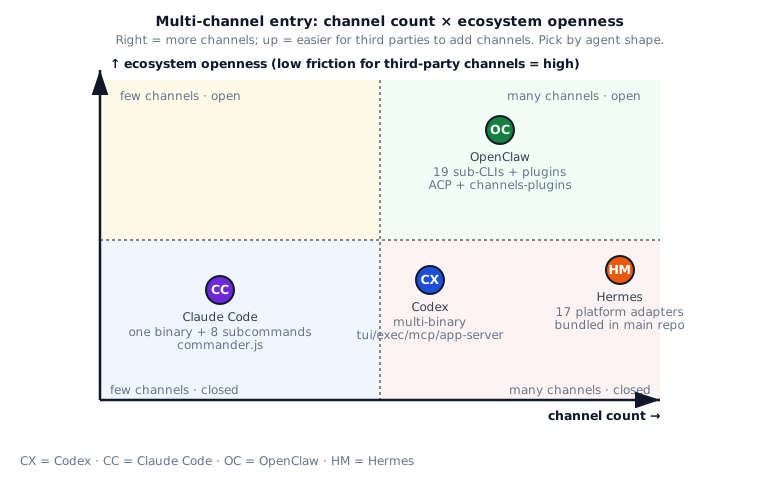
Four typical scenarios:
- Dev-tool style agent: borrow from Codex / Claude Code’s CLI + IDE + MCP triad. Both ship complete answers.
- ChatOps style agent: borrow from Hermes’s BasePlatformAdapter +
check_<platform>_requirements()pattern. 17 platforms are a real sample. - Platform-style agent framework: borrow from OpenClaw’s channels-plugins + ACP design. Let the ecosystem build new channels.
- Both worlds (dev tool + ChatOps): borrow Hermes’s “HTTP API as a platform” plus Codex’s stdio-to-uds bridge. Reuse one message handler everywhere.
§6 · My Take
Section titled “§6 · My Take”| System | Score | Strengths | Risks |
|---|---|---|---|
| Codex | ★★★★★ | Multi-binary lets every entry ship and upgrade independently. The stdio-to-uds bridge cleanly decouples the IDE from the daemon. app-server on axum handles HTTP1 + WS in one daemon for different clients. | Too many entries hurts discoverability (codex vs codex exec vs codex mcp-server vs codex app-server). Multi-binary inflates packaging and distribution. |
| Claude Code | ★★★★ | commander.js is used thoroughly with clean subcommand groups (mcp / auth / plugin / server). --bare mode gives CI and SDK a clean entry. The server subcommand supports Unix sockets for local multi-process clients. | main.tsx is over ten thousand lines in one file. --ide auto-detect is ambiguous when multiple IDEs are open. Startup is heavy (plugins, LSP, hooks all load). |
| OpenClaw | ★★★★★ | Lazy-loaded sub-CLIs have the smallest startup overhead. channels-plugins lets the ecosystem build new channels. ACP is a standardized protocol for external IDE integration. gateway daemon + RPC clients is the cleanest decoupling. | Many entries are hard to grasp at once. Users must start the gateway daemon before most commands work. channels-plugins ecosystem is still mostly maintained by the core team. |
| Hermes | ★★★★★ | 17 platform adapters is the widest coverage in the industry. BasePlatformAdapter is a clean abstraction (6 abstract methods). Modeling HTTP API and Webhook as platforms reuses the message handler. check_<platform>_requirements() enables graceful degradation. | Every adapter lives in the main repo, bloating size and test matrix. Each new platform brings real code plus an SDK dependency. Not IDE-focused. |
§7 · Build recipe
Section titled “§7 · Build recipe”Below is the recipe distilled from the four systems for writing your own multi-channel entry. Lay solid foundations first, then add production-grade features, finally avoid five common dead ends.
Build recipe
最小可行
- Provide at least 3 entry modes: TUI (human interaction) / script mode (-p or exec for automation) / MCP server (stdio protocol) — covers humans, automation, and tool chains; missing one cuts off a class of users
- Add --bare mode (borrow from Claude Code) — skip all "automatic" behaviors (auto-update, welcome message, analytics opt-in, etc.) for CI / SDK use; these are friendly in interactive scenarios but noise in CI
- Put auth in dedicated subcommand (borrow from Claude Code' auth / Codex' login) — login / status / logout as independent subcommands not main flags; this lets auth flow be independently testable / logged / UX-tuned
- Ship a doctor subcommand (borrow from Claude Code' doctor) — inspect deps / network / config / credentials; users on first error run doctor, avoiding the pain of "stuck on some step but don't know which"
进阶
- Multi-binary split (borrow from Codex) — daemon (long-running service) / CLI (user entry) / mcp-server (MCP protocol endpoint) / stdio-to-uds (bridge) as separate binaries that upgrade independently; different parts upgrade at different speeds, separating into binaries enables fine-grained
- stdio-to-uds bridge (borrow from Codex) — IDE spawns child speaking stdio (the protocol IDEs expect), child internally goes UDS to daemon (high-performance IPC); IDE and daemon completely decoupled (daemon restart doesn't affect IDE, IDE upgrade doesn't affect daemon)
- app-server on axum (borrow from Codex) — one daemon supports both HTTP1 and WS (different clients pick protocol); axum is Rust ecosystem's most popular web server, performance + ecosystem mature
- Lazy-loaded sub-CLIs (borrow from OpenClaw) — each sub-CLI (auth / config / doctor / login etc.) one file, imported only on demand; CLI startup time is critical UX, importing all makes startup half a second slower
- channels-plugins catalog (borrow from OpenClaw) — channels register as independent npm packages through catalog; this way new channels (e.g. new IM platform) only need npm package without changing main package, enterprises can publish their own private channel packages
- ACP protocol (borrow from OpenClaw) — let external IDEs / orchestrators integrate through standard protocol; don't invent private protocols (external ecosystems won't adopt), ACP is OpenClaw-promoted standard
- BasePlatformAdapter (borrow from Hermes) — 6 abstract methods extracted (send_message / receive / parse / validate / authenticate / cleanup), one subclass per platform; new platform just implements these 6 methods
- check_<platform>_requirements() (borrow from Hermes) — graceful degradation with warning on missing deps (e.g. "telegram lib not installed, telegram channel disabled"), not fatal; lets users gradually enable channels rather than installing all deps at once
- Model HTTP API / Webhook as platforms (borrow from Hermes) — reuse same message handler; HTTP and Telegram in agent's view are both "received a message, send a message back", unified abstraction simplifies code
- Extras for platform deps (borrow from Hermes) — main package without SDKs, install platform deps via hermes[slack] / hermes[discord] / hermes[telegram] extras; Telegram-only user shouldn't be forced to install discord.py / slack-sdk etc.
一开始别做
- Don't pack everything in one main file — past 5000 lines, split; Claude Code's cli.js single file is the cautionary tale (debugging extreme pain, single point of failure)
- Don't make every platform a hard dependency — a Telegram-only user shouldn't be forced to install discord.py / slack-sdk and other platform SDKs; use extras to let users choose
- Don't run long tasks inside an MCP request — MCP is request-response by design, use progress notifications (streaming updates) or split (split into multiple request-responses); long-running blows out stdio buffer
- Don't rely on private protocols for IDE integration — MCP / ACP are public protocols, external IDEs naturally support; private protocols each IDE has to adapt separately, always behind
- Don't tightly couple daemon and CLI — upgrading daemon shouldn't force every CLI client to restart (user's long-running session breaks); use stdio-to-uds bridge to decouple
§8 · Four entry topologies side by side
Section titled “§8 · Four entry topologies side by side”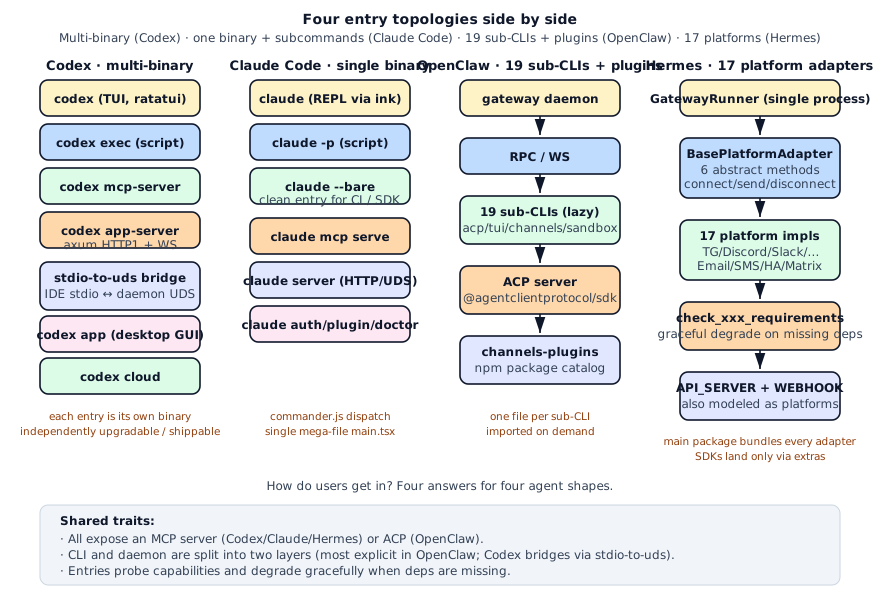
Placed side by side, “how does the user come in” lights up: Codex gives each caller a dedicated binary, Claude Code lets commander dispatch, OpenClaw lets the ecosystem build new channels, and Hermes packs 17 platforms into one process.
§9 · Further Reading / Source Pointers
Section titled “§9 · Further Reading / Source Pointers”§10 · Exercises
Section titled “§10 · Exercises”- 🟢 Four-entry summary: Write one sentence per system describing its main entry. How does each handle a non-interactive mode?
- 🟠 Implement BasePlatformAdapter: Write a Python
BasePlatformAdapterabstract class with 5 abstract methods (connect / disconnect / send / send_typing / get_chat_info). Implement two subclasses:StdinAdapter(read messages from stdin) andWebhookAdapter(receive messages via HTTP POST). - 🟠 Lazy-load sub-CLIs: Use commander.js to write a CLI with three subcommands (
logs / sandbox / models). Each subcommand lives in its own file and is imported only when the user runs it. - 🔴 stdio-to-uds bridge: Write a Node.js program that reads JSON-RPC messages from stdin, forwards them to a local UDS (
/tmp/agent.sock), and writes any UDS responses back to stdout. Verify: your IDE spawnsnode bridge.jsas a child, a separateagent-daemonlistens on the UDS, and both sides exchange RPC messages.
§11 · Interview drill: 10 questions with worked answers
Section titled “§11 · Interview drill: 10 questions with worked answers”Q1 · Concept: Why does Codex pick multi-binary while Claude Code picks single-binary?
Both choices reflect different ecosystem positioning:
Codex multi-binary: each entry (tui / exec / mcp-server / app-server / stdio-to-uds / app / cloud) is a standalone Rust binary. Benefits:
- Independent upgrades: changing the TUI doesn’t touch mcp-server. The VS Code extension can update stdio-to-uds without touching the TUI.
- Minimal startup cost: each binary only links its crates, startup overhead < 50ms.
- Clear responsibility:
codex-app-serversays “daemon”;codexsays “TUI” at a glance. - Distribute through different channels: app can be on macOS App Store / Windows Store.
Cost: heavy memory burden for users (8 binaries); packaging / distribution complexity (need manifest to manage multiple binaries).
Claude Code single-binary: commander.js packs all entries into main.tsx with subcommand routing. Benefits:
npm install -g @anthropic-ai/claude-codeis all-in-one: users don’t differentiate binaries.- Code / types / tests in one project: cross-subcommand refactoring is free.
- commander auto help / subcommand dispatch: lighter development.
- Aligned with npm ecosystem: one bin field, auto-generates PATH entry.
Cost: main.tsx is ten thousand lines in one file; heavy startup (plugin / LSP / hook all load); changing one subcommand risks breaking others.
Which to pick?
- Rust agent + heavy multi-entry: Codex multi-binary is right
- Node / Python agent + npm/pip one-shot install: Claude Code single-binary is right
- Rust agent + few entries: single binary + clap subcommand works (mini-Codex)
Follow-up: “Hybrid approach?” Possible: Codex is 80% multi-binary, but main codex binary embeds 90% of TUI code and invokes subcommands when needed; OpenClaw goes hybrid: “main binary + lazy-load sub-CLI modules.”
Source: codex/codex-rs/cli/src/main.rs:105-182 + claude-code/src/main.tsx:971-1006.
Q2 · Concept: MCP and ACP are public protocols. Why do all four systems adopt them?
The “public vs private protocol” cost analysis is clear:
Private protocol costs:
- Every IDE / orchestrator needs custom integration
- Docs / SDK / version compat maintained alone
- Users locked in → switching hard → ecosystem closed
Public protocol (MCP / ACP) benefits:
- Implement once, all protocol-supporting IDEs / orchestrators work
- Protocol design iterated by multiple parties, corner cases covered
- Docs / SDK / version mgmt maintained by protocol org
MCP and ACP positioning:
- MCP (Model Context Protocol): Proposed by Anthropic, primary scenario is “LLM client calls external tools.” Codex / Claude Code / Hermes expose themselves as MCP servers to Cursor / VS Code / Cline.
- ACP (Agent Client Protocol): Proposed by OpenClaw, primary scenario is “Agent-to-agent communication.” OpenClaw acts as ACP server, external orchestrator as ACP client to schedule multiple agents.
All four adopt:
- Codex
mcp-serverbinary - Claude Code
claude mcp serve - OpenClaw
openclaw acpsubcommand - Hermes
mcp_serve.py
Real effect: users can mount Codex, Claude Code, and Hermes as MCP servers simultaneously in Cursor, without three-way adaptation. Classic case of “public protocols produce network effects.”
Follow-up: “Wait until protocol matures before adopting?” No. Early MCP / ACP have breaking changes, but “follow an early public protocol” beats “invent a private one” by far.
Source: codex/codex-rs/mcp-server/, openclaw/src/acp/server.ts, hermes-agent/mcp_serve.py.
Q3 · Architecture: Why is the stdio-to-uds bridge so important?
IDE integration has a fundamental tension:
IDE side constraints:
- Spawn subprocess with stdio (VS Code Extension API, JetBrains Plugin SDK both designed this way)
- Subprocess must be cleaned up on IDE exit (prevent zombie processes)
Agent side constraints:
- Long tasks must run in daemon (closing IDE shouldn’t kill agent task)
- Multi IDE / multi client share same agent state
Conflict: IDE subprocess model and “daemon long-running” are inherently at odds.
stdio-to-uds bridge solution:
IDE spawns stdio-to-uds subprocess (stdio to IDE) ↓stdio-to-uds connects to UDS internally (Unix domain socket) ↓agent-daemon listens on UDS (independent long-running process)The bridge itself is a lightweight process (< 5MB memory), exits when user closes IDE, but daemon doesn’t exit. Next IDE start launches new stdio-to-uds, connects to same daemon → session state / cache intact.
Bridge’s specific responsibilities:
- Forward stdio JSON-RPC messages to UDS
- Translate stdio vs UDS protocol differences (if any)
- Reconnection: IDE restart, bridge reconnects UDS, daemon unaware
- Multi-client: multiple IDE instances connect to same daemon
Windows? UDS supported on Windows 10+. Or use named pipe (\\.\pipe\agent) equivalent.
Follow-up: “Without bridge, can IDE connect to UDS directly?” VS Code Extension API doesn’t support direct UDS connection, only subprocess with stdio. So bridge is required. Cursor / Cline / others have same constraint.
Codex is the only agent that explicitly does this: stdio-to-uds is a standalone crate. The other three also face the same problem for IDE integration but haven’t extracted it yet.
Source: codex/codex-rs/stdio-to-uds/.
Q4 · Concept: Benefits of Hermes modeling HTTP API and Webhook as platforms?
“Platform adapter” was originally abstracted for chat platforms (Telegram / Discord / Slack). Hermes also stuffs HTTP API and inbound webhook into the same abstraction. Benefits:
1. Reuses message handler logic
Agent’s message handler doesn’t care where the message came from. A Telegram user message and an HTTP API call both arrive at the agent as MessageEvent { content, chat_id, user_id }. Same connect / send / disconnect abstraction, same response routing logic.
2. Unifies multi-channel behavior
“User asks on Telegram → agent replies on Telegram” and “external system POSTs to webhook → agent POSTs back to webhook” have identical logic. If HTTP / webhook weren’t platforms, you’d need two response routings.
3. Unified session management
Each platform adapter self-manages _active_sessions: Dict[str, asyncio.Event]. HTTP / webhook reuse this session concept: HTTP caller passes session_id, agent links that HTTP request to a session.
Costs:
- HTTP / webhook lack “typing indicator” platform features. BasePlatformAdapter forces 6 method abstraction; HTTP adapter has to no-op
send_typing(). - Auth modes completely different from chat platforms: Telegram uses token, HTTP uses API key / JWT. Forcing same abstraction increases coupling.
- Protocol assumption drift: HTTP is request-response, Telegram is event-driven. Forcing same abstraction requires adapter-side bridging.
Why is Hermes’s approach right?
Hermes positions as “ChatOps-first.” HTTP API and Webhook are secondary entries, no need to architect around them. Reusing platform adapter keeps code small, maintenance simple. If HTTP API were the main entry, design should be reverse (HTTP-first, chat platforms as adapters).
Follow-up: “What to watch out for when implementing this unified adapter?” Make abstraction layer minimal (5-6 methods), let concrete adapters decide details. Hermes abstracts send_typing but allows no-op, that’s the escape hatch.
Q5 · Engineering: How does OpenClaw implement lazy-load sub-CLI?
OpenClaw has 19 sub-CLIs (acp / gateway / tui / channels / plugins / sandbox / …). Importing all of them would drag startup to over 1 second. The lazy-load approach:
Implementation:
program  .command('channels')  .description('manage channels')  .action(async () => {    const { run } = await import('./subclis/channels.js')    return run()  })
program  .command('sandbox')  .description('manage sandboxes')  .action(async () => {    const { run } = await import('./subclis/sandbox.js')    return run()  })
Key points:
actionis async: commander supports async actions, import then run.- Dynamic
import('./...'): only loaded when user runs that subcommand. - Each subcommand in own file: implementation split, each file only imports its own deps.
Startup time comparison:
- Full import:
openclaw --help600ms (19 files + their deps) - Lazy-load:
openclaw --help50ms (only register.subclis.ts + commander)
Real gap of 10x+. CLI users feel it instantly.
Costs:
- Type checking gets complex: dynamic import type inference needs TypeScript 4.5+ to work well
- Build tool config: webpack / esbuild / Vite must handle dynamic imports correctly (defaults usually fine)
- Testing slightly harder: each sub-CLI needs file system mocking for isolation
- Error handling: sub-CLI file deleted means startup fails, need clear error messages
Follow-up: “Python equivalent?” importlib.import_module(name) in action function. Click + lazy-loading also works. Note Python startup overhead mainly comes from import, so effect is even more pronounced.
Hermes doesn’t do lazy-load: because all platform adapters are bundled, all load at startup. But each adapter has check_<platform>_requirements(), only adapters with installed deps actually instantiate. Different lazy strategy.
Q6 · Real-world: Adding multi-channel entry to your agent, zero to production?
Four phases: core CLI → MCP → IDE integration → chat platforms.
Week 1 · core CLI
import click
@click.group()def cli(): pass
@cli.command()def chat():    """Interactive REPL"""    run_repl()
@cli.command()@click.option('-p', '--prompt')def exec(prompt: str):    """One-shot script mode"""    print(run_once(prompt))
@cli.command()def doctor():    """Diagnose installation"""    check_dependencies()
if __name__ == "__main__":    cli()
Borrow Codex codex + codex exec thinking.
Week 2 · MCP server
from mcp.server import Server
server = Server("my-agent")
@server.list_tools()async def list_tools():    return [Tool(name="ask", description="Ask the agent")]
@server.call_tool()async def call_tool(name, args):    if name == "ask":        return run_once(args["prompt"])
if __name__ == "__main__":    server.run_stdio()
Borrow Hermes mcp_serve.py.
Week 3 · IDE integration (hardest)
Take the MCP route: Cursor / VS Code / Cline all support MCP server. Users configure mcp_servers.json:
{ "my-agent": { "command": "python", "args": ["-m", "my_agent.mcp_serve"] }}IDE spawns subprocess, stdio communicates with agent. All IDEs share same protocol.
Don’t invent private protocols.
Week 4-5 · chat platforms
Borrow Hermes BasePlatformAdapter:
class BasePlatformAdapter:    async def connect(self): ...    async def disconnect(self): ...    async def send(self, chat_id, content): ...    async def handle_message(self, event): ...
class TelegramAdapter(BasePlatformAdapter):    async def connect(self):        self.app = Application.builder().token(TOKEN).build()        await self.app.start()    # ...
check_telegram_requirements() checks if python-telegram-bot is installed, degrade gracefully if missing.
Key takeaways:
- First week only CLI, don’t gold-plate: make one user able to use it first
- Second week MCP: IDE integration solved by MCP alone, don’t make protocols
- Third week don’t add more channels: get CLI + MCP stable
- Fourth week add Telegram / Discord / etc.: each channel is a PR, not bulk add
Follow-up: “Daemon vs process model?” First phase doesn’t need daemon, every start fresh state. Only when session crosses processes (IDE close+open) do you add daemon + UDS. Simple before complex.
Q7 · Concept: What’s the essential difference between --bare and -p (script mode)?
Both are “non-interactive modes,” but at different abstraction layers:
-p / --print / exec:
- Input a prompt, output final answer
- Intermediate process (tool call / thinking / progress) hidden by default
- Fits: bash pipe (
echo prompt | claude -p), shell script, simple automation
--bare:
- Skips all “smart” behavior: plugin, LSP, hook, auto-detect IDE, telemetry
- But interactive still possible, full tool support still works
- Fits: CI environments, SDK calls, scenarios needing predictable behavior
Why need --bare?
Real CI issues when running claude:
- plugin auto-load → CI failure due to missing plugin deps
- LSP startup → CI VM unsupported → startup hangs
- telemetry background → CI VM network issues
- auto-detect IDE → CI is docker container, detect errors
--bare kills all of this. CI gets the “minimal working agent.”
vs -p:
--bare -p promptis a combo: CI env + script mode--barealone: CI env + possibly interactive (rare but exists)-palone: dev machine script mode (with plugin / LSP / hook)
Claude Code’s comment (semantics directly in comment):
—bare: Skip all “automation” behavior. Useful for CI / SDK.
Follow-up: “Should this flag default on or off?” Default off, explicit on. Reason: users spend 90% of time in dev env, should default to plugin / LSP / hook conveniences. CI / SDK are edge cases, let user explicitly turn --bare on.
Similar designs:
- npm
--ciflag - pip
--no-cache-dir - git
-c core.pager=cat
All “disable smart behaviors for predictable results.”
Source: claude-code/src/main.tsx:971-1006 + various if (settings.bare) skip ....
Q8 · Concept: Benefits and costs of channels-plugins catalog letting ecosystem contribute channels?
OpenClaw makes channels into npm packages + catalog registration. Example:
export const CHANNELS: Record<string, ChannelInfo> = { telegram: { package: '@openclaw/channel-telegram', description: 'Telegram bot channel', enabledBy: 'TELEGRAM_BOT_TOKEN', }, discord: { package: '@openclaw/channel-discord', description: 'Discord bot channel', enabledBy: 'DISCORD_BOT_TOKEN', }, // ... third-party contributions registerable here}Benefits:
- Ecosystem contributable: anyone writes
@my-org/openclaw-channel-xxxnpm package, PR to catalog → available to other users. OpenClaw doesn’t maintain these channels itself. - On-demand install: user
npm install @openclaw/channel-telegramto install Telegram deps. Other channels not forced. - Independent versioning: channel SDK upgrade doesn’t require OpenClaw major bump.
- Separation of concerns: channel maintainers focus on their channel, OpenClaw on core.
Costs:
- Version compat matrix: channel package version × OpenClaw version. Some combinations incompatible, catalog must note compat ranges.
- Quality uneven: third-party channels may have bugs / be unmaintained / have security issues. Catalog needs review mechanism.
- Discovery hard: how does user know which channels exist? Need catalog UI + docs.
- Breaking change coordination: OpenClaw changes ChannelAdapter API, all third-party channels must follow.
vs Hermes approach:
Hermes bundles all 17 platforms in main repo. Benefits: quality unified, OpenClaw fixes breaking changes in one place, simplest user experience. Costs: large repo, third-party contribution hard.
Two approaches’ fits:
- OpenClaw model: expect dozens of channels long-term, mostly ecosystem-maintained
- Hermes model: expect 10-20 channels, all maintained by you / your team
Follow-up: “Can both legs walk?” Yes. Hermes main repo carries 17 core platforms while providing plugin API for third-party platforms. OpenClaw’s current channels-plugins is actually “official core + third-party space.” Hybrid mode.
Q9 · Engineering: Implementation details of check_<platform>_requirements() graceful degradation?
Hermes’s 17 platforms each have a check function:
def check_telegram_requirements() -> bool:    """Check if Telegram dependencies are installed."""    try:        import telegram  # python-telegram-bot        return True    except ImportError:        return False
def check_discord_requirements() -> bool:    try:        import discord        return True    except ImportError:        return False# ...
Usage in _create_adapter:
def _create_adapter(self, platform, config): if platform == Platform.TELEGRAM: if not check_telegram_requirements(): logger.warning("Telegram: python-telegram-bot not installed") return None return TelegramAdapter(config) # ...Why not just try: import telegram?
- Clearer error messages:
logger.warningtells user “dep missing” rather than stack trace - Detectable at config phase: don’t wait until runtime first import for fail
- Decoupled from platform registration: check function is module-level, can be called from many places
Pure ImportError vs check function:
# Anti-pattern: import directlydef _create_telegram():    import telegram  # ImportError on first call    return TelegramAdapter(...)
# Correct: check firstif check_telegram_requirements():    return TelegramAdapter(...)else:    logger.warning("Telegram dependencies missing")    return None
Advanced: optional dependencies in setup.cfg / pyproject.toml:
[project.optional-dependencies]telegram = ["python-telegram-bot>=20.0"]discord = ["discord.py>=2.0"]slack = ["slack-bolt>=1.0"]all = ["python-telegram-bot", "discord.py", "slack-bolt", ...]User uses pip install hermes[telegram] or pip install hermes[all]. Main package without platform SDKs, extras install them.
Follow-up: “Why not force all SDK install?” User may only use Telegram, no need to be forced into discord.py (200MB dep + completely unused). pip extras lets users choose on demand.
Similar designs: TensorFlow has tensorflow[gpu], PyTorch has torch[cu118], numpy doesn’t force SciPy. “Main package + extras” best practice.
Source: hermes-agent/gateway/run.py:2663-2820 + each platform’s check_xxx_requirements.
Q10 · Open-ended: Synthesize the strengths into a universal multi-channel entry framework.
5-layer architecture:
Layer 1 · Entry routing (mandatory)
// CLI dispatchprogram .command('chat').action(runRepl) .command('exec').action(runScript) .command('mcp serve').action(runMcpServer) .command('server').action(runHttpServer) .command('auth').action(runAuth) .command('doctor').action(runDoctor);Borrow Claude Code commander dispatch.
Layer 2 · Protocol server entry (mandatory)
# MCP server (Codex/Claude/Hermes)from mcp.server import Serverserver = Server("agent")@server.call_tool()async def call_tool(name, args): ...server.run_stdio()
# ACP server (OpenClaw)from agentclientprotocol import AcpServeracp_server = AcpServer(handler)acp_server.serve()
Borrow all 4 systems’ public protocol entries.
Layer 3 · Platform adapter abstraction (optional, scenario-dependent)
class BasePlatformAdapter(ABC):    @abstractmethod    async def connect(self): ...    @abstractmethod    async def disconnect(self): ...    @abstractmethod    async def send(self, chat_id, content): ...    @abstractmethod    async def handle_message(self, event): ...
def check_platform_requirements(name: str) -> bool:    try:        import_platform_sdk(name)        return True    except ImportError:        return False
Borrow Hermes BasePlatformAdapter + check_xxx_requirements.
Layer 4 · daemon ↔ client bridge (optional, IDE integration needs it)
// stdio-to-uds bridgeasync fn bridge(stdin: Stdin, stdout: Stdout) { let uds = UnixStream::connect("/tmp/agent.sock").await?; tokio::join!( forward_stdin_to_uds(stdin, uds.clone()), forward_uds_to_stdout(uds, stdout), );}Borrow Codex stdio-to-uds crate.
Layer 5 · Entry probe / doctor (mandatory)
def doctor(): """Diagnose installation.""" checks = [ ("Python version", check_python_version), ("MCP SDK", check_mcp_sdk), ("Network", check_network), ("API keys", check_api_keys), ] for name, fn in checks: ok, msg = fn() print(f"[{'OK' if ok else 'FAIL'}] {name}: {msg}")Borrow Claude Code doctor subcommand.
Contributions:
- Codex: multi-binary split + stdio-to-uds bridge + public protocol entry
- Claude Code: commander.js subcommands +
--baremode + doctor - OpenClaw: sub-CLI lazy-load + channels-plugins catalog + ACP
- Hermes: BasePlatformAdapter +
check_xxx_requirements+ 17 platform implementations
Engineering effort:
- Layer 1-2: 1 week (mandatory)
- Layer 3: 2 weeks (optional)
- Layer 4: 2 weeks (IDE integration needs it)
- Layer 5: 3 days
4-6 weeks v0.1.
Key decisions:
- CLI + MCP day one: every agent should have these two entries
- Don’t rush chat platforms: wait for actual user demand
- Don’t invent private protocols: MCP / ACP good enough
- doctor early: user triage entry
- Lazy-load early: CLI startup < 100ms is standard
Follow-up: “Microservices better?” For small projects (< 10K LoC) multi-binary / microservices are over-engineering. Codex’s multi-binary isn’t required; it works because the 50+ Codex team has someone dedicated to app-server. MVP single binary + subcommand is right.
Source mosaic: codex/codex-rs/cli/ + codex/codex-rs/stdio-to-uds/ + claude-code/src/main.tsx + openclaw/src/cli/program/register.subclis.ts + hermes-agent/gateway/.